

Hi All,
can anybody help to update the size wise breakup formula.

I'm not sure that I understand your question. You want to break down each of the yellow numbers into a maximum of 5 plans. And the sum of each plan should be 120 except for the last one if the total quantity is not a multiple of 120. Like in your example, the total equals 396 which translates to 3 x 120 + 1 x 36.
How could other size runs look like? Would you always have multiples of 6?
Please clarify and add some more examples.

Hello,
I am using the LET function in this solution, see attached file.
Hopefully it works as you want it to.
Br,
Anders
Hi Anders,
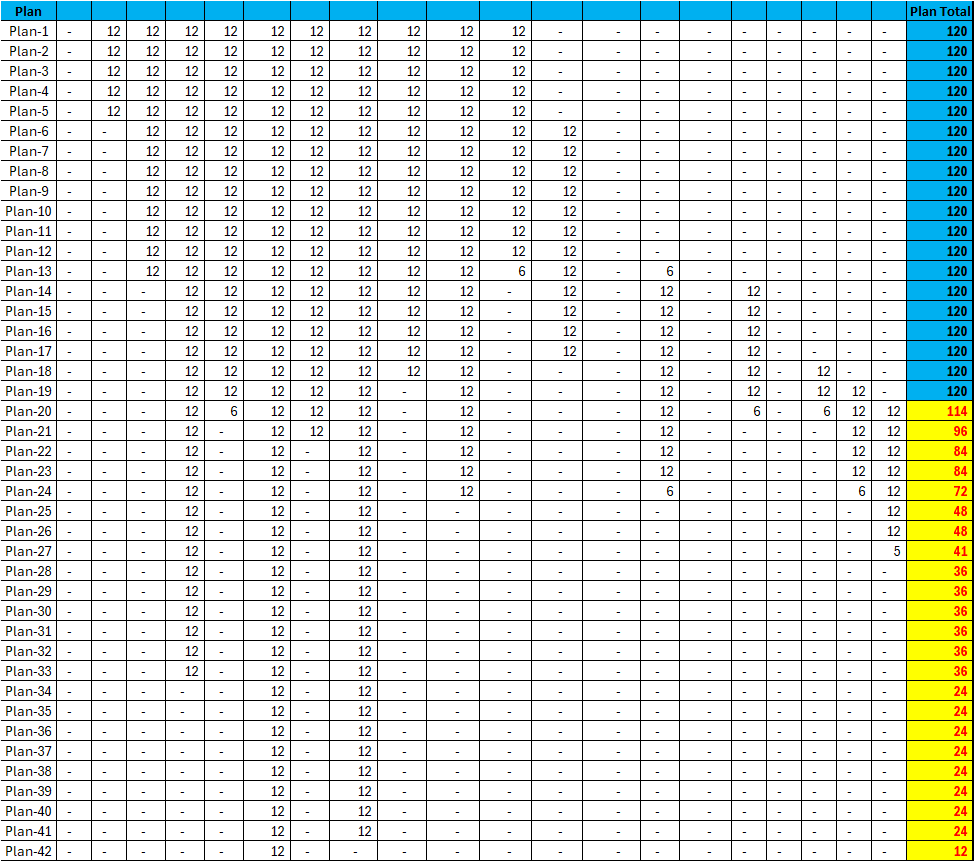
i am very thanks full to you for this support, and almost we got the result. If we get the 3rd point result, it'll be most useful for my report. which is highlighted in Yellow.
Notes: -balance
Just to clarify.
1) The maximum number in any position on the grid is 12
2) The plan total may not exceed 120, but less is allowed
If so, then the attached file does just that and renders the same result as in your latest file.
But then I wonder why your initial file also allowed values like 36 in the grid. That was the reason for questioning the logic.
Hello,
Sorry, I assumed you wanted each cell to have a max of 12, I most likely misunderstood the second criteria text.
2. These details are broken down into 12 pairs in each plan, size-wise.
It seems I also took the assumption that Plan-e was the last plan and that you wanted the remaining values to stack up there, but that is obviously not the case. Sorry it didn't fully reach the goal, but perhaps the sample file is useful as a stepping stone to continue the climb.
Br,
Anders
Clearly, both Anders and I have misunderstood your intentions.
But I understand from your latest comment that only the last plan may have a total that is less then 120. All others must have 120. Correct?
If so, the easiest way to achieve that is to set the maximum quantity for both an individual size and the total plan to 120. I've slightly amended my previous file to demonstrate that.
If this is not what you have in mind you'll need to give some clear examples of how you would break down the the run sizes if you have to do it manually. and explain the logic you applied.
Hi Riny & Andres,
I'm glad to hear that! 😊 I've checked both files, and I'm happy my requirements were met in the below report. Thank you so much for your support!
Hi Riny & Andres,
I've checked with my team, and they suggest completing the line from size 4 to 13 using 12 pairs and 6 pairs calculation. Can you help us implement this formula for production.
due to all size details need to plan for production as per customer instruction.
Notes:- instead of only 12 pairs, now we can use 12 prs & 6 prs, but we need 120prs in total

Reading your question again, I don't understand at all. The file you attached seems to be based on what I sent you earlier. It only has 12's and 6's and one 5 for the last size as the quantity is not a multiple of 6. But Plan20 and below will never add up to 120 if you are limited to 12's and 6's.
Hi Riny,
I've attached sample data for reference. We need to fill Plan1 using 12 or 6 pairs calculation and update breakup details as follows:
- need to update the formula using 12 pairs or 6 pairs calculation
- targeting a total of 120 pairs.
for your easy to understand, i have attached sample manual data for your information.
If that's really the solution you want I dare to say it can't be automated as there is no consistent logic. Only the first 6 plans have 6's and 12's. After that you introduce 18, 24 and 30. I can't think of a way to automate that.
The attached file has an automated solution that uses only multiples of 12 and a multiple of 6 for the last plan. In this case the maximum multiple is 84 and it will automatically split the runs in 28 plans of 120 and one of 18. Just like your sample file but using a consistent logic and therefore a totally different split.