
This is a MOTH monthly budget spreadsheet from the MOTH download. I have the Data and Categories tabs the way I need them but now the Report is broken. I'm not skilled with pivot tables and unable to repair it.
Appreciate any help. It's attached here. Thanks for any replies.
PS: I'm using a PC with Microsoft 365 Suite. Thanks.

Since you used a greater number of categories than the original template the pivot table that summarizes expenses by category becomes too big and can't refresh in the space that was reserved for it. You need to move the smaller pivot table below it and then reorganize the others to make it look nice again.
BUT!!! You must fix your data also. The transactions table contains several entries with dates in years other than 2026.
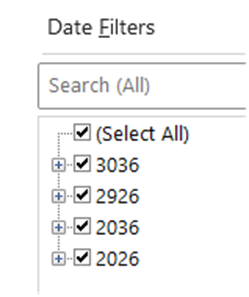
The attached file is a corrected version of yours. The pivot tables are spaced so that the (currently) fit your needs. The dates were all set to be in 2026 and all pivot tables and slicers were refreshed.
I believe that's what you need. Try to rework your own file first so that you learn from it and look at the video again to see how to place/move pivot tables.
Thank you Riny !
I have much to learn about pivot tables.
Perhaps you'll find the articles in the link pasted below useful.
https://www.myonlinetraininghub.com/category/excel-pivottables