
I am having issues with a measure in a power pivot table. The measure is not calculating correctly, I believe due to my incorrect SKU relationship pattern. I also have a Pricing potential issue.
SKU Management Thought process: There is not a direct relationship between "Clean Nomalized M2M SKU" in the Pricing _Table and the filed "Clean_Normalized_Raw_SKUs" in the TBLPOSData table. This is because the "Clean_Normalized_Raw_SKUs" field contains various versions of raw SKUs from various distributors that slightly alter our M2M SKUs, by adding prefixes, etc. Therefore, I created two intermediate tables to try to establish this relation ship. I created a relationship between the field "Clean_Normalized_Raw_SKUs" in the TBLPOSData table to the field "UniqueCleanNorm RawSKUs" in the TBLUCNRawToCNM2M table. This was done so that I had a field with unique clean nomralized Raw SKUs, since the relationship has to be one to many. Then, in the TBLUCNRawToCNM2M table, I have a second field, named "Clean Normal M2M SKU" that relates to each of the "UniqueCleanNorm RawSKUs". Then I created a table named TBLUCNM2MToCOM2M, which has a relationsip bewteen the "Clean Normal M2M SKU" field in the TBLUCNRawToCNM2M table to the field "Unique Clean Normalized M2M SKUs" in the TBLUCNM2MToCOM2M table. Again, done so that I have a 1 to many relationship. Finally, I related the field "Unique Clean Normalized M2M SKUs" in the TBLUCNM2MToCOM2M table to the field "Clean Normalized M2M SKU" in the Pricing table. Where is my error? Is it possibly with respect to the arrows of the relationships?
Pricing: I also get the right Dist Price in my measure by doing a lookup in the pricing table, which depends on both the Distributor ("ADI" or Everyone else as "Standard") and the Clean Normal M2M SKU.
I thnk that powere query may be able to solve this for me, but I have zero experience in using PowerQuery.
I appreciate the help!!
BTW, Love the videos, learn alot (obviously, just not enojugh!!)

It's difficult to dive into such a model without in-depth knowledge of what you looking at, but I believe there are two major issues (perhaps more) that would explain why you get unexpected results.
1) I believe you need to use the normalized SKU from the table in the picture below. Then you will get results that seem more meaningful. Though I can't tell if they are correct.
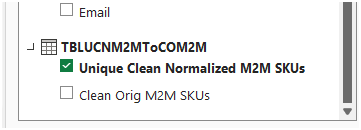
2) The date column in the POS Sales table contains a mix of real date values, real date/time values and texts that merely look like US style dates (most with "-" but some with "/" as the separator between the date elements). And then there are some dates for December 2026.
All entries in this column need to be real dates (and I assume all are in 2025) for the date filter in the Power Pivot table to work correctly.
I've quickly corrected the 'errors' in the attached file. See if this resolves your issues. If it doesn't, come back here and clarify through some examples what's wrong and what outcome you expect and why?