
Hello
SIMPLER EXPRESSION “1 CELL” then this? It is CALC of: FINISH DATE/TIME - START = DECIMAL HOURS
=IF(DATE(YEAR(C25),MONTH(C25),DAY(C25))=DATE(YEAR(F25),MONTH(F25),DAY(F25)),(F25-C25)*24,IF(F25-C25>=TIME(23,59,59),INT((F25-C25)*24),MOD(F25-C25,1)*24))
This is…. an NESTED If FORMULA with DATE / TIME / INT & MOD, I’ve amalgamated (Joined..) together from separate Formulas to workaround the 24H HOUR MAX limitations of XL Dates/Times as conventional TIME (HH:MM) is Ltd to same day in same 24hr. To Further explain this in 3 Parts, Formula in plain English 1st of all:
SAME DAY: SUBTRACT (TIME CELLS no DATE)
If DIFFERENT DAY >24+: INT (DATE CELLS with TIME)
If DIFFERENT DAY <24-: MOD (DATE CELLS with TIME)
And in more detail, with Formula Passage ref’d of 1 row as E.G., to indicate its purpose.
- DATE CALC: SAME DAY or DIFFERENT DAY?
=IF(DATE(YEAR(C25),MONTH(C25),DAY(C25))=DATE(YEAR(F25),MONTH(F25),DAY(F25))
- DATE CALC: SAME DAY
(F25-C25)*24
- DATE CALC: IF DIFFERENT DAY, LESS or GREATER then 24HRS?
IF(F25-C25>=TIME(23,59,59)
- DATE CALC: DIFFERENT DAY >24HR
INT((F25-C25)*24)
- DATE CALC: DIFFERENT DAY <24HR
MOD(F25-C25,1)*24)
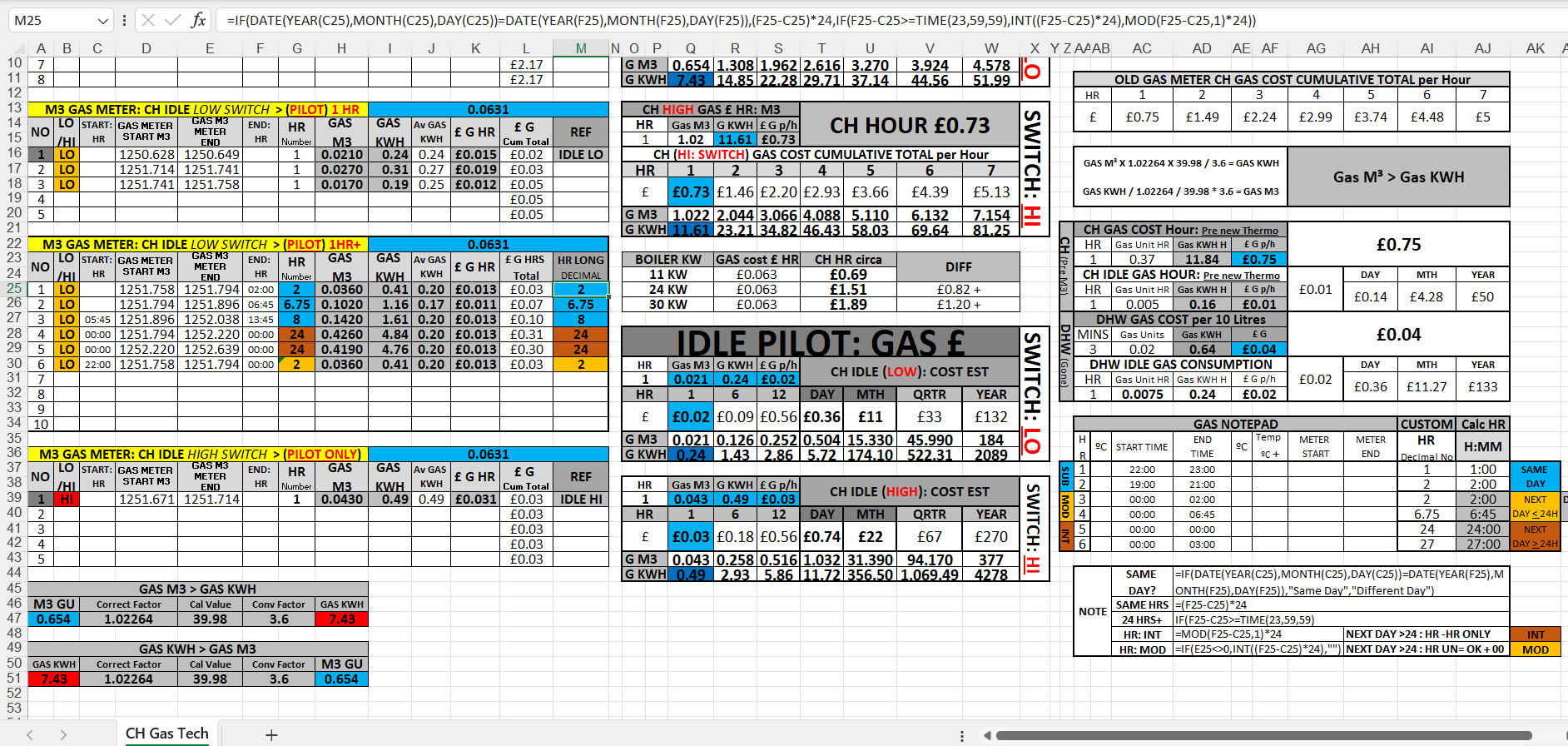
Please see Photo attachment to clarify & also attached XLSX sheet:
COLUMN: M
ROWS: 25 - 30
The purpose is to calculate the cost of GAS PER HOUR AVERAGE. It is derived from used GAS M3 > GAS KWH hence GAS CONSUMED PER USAGE with DATE/TIME START/FINISH, which is converted into DECIMAL NUMBER with the TITLE TOP FORMULA for ease of calculation of:
GAS KWH USED = £ PER HOUR AVERAGE (ie: G = £)
COLUMN: K
ROWS: 25 - 30
Anyways.. This all works by the way, with.. current Data Set, obviously if not recorded at exact HOUR to HOUR in WHOLE NUMBER then requires.. this complicated Formula, due to.. DECIMAL PLACES… which is where MOD (<24HR pre-fer in 1 HOUR BLOCKS) Formula is required! INT (>24HR+) Formula is needed for accurate calc as exceeding 24 Hour threshold of Excel Time…
And yes it is already is realistically a 1 CELL FORMULA wrap, I know that, took some thought as not expressions used regular with EXCEL spreadsheets, having said that is there a better way, I don’t know, Suits me so far… So constructive advise I welcome…!
But seems like Excel has made DATES with TIMES such an over complication, calculating them that is, the difference, especially in... DECIMAL PLACES..
CROSS THREADS:

Assuming that your problem lies in your comment "... to workaround the 24H HOUR MAX limitations of XL Dates/Times as conventional TIME (HH:MM) ...." use the custom format [HH]:MM to change from a 24 hour clock format to a duration. Adding the square brackets does that trick.
Then, a duration of 27 hours will be displayed as 27:00 rather than 03:00 (3 hrs past midnight).
By the way, I found your schedule quite difficult to 'get into' and have not put any effort into understanding it. If you have any more issues after solving the 24 hour problem, please come back.
Hello
What's the Difference between 2 Dates! ?
Solved Solution is:
=CONVERT(F25-C25,"day","hr")
It looks so simple and gladly it works as is, but wouldn't have reached that conclusion from formula definition, and hence Google search would have been futile.
Shouldn't have been this difficult should it! Really Modern Excel should do this in the very 1st place when using Subtract (negative -) with Dates..:
After - Before = HOURS
As much fun as it was Constructing the Nested If, due to Dates calc that weren't Whole numbers which were incorrectly stated/reported, and obviously Same Day Hours max is 24 Hours... But Subtract works with that accurately!
HOURS that is...
Cheers anyways... Stephan
so if 2 DIFFERENT DATES (FINISH - START) = HOURS ACTUAL (NOT DECIMAL)
What is correct FORMULA & FORMAT CELLS? Custom?
Ain't it odd basic SUBTRACT (-) of AFTER-BEFORE doesn't equal right HOURS!
SOLUTION!
FORMAT CELLS: [HH]:MM
Not really. You're doing the same work twice there by converting to hours and then dividing by 24, which gets you back to decimal days. All you need is:
=F29-C29
and format as [hh]:mm
However without CONVERT the calculation with SUBTRACT/NEGATIVE of NUMBER DECIMAL is incorrect with DATASETS where the Result is that it does not equal whole Hours.
Which was initial question in 1st PLACE, as calc is:
GAS KWH / HOURS DECIMAL = £ PER HOUR
OR for short... : G = £
Actual HOURS is just another COLUMN to look again.. for DBL CHK.. HOURS > DECIMAL. . . Yes that's right.. Etc..
So rather favour reliable Formula with all Datasets, especially when already so Concise, Simple & Uncomplicated.
Certainly not worthwhile to have even shorter variants, as rather NOT compromise just to have few less characters, ooh wow don't need these letters (word), a daft antagonist point, especially when copying & pasting on mass, just to ponder on later why some block mass cells are obviously wrong, but some are right... I'll use the CONVERT in EXCEL 2021...
But yes CONVERT.. it is unrecognised... By older versions of Office package including the classic 2003..
@riny Also I appreciate comments including...to effoect you don't have to do any of that or it is confusing, which led me to see how it (DATE-TIME FORMULAS) would fare in...
OLDER VERSIONs of EXCEL like 2003, without CONVERT, MOD, INT, etc none of that..
And yes I did find the most SIMPLE/BASIC version of the FORMULA to work, AND the only reasons WHY it did NOT work was because... (AS YOU SUGGESTED... BRACKETS!)
Either FORMULA needed SUM [B][I][U]BRACKETS[/U][/I][/B], or FORMAT CELLS CUSTOM [B]HH [/B]needed [U][I][B]BRACKETS[/B][/I][/U].... Some crucial details some XL sites did leave out in some bland advise like oh yer just x24.., also many HOURS calcs are not UNLIMITED at all, some only upto 24HOURS, or excluding Decimals Details.. INT?
FORMULA in SIMPLE/BASIC all XL versions:
[B]HOURS or DECIMAL = END DATE2 - START DATE1[/B]
[B]DATE1:[/B] Cell A1 MANUAL ENTRY
[B]01/01/2025 00:00[/B] FORMAT CELLS: CUSTOM [B]dd/mm/yyyy hh:mm[/B]
[B]DATE2:[/B] Cell A2 MANUAL ENTRY
[B]02/01/2025 00:00[/B] FORMAT CELLS: CUSTOM [B]dd/mm/yyyy hh:mm[/B]
[B]HOURS FORMULA:[/B] Cell A3
[CODE]A2-A1[/CODE]
FORMAT CELLS: CUSTOM [B][HH]:MM[/B]
or
[B]HOURS DECIMAL:[/B] Cell A4
[CODE]=SUM(A2-A1)*24[/CODE]
FORMAT CELLS: [B]NUMBER[/B]
Anyway that certainly simplified the situation, certainly other XL sites calculations & formulas far exaggerate this.. I wonder why to what end..To mess me about... Most likely!
Anyways..Who would have thought it was possible to mix up 2 dates so much, Life eh...
Well hopefully TombStone GraveDiggers/Engravers are better at TIME calcs then Maths XL Genius, u know... BD - DD, yer 1 2 3 4 5 etc.
Cheers Stephan
