
Hello
OBJECTIVE:
Best method for simple, basic & concise way to calc:
DATE DIFFERENCE between 2 DATES displayed in:
YEAR - MONTH - DAY - HOUR - MIN
QUESTION:
Surely there must be a better way of calculating DATE DIFFERENCES of:
2 DATE:TIME CELLS in XL 2021 and/or 365 to calc, other then using DATEDIF? Unless it a much abbreviated version, then old layout..
So far best suggestion is CONCATE DATEIF, which is @ btm of this post, all in 1 cell visible to, not all folded under in cascading lines...
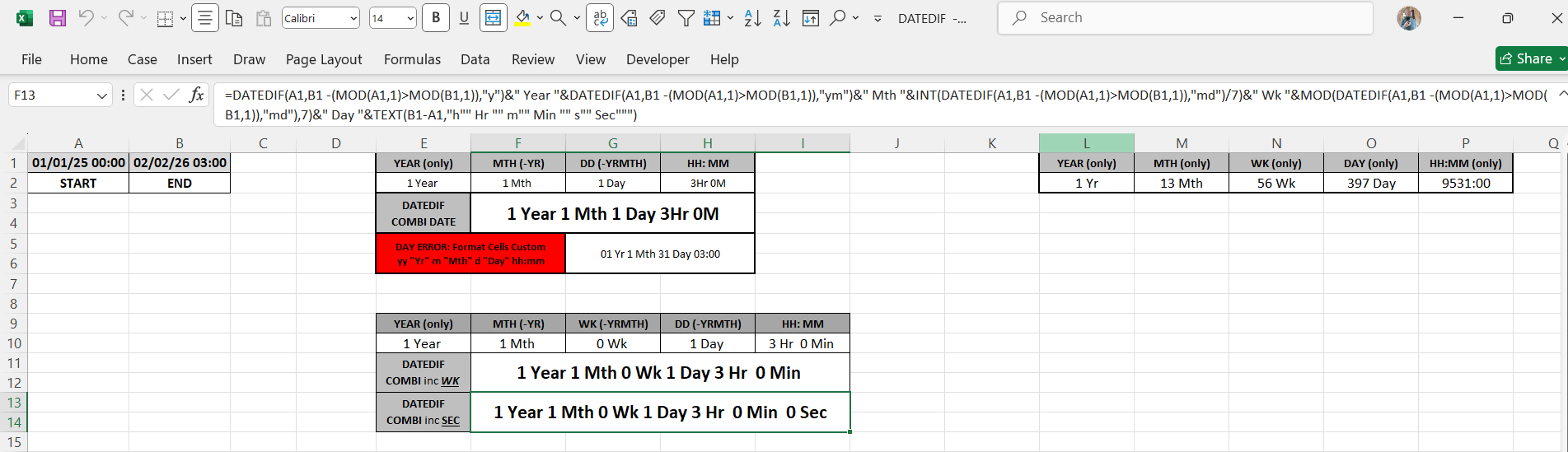
Please see attached Spreadsheet & Screen-Shot for clarification.
- DATES SUBTRACTED, but is incorrect with current FORMULA & FORMAT CELLS, yes I did try BRACKETS on HOURS… [HH] but was not right…either..!
=B1-A1
FORMAT CELLS CUSTOM:
yy "Yr" m "Mth" d "Day" hh:mm
See CELL E5 in RED for ERROR, & compare with correct DATE+TIME calc in F3.
- DATEDIF I recognise exists & probably the long term solution, but it is very very REPETITIVE, re-quoting CELLS REFs again & again, and when strung concertina together in 1CELL, it is complicated to follow, hence fraught with likely human error when used elsewhere, appreciate you might say…this is the way to do it & want u want to get it all in 1 and to display in 1 cell string together, or add it together from separates is easy to edit. E.G:
A.
1 CELL: F13
=DATEDIF(A1,B1 -(MOD(A1,1)>MOD(B1,1)),"y")&" Year "&DATEDIF(A1,B1 -(MOD(A1,1)>MOD(B1,1)),"ym")&" Mth "&INT(DATEDIF(A1,B1 -(MOD(A1,1)>MOD(B1,1)),"md")/7)&" Wk "&MOD(DATEDIF(A1,B1 -(MOD(A1,1)>MOD(B1,1)),"md"),7)&" Day "&TEXT(B1-A1,"h"" Hr "" m"" Min "" s"" Sec""")
Or
B.
SEPARATE CELLS:
YEAR: CELL E10
=DATEDIF(A1,B1 -(MOD(A1,1)>MOD(B1,1)),"y")&" Year "
MTH: CELL F10
=DATEDIF(A1,B1 -(MOD(A1,1)>MOD(B1,1)),"ym")&" Mth "
WK: CELL G10
=INT(DATEDIF(A1,B1 -(MOD(A1,1)>MOD(B1,1)),"md")/7)&" Wk "
DAY: CELL H10
=MOD(DATEDIF(A1,B1 -(MOD(A1,1)>MOD(B1,1)),"md"),7)&" Day "
HOUR:MIN: CELL I10
=TEXT(B1-A1,"h"" Hr "" m"" Min """)
ADD TOGETHER: CELL F11
=E10&F10&G10&H10&I10
- CONCAT DATEDIF
=CONCAT(DATEDIF(A1,B1,{"y","ym","md"})&{" Year "," Mth "," Day "})&TEXT(B1-A1,"H""Hr"" M""M""")
And appreciate my perspective if was way for SIMPLE/BASIC SUBRTRACT to calc correct that would be best, if not, choice between the original DATEDIF separates or the suggested CONCATE DATEDIF is prob best…
But realistically surely in this day & age, there must be a better way or ways!
Cheers Stephan
CROSS THREADS?:
excelforum.com/excel-formulas-and-functions/1437214-datedif-xl-2021-better-concise-alternative-instead-of-concertina-string-together-mess.html#post6042739
UPDATE: Best abbreviated DATEIF so far...
=CONCAT(DATEDIF(A1,B1,{"y","ym","md"})&{" Year "," Mth "," Day "})&TEXT(B1-A1,"h\Hr m\M")
So... CONCATE DATEIF is probably as good as it gets, unless some of you, an XL GENIUS have better ideas? But what about a simple/basic subtract..???
Subtract: B1-A1
FORMAT CELLS CUSTOM: yy "Yr" m "Mth" d "Day" hh:mm
But DATE is in ERROR. Partially right / Partially wrong...NUMBER of DAYS is WRONG!
What would be right, tried [HH] and after some humming (mmm0, turns out that not right... either..
Cheers

Just a few observations. Kindly ignore them if you don't find them useful.
1) DATEDIF is not an official Excel function. It exists to be compatible with old Lotus 1-2-3 files and is known to give incorrect answers. Better to avoid that function altogether.
2) What is "one month"? A month's length varies from 28 to 31 days. Thus, expressing a duration in months is meaningless if you don't know which months are included.
3) Subtracting date/times like =B1-A1 is the most accurate result you can get. In your example it returns 397.125 days. I.e. the full year of 2025 (365), plus a full month of January (31) plus 1 whole day in February (1) plus 3 hours (0.125). And this indeed translates back to 9531 hours.
4) A custom format yy "Yr" m "Mth" d "Day" hh:mm will never return correct results as the date value 397.125 represents 03:00 on 31 January 1901 in Excel's internal calendar that starts 1 January 1900. Hence, yy = the 01 in 1901, m = 1 for January, d = 31 for the 31st. Not at all what you have in mind.