
Hi, I recently filled the excel with my 2025 expsenses and I'd like to know
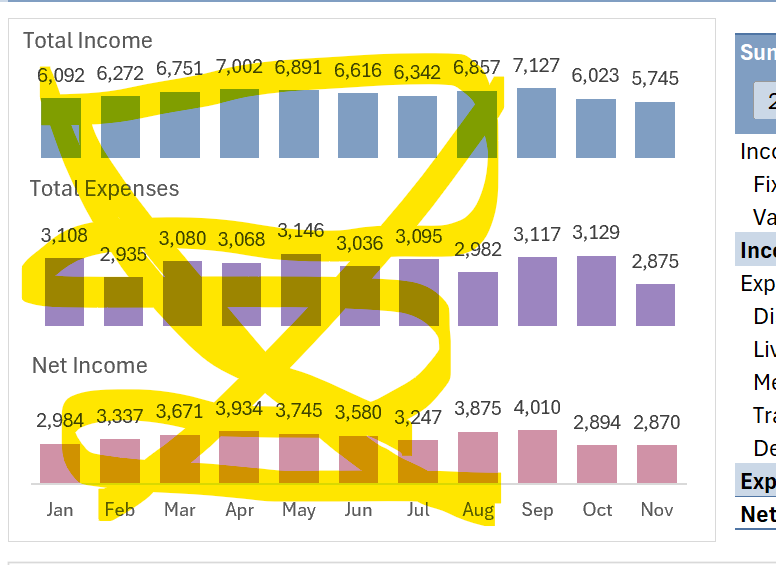
1. How can I display December at the Sum of Income Chart
2. Why the "Medical" expense appears since I didn't added any and how can I make sure everything is on point (cathegories and totals)
2.1 I don't have movements from jan to aug and the graphic shows data, why?
3. I don't think my numbers match pretty well (what's the box that I could compare to my Balance on my Bank app)
For example is it ok if I have $3,515.70 as spending since I transfered from savings to checkings, then I spend that same amount from my debit card. The same amont is on the same colum. I filled the data by downloading my balance datasheets.
I hope my questions are clear.
Thank you in advance for your support.
Hi Adriana,
Thank you for sharing your file.
You should be able to simply refresh the report via the Data tab > Refresh All, and the report updates, but there are a few issues:
1. You renamed the columns in the Transactions table, so the PivotTable can no longer find the fields it's referencing. To fix it, you either rebuild the PivotTables and report from scratch following the steps in the video or put the names back the way they were when you downloaded the file.
2. Your Transactions table has almost 500 blank rows at the bottom of the data. You should never have blank 'placeholder' rows in your table. They are not necessary since the table will automatically expand as you add more data in the next empty row below it. These empty rows will result in 'blank' items in your reports.
In the attached file, I've changed the column labels back the way they were and deleted the empty rows in the table, so your report now updates via the Refresh All button
Mynda