
I have a series values that looks like this ='2025'!$E$3:$E$14 and a series name that looks like this ='2025'!$E$2 where 2025 is the current year. Is there a way to either generate the year via formula or by referencing a cell that has a formula that computes the year?

Let's say the year 2025 is entered in cell A1, then you could use
=INDIRECT(A1 & "!$E$3:$E$14")
The other one would be similar. The trick is that you construct a text string for the range you want to reference, wrapped in INDIRECT(...)
Does that work for you?
Unfortunately, it doesn't, it generates an error, "That function isn't valid"
I am using Office365 and I think the confusion is that this needs to be how I select data within a chart. Your formula works fine in a cell but not as a parameter for selecting series values in a chart
@retiredit Can you upload a file demonstrating what exactly you are trying to achieve?
I'm in an Excel chart and I want to replace 2025 with the value in a cell and not have it static
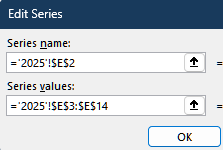
@retiredit Ah, yes! you can't use a formula to reference a chart series. What I would do then is use the indirect formula on a separate sheet for Chart Data based on the selection of the year. See attached file. It's just a smal example and I've worked with named ranges to grab the data for each year.
I've been playing around with various solutions and I think I have one that works and would like your thoughts on the attached file. The answer appears to be that the workbook name needs to be used in the solution
Turns out that doesn't work either. Per our AI friends the only way around it is to create some VBA code to populate the chart data
@retiredit Or use the solution I suggested earlier. Worked for me. Anyway, I can't help you with VBA. Sorry.