

While you have given us a title and a sample workbook, you have not described your objective. Please tell specifically what you are attempting. No formulas in your workbook. Help us to help you by telling us more. My crystal ball is out for repair.
I wanted to see the running total of only the negatieve qty. Because if you see as well the negative as the positive figures, your grand total is wrong. -100+100 = 0 and in reality, you need to produce 100 pieces. Can this be done in a day formula?

@johavand
Not sure I understand what you want to calculate. Your measure for the running total is based in [INVENTORY]-[REQUIREMENT] and that results in negative numbers (except for the first few months for Material B) as the beginning inventory is less then the requirement. If you want it to show these as a positive, just multiply by -1 or swap the arguments. If this makes no sense, please provide some examples of expected results based on your real data.
Hey Riny, I added a new file, because my formula was wrong.
I have a column in my power pivot, where I do the sum of the "Rec./reqd.qty".
Sum of Rec./reqd.qty:=SUM([Rec./reqd.qty]).
I'm filter based on "Planning segmend" => Requirements - Inventory and Receipt.
REQUIREMENT:=-CALCULATE([Sum of Rec./reqd.qty],FILTER(Data,Data[Planning segment]="REQUIREMENT"))
INVENTORY:=CALCULATE([Sum of Rec./reqd.qty],FILTER(Data,Data[Planning segment]="INVENTORY"))
Then I deduced the "Requirement" from the "Inventory".
Inv_Req:=[INVENTORY]-[REQUIREMENT]
I create a running total, just to see what we still have to produce.
RUNNING T_Inv-Req:=CALCULATE(([INVENTORY]-[REQUIREMENT]),FILTER(ALLSELECTED('Calendar'[Calendar]),ISONORAFTER('Calendar'[Calendar],max('Calendar'[Calendar]),desc)))
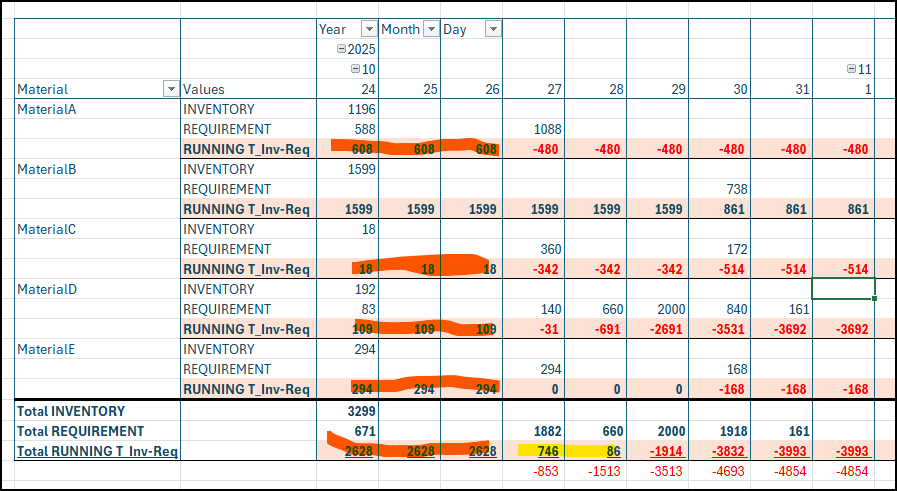
But below picture, you can see that the result is theoretically correct, but to see what we still have to produce, I don't want to see the positieve figures.
Because as you can see for day 27, I don't have to produce anything, but in reality, I have ot produce 853 pcs. And day 28, 1513 pcs. So as you can see, I can't use this running total to see what I really have to produce. Or I have to add on top a formula, which is considering only the negative figures, but if I wanted to do this on week level or monthly level, it's very annoying to calculate this.
So is there a possibilty in DAX to write the right formula?
I see. To do it by material I can understand, but not for all materials together. Can't really think of a DAX solution right now, but if you want to get the result as you added below the pivot table, I'd use a SUMIFS function. See attached.
That's what I do in my official file, but it's not working if you do that per group. Not per material. And also per week or per month it's a really work around. I though it was maybe existing. A pity.
And in power query M language, is there maybe a solution?
@johavand I'm not saying it can't be solved. Just can't think of it right now. And perhaps you can scale down your problem to a pivot table that only has 10 columns or so. Now it has almost 600 columns and it's easy to 'get lost' in the numbers.
Then you can also explain what you expect to see per day, week, month, in total and by material.