
I have a dashboard with multiple years of data. I want to seperate the data by years on my spreadsheet using tabs in the spreadsheet. I am having trouble linking the years so my slicer will grab all of the years from all sources instead of just one. All sheets have the same data fields.
The data on this dashboard has not been seperated yet.

The link returns the message "This content is not available" so I couldn't look at what you intended to share with us.
I suspect it's your PowerBI model. And in case it connects to data in (an) Excel sheet(s), the data may indeed be in separate sheets/files for each year. No problem. But for reporting purposes you would want to put them into one single table in your PBI model to keep it simple.
There may be other solutions, but I would be speculating towards the set-up of your model.
Please try uploading your file or a link that works, again.
I have it all in one sheet /tab now. I just thought seperating them might be better.
Okay! Didn't think clear when I wrote my previous answer. Was on a Mac and than PowerBI doens't work. Not even in the PBI (online) Service.
I can now see your dash board but not the underlying date. So, if the data is now in one Excel sheet/tab, you can separate them there. Create one table per year and connect PBI to each and use Power Query (within PBI) to append them and create one table from them. As long as you get the same format/structure as what you have now all should continue to work. Nothing complicated, but you really want to have one data table in PBI.
Right now my spreadsheet has all data in one sheet. I was hoping to seperate them but I will leave it as it is.
Thank You
But you can separate the Excel data if needed. In separate tabs or even separate files. Then you connect your PBI model to separate sources and append them into one table to ease reporting.
Your choice, but you haven’t explained yet why you want to split the data in Excel. Is the file getting too big?
I’ve built models before where data was in Excel in one table with tens of thousands of rows, and some 60 columns with many formulas. It became very slow, so I did split the table into files by year. And then put them together again in PBI with PQ. Exactly what you seem to be wanting.
I was hoping to split the data into different Spreadsheets by year. The goal was to keep the one file from getting too large. I have not been successful in appending them into one table. I have attached my spreadsheet. I have one sheet that has all data and three more where the data is seperated by year.

If you have the data in separate workbooks, you can append them in Power Query and then create your graphics in Power BI.
Thanks for the file. Although the file with only the "All" sheet wouldn't be extremely large (approx. 8MB) I do understand that navigating through 55K rows (and rising) may become somewhat cumbersome.
So, save each year sheet into separate files and call them (for instance) CFR2024, CFR2025 and CFR2026. Save them in a folder called CFRdata. By the way, you don't need the Year columns as the files already have dates in them.
Then, in PowerBI you connect to files from a folder. It's not very complicated but you need to click quite a bit in the user interface. (Get Data, more..., File, Folder, Connect, Browse... (navigate to the CFRdata folder), OK, Transform Data). This brings you to the Power Query (PQ) editor inside Power BI.
Mynda has a blog post on getting files from a folder with PQ (link below)
https://www.myonlinetraininghub.com/power-query-get-files-from-a-folder
Once in the PQ editor, you should be able to follow along and perform some clean-up steps.
Ultimately, you'll end up with a bunch of automatically created queries and one table in PBI consisting of the combined files for 2024, 2025 and 2026. And that one should be the same as what you get when you connect to the data in the "All" tab in the Excel workbook. It will look something like this:
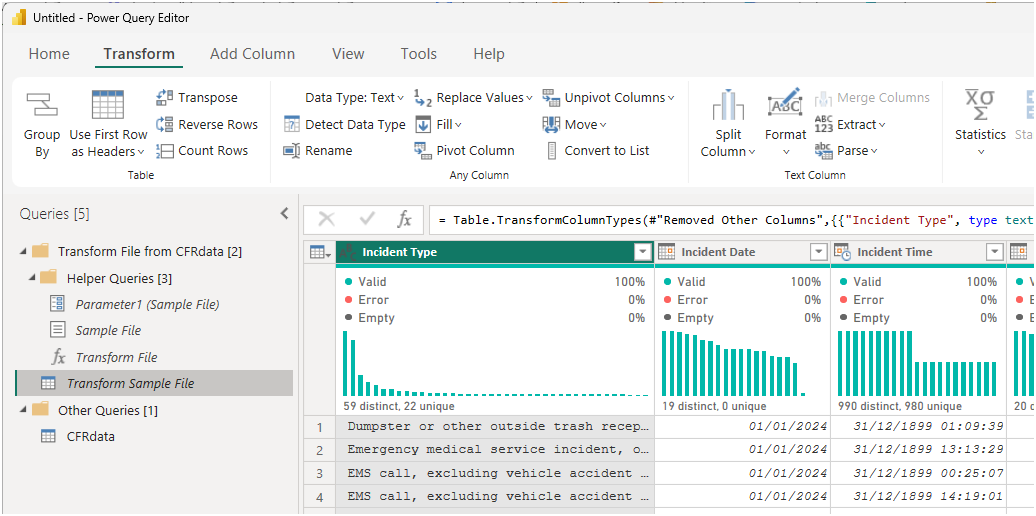
Next year, save CFR2027.xlsx into the same folder and just refresh your model to include its data.
Come back here if you get stuck.
@riny Thank you for that information. I will give that a try.