
Hello,

I believe that the template wasn't designed with a production cycle in mind where parts are assembled into finished product. It would add quite some complexity to the system and would require a separate table for the finished product specifying the parts they are composed of (the BOM).
Please upload your file with what you have built so far and include some realistic examples of kits that you build. Not only one simple product.
Oh, and what Excel version are you using?
OK, but that is just one BOM. What's the finished product? A kayak, I suppose.
The template you referred to is designed to cope with ordering, receiving and selling goods. So, do you already have tables with all parts and finished products, BOMs for each product, stock levels for parts and finished products, a system to record receiving of parts, production of finished products and sales of finished products?
All this is needed to be able to ascertain if customising the template to accommodate manufacture/assembly is at all doable.
@riny Yes, we have all that in an excel spreadsheet that has worked relatively OK with references back and forth between sheets. The relatively simple spreadsheet became quite convoluted since we added multiple locations doing different assemblies using the same items. We can share our spreadsheet with you but prefer privately. Is it OK to communicate directly?
Understand, but this forum has no private messaging. My involvement here is limited to solving relatively simple issues that don't take much time and only if and when I have time to do so. Can't you anonymise a file with some examples?
Hi, we have created sample files. One is the 'Inventory Sample' which has been partly filled in (Inventory, Transactions and Products sheets) using the template from this site. The other is the 'BOM Sample' we created. Hopefully this is a comprehensive start to work from. We apprecaite any help you can provide. Thank you.
@pakayak Thanks for the files. Not sure what I'm looking at, though. My guess is that in the BOM file you have assembled (as an example) 2 products mentioned in the Build sheet.
Each has three components. Two what I would call 'single' parts that are in the Inventory file and one sub-assembly that in turn consists of four 'single' parts.
Am I correct?
If so, I believe that's more work than just tweaking a template or writing some formulas. I would probably use Power Query to 'explode' Build data to a list of products assembled ( +5 for test1 and +10 for test2) and minus quantities for all single parts and sub-assemblies used. Ultimately you would copy/paste these +/- quantities in the Transactions table.
Does this make sense?
If so, you may find the attached file useful. I added some more test items and I believe it works.
@riny Thank you, that will work. Can you tell us how to "see" the power query used so we can duplicate the action? Also, we were hoping to enter one 'Assembly' line in the Transaction sheet and have the child items deducted automatically in the Inventory, mainly to keep the transaction sheet smaller. Ideas? Very many thanks!
On the Data ribbon you'll see "Queries and Connections" (i.e. PC not Mac)
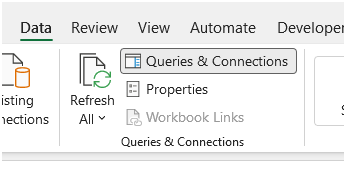
then on the right hand side a side bar will open with the queries.
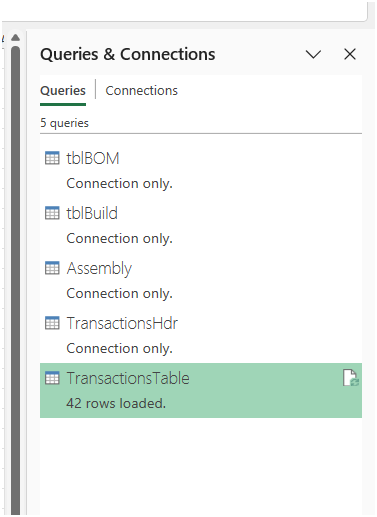
If you have never used PQ before it will be a challenge to understand it right away. Some self-study from Mynda's blog posts on this site (or a course) would be recommended. Just to get a basic understanding of PQ.
The queries in the file I attached earlier 'expand' the BOM and I recommend to copy/paste the expanded parts table to your transactions table. There's no such thing like just entering "5 of final product X" and have Excel miraculously update inventory automatically. Perhaps feasible with VBA and quite some programming, but I can't help you with that.
We need help with an XLOOKUP formula that's not working. Trying to have a column in the BOM gather the inventory quantity from the Inventory sheet when Site = "Integrity" but it's giving #N/A. I've tried several versions but can't get it to work. Here's the formula: =XLOOKUP(B3,(inventory_management_system.xlsx!Inventory[ProductID])*(inventory_management_system.xlsx!Inventory[Site]="Integrity"),inventory_management_system.xlsx!Inventory[QuantityOnHand])/[@[Qty Required]] Hoping you can help. Thanks!!
Since you want to look for the ProductID and the Site, it's easier to use to use FILTER as it allows you to combine filter criteria by + (OR) or * (AND).
Based on the Inventor file you attached earlier, this formula should work:
=SUM(FILTER('Inventory Sample.xlsx'!Inventory[QuantityOnHand],('Inventory Sample.xlsx'!Inventory[ProductID]=[@ProductID])*('Inventory Sample.xlsx'!Inventory[Site]="Integrity"),0))
I've wrapped it in a SUM so that it can be used inside a structured table. It will return the Qty on hand for the ProductID at "Integrity".
Now, you can use XLOOKUP, but then you need to concatenate the two criteria into one lookup value and do the same for the lookup array. It works but it quickly gets messy IMHO.
=XLOOKUP("Integrity"&[@ProductID],'Inventory Sample.xlsx'!Inventory[Site]&'Inventory Sample.xlsx'!Inventory[ProductID],'Inventory Sample.xlsx'!Inventory[QuantityOnHand],0)
Perfect, thank you!