
Hi there,
I am wondering why the Pivot Table in Analysis tab is not updating. An error message comes up
We couldn't complete the action for the Pivot Table "Pivot Table4 in the sheet Analysis because there is already a pivot table "Pivot table1" Please make space and try again.
But when I check the Name Manager screen there is no name PivotTable1
Please see attached files
I look forward to your reply
Cheers
Chris

@cbird
But cell O4 and onwards contains a pt called "PivotTable1". Remove it or insert at least 6 columns, refresh PivotTable4 and it will have the space it needs.
Pivot Tables don't show in the Name Manager, though they will open up a separate ribbon when you click inside them.
Hi Riny,
Thanks for the help to update the pivot table.
Now, in the Analysis tab,
Can you please advise, though, why I am getting the column headers "Total Profit and Loss" and "Sum of Dec25 for each of the months. All I am requiring is the month as the header for each column (of revenue and expense)?
Very mysterious?
I look forward to your reply
Regards
Chris
@cbird You have a Calculated Field called "Dec-25" with the formula =Period which makes no sense.
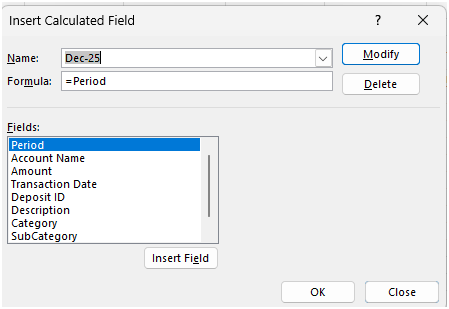
Just remove that Calculated Field all together or unselect it from the Values area of the pivot table and it will look like this:
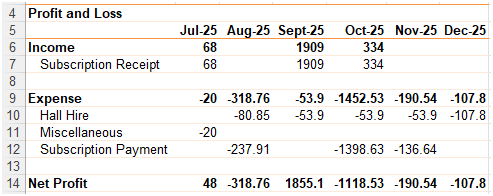
Is that what you intended?