
If you’ve ever opened a large Excel workbook and felt that familiar sinking feeling, hundreds of rows, undocumented assumptions, broken formulas, inconsistent formatting, you already know the problem.
Excel isn’t hard.
Understanding someone else’s Excel is.
That’s exactly the problem Endex.ai claims to solve.
Unlike traditional Excel AI tools that explain formulas or generate snippets of content, Endex positions itself differently:
An AI that understands your workbook the way a financial analyst would.
That’s a bold claim, so I put it to the test.
In this article, I’ll walk through four real-world tests using Endex inside Excel:
- PDF extraction into fully-functional spreadsheets
- Deep workbook understanding and risk analysis
- Professional formatting and cleanup
- Building a complete financial model from scratch
I’ll also explain where Endex fits alongside tools like Copilot, and where it stands apart.
Table of Contents
- Watch the Video
- Download Workbook
- What Is Endex.ai?
- Test 1: PDF Extraction That Actually Creates Excel Models
- Test 2: Workbook Understanding (This Is the Big One)
- Test 3: Professional Formatting in Seconds
- Test 4: Building a Financial Model From Scratch
- Endex vs Copilot: Different Jobs, Different Strengths
- Is Endex Worth Using?
- Try Endex
Watch the Endex.ai Video

Get the Free Practice File
Enter your email address below to download the free file.

What Is Endex.ai?
Endex is an Excel add-in that runs inside your workbook as a task pane.
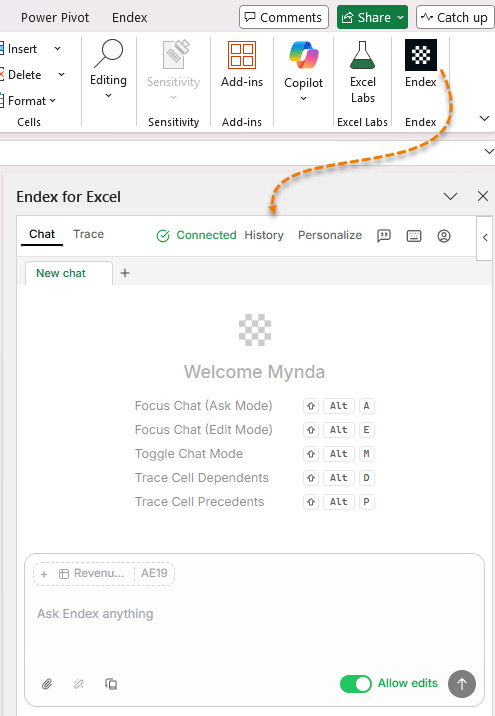
Once installed via Home → Add-ins, it behaves like a persistent AI analyst that can:
- Read and interpret complex Excel models
- Identify errors, risks, and assumptions
- Convert PDFs, images, and PowerPoint slides into dynamic Excel data
- Reformat messy sheets to professional standards
- Build complete financial models from a single prompt
Crucially, it doesn’t just describe what is in your workbook, it analyses what it means.
That distinction matters.
Test 1: PDF Extraction That Actually Creates Excel Models
PDFs are one of Excel’s biggest productivity drains.
Most tools simply dump text into cells, leaving you to:
- Clean layouts
- Rebuild formulas
- Validate totals
- Re-format everything manually
What I Asked Endex
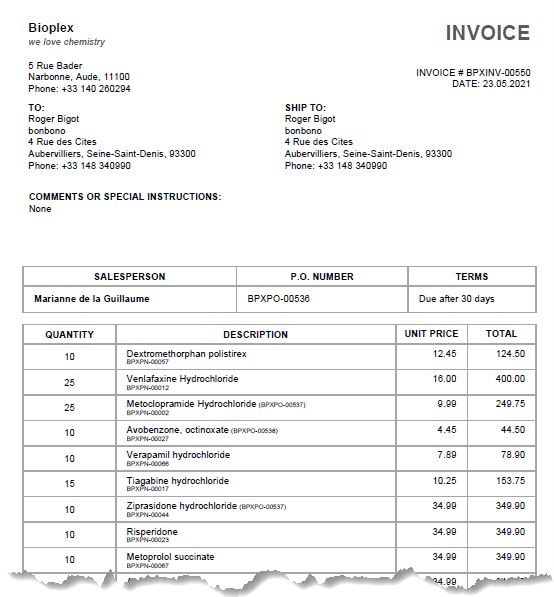
“Extract the data from the PDF invoice and place it in a tabular layout with all relevant information and formulas ready for analysis.”
This is what the PDF invoice looked like before:
This is what Endex created in Excel:
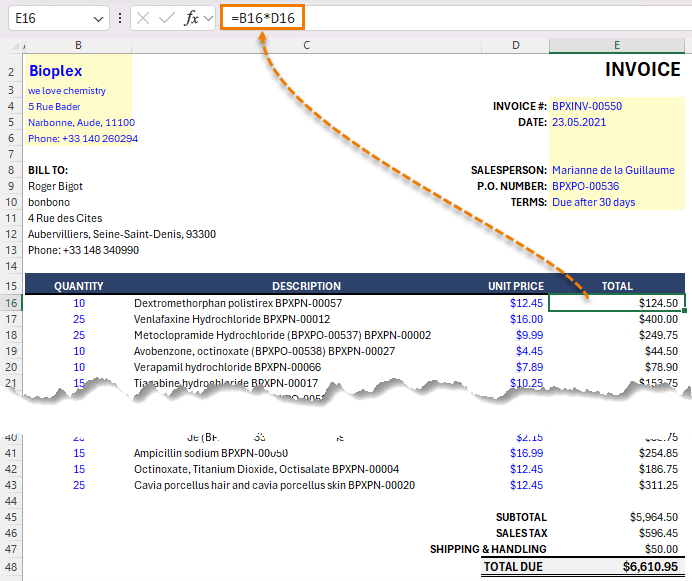
What Endex Delivered
- A clean, structured Excel table
- Formulas, not hardcoded values
- Automatic subtotal and total calculations
- Professional formatting, without being prompted
If I change quantities or unit prices, totals updated correctly. That’s the difference between data extraction and model creation.
Endex can also pull structured data directly from:
- Images
- Scanned documents
- PowerPoint slides
All converted into editable, formula-driven Excel ranges.
Test 2: Workbook Understanding (This Is the Big One)
This is the feature Endex claims truly sets it apart.
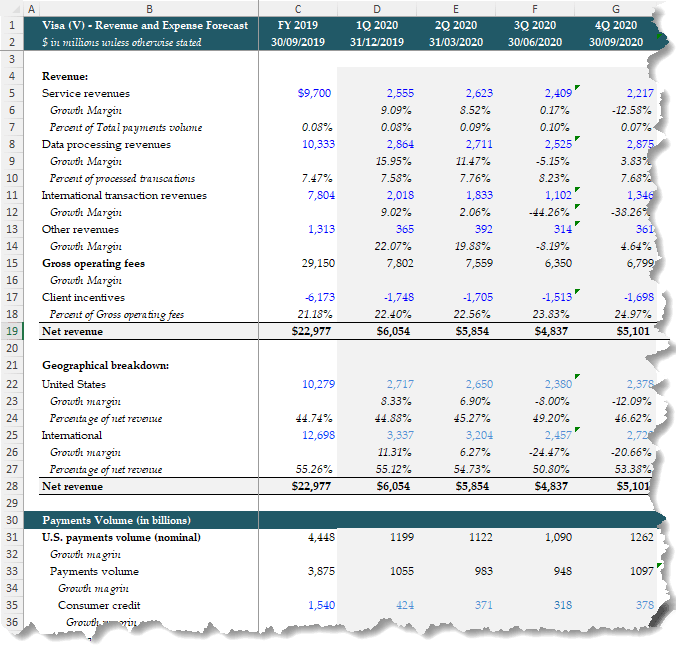
For this test, I loaded a large Visa revenue forecast model containing nearly 270 rows of historicals, drivers, and projections, and asked one simple question:
“Explain the key takeaways from this model and highlight any risks or concerns.”
Here’s a glimpse of the model, it’s not for the feint hearted:
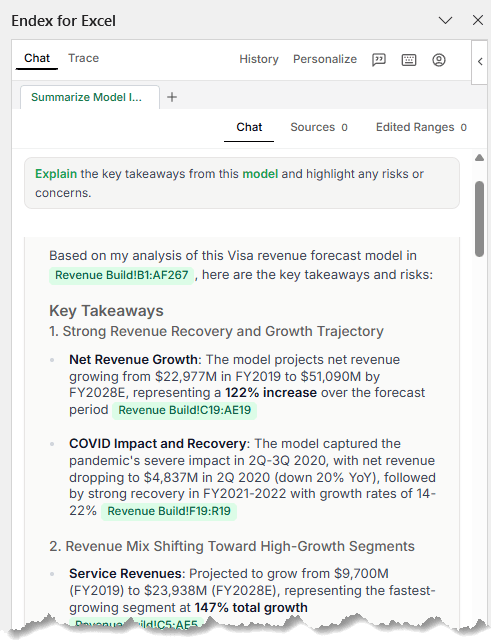
And here’s the Endex chat pane with the results:
What Endex Identified Immediately
Revenue Storytelling
- Net revenue growth from ~$23B (2019) to ~$51B (2028)
- A 122% increase over the forecast horizon
- Clear identification of the COVID dip and recovery pattern
This wasn’t a summary, it was interpretation.
Revenue Mix Analysis
- Service revenues growing ~2.5×
- International transaction revenues nearly tripling
- Data processing revenues showing steady CAGR
Each insight included clickable links (shown in green in the task pane) back to the exact rows and sheets driving the conclusion.
Geographic Trends
- International revenue share increasing from 55% → 58%
- U.S. revenue share declining slightly (despite absolute growth)
Again, meaningful patterns you’d expect from a professional model review.
Risk Detection (Where Endex Really Earns Its Keep)
Endex didn’t stop at the positives.
It immediately flagged:
- 20 separate #REF! errors
- 16 #NUM! errors
And because it surfaced the exact cell locations, remediation was immediate.
Beyond technical errors, it raised assumption-level risks and recommended concrete next steps.
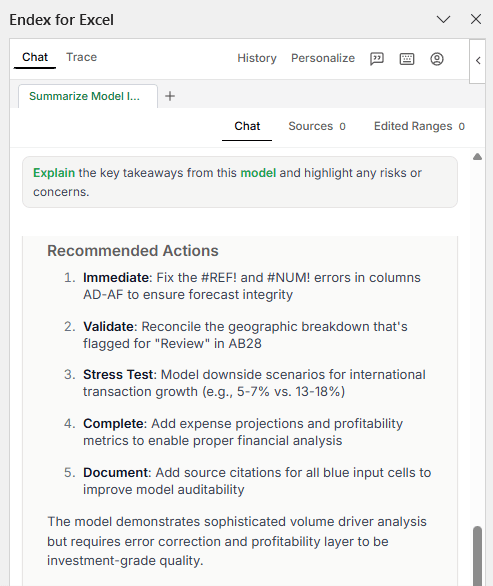
That’s not AI summarisation, that’s model review.
Test 3: Professional Formatting in Seconds
Next, I tested something far more common than valuation models, a messy worksheet.
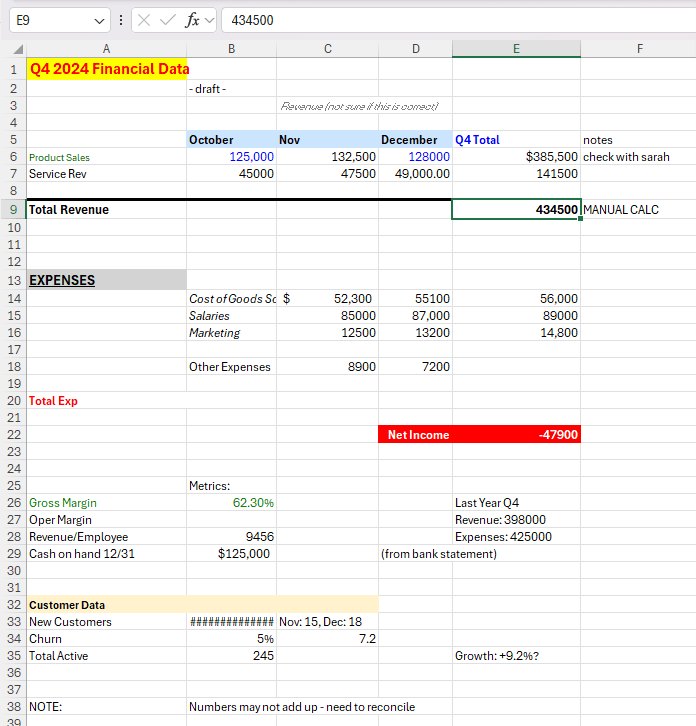
- Inconsistent fonts
- Hardcoded totals
- No visual hierarchy
Exactly the kind of file you’re handed five minutes before a meeting.
Prompt
“Please reformat to an industry professional standard.”
Result
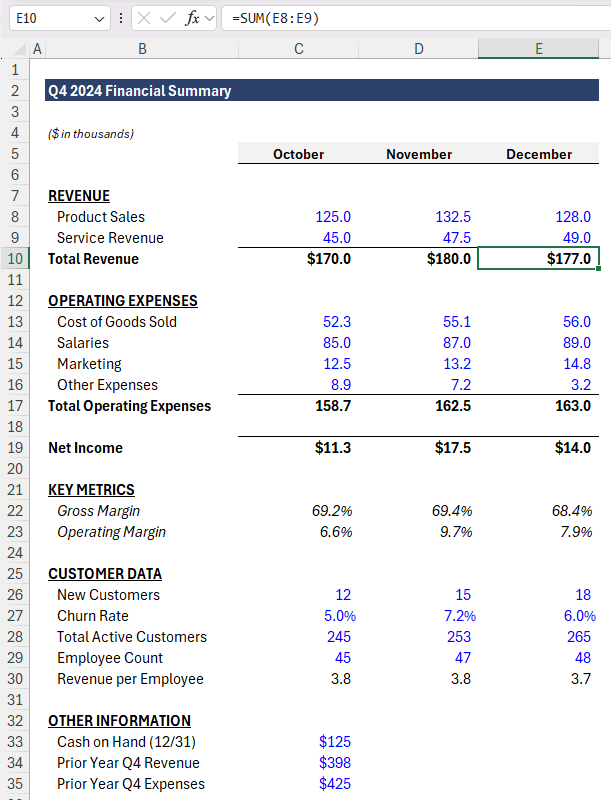
Endex:
- Rebuilt the layout from the top down
- Removed gridlines and improved spacing
- Applied consistent headers and section structure
- Used industry-standard colour conventions
- Blue = inputs
- Black = formulas
- Fixed number formats and alignment
- Replaced every hardcoded total with formulas
This is the kind of cleanup that usually takes 10–15 minutes of focused work. Endex did it in seconds.
No gimmicks. Just clean, stakeholder-ready Excel.
Test 4: Building a Financial Model From Scratch
For the final test, I asked Endex to do something genuinely ambitious:
“Build a valuation model for META.”
What It Created
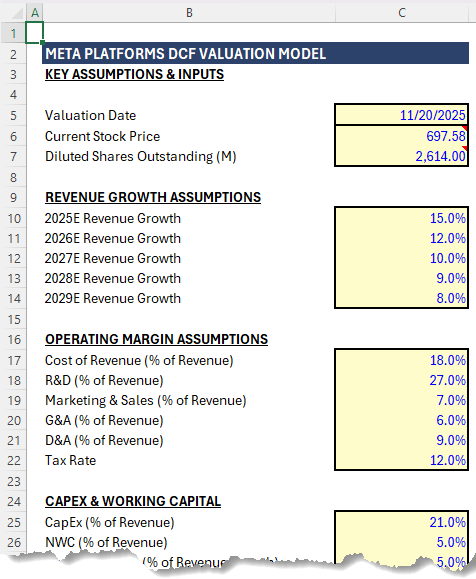
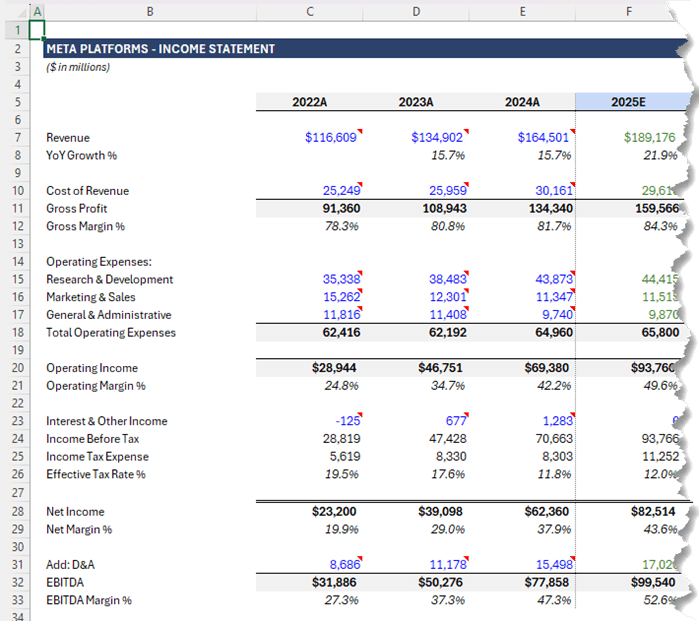
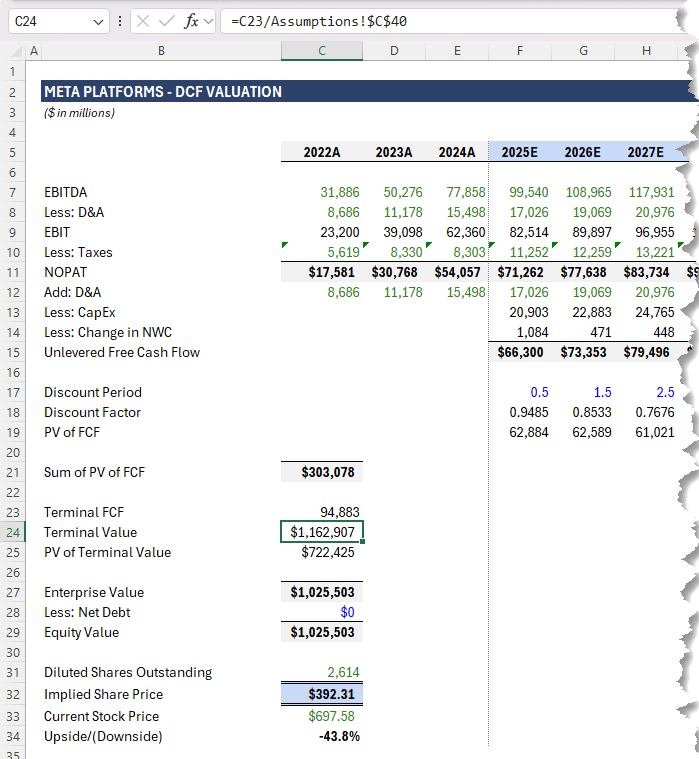
A fully-structured, three-sheet DCF model:
- Assumptions
- Income Statement (with projections)
- DCF Valuation
The model included:
- Historical data imports
- Revenue and margin projections
- EBITDA → EBIT → NOPAT → Free Cash Flow
- Present value, terminal value, enterprise value
- Implied share price
Everything flowed logically. No hardcoded totals. Fully auditable.
Would you still review assumptions? Absolutely. But as a starting point, this was surprisingly comprehensive and built entirely inside Excel.
Endex vs Copilot: Different Jobs, Different Strengths
Tools like Microsoft’s Copilot are designed to work across Microsoft 365.
Endex is purpose built for Excel models.
- Copilot generalises
- Endex specialises
Endex focuses on:
- Understanding complex models
- Analysing assumptions and risks
- Fixing broken logic
- Turning unstructured data into real spreadsheets
Is Endex Worth Using?
If your work involves:
- Large or inherited Excel models
- Financial analysis or forecasting
- Cleaning up messy spreadsheets
- Converting PDFs into usable Excel data
- Building repeatable, auditable models
Then Endex is a productivity multiplier. And importantly, it doesn’t replace Excel skills. It amplifies them.
Try Endex
Endex sponsored the original video, but I don’t do sponsorships lightly. This was the first tool I’ve tested that genuinely does something we can’t already do efficiently in Excel.
Click here to try Endex and apply the code below to get 25% off your first year:
MOTH2026



I generally like to try the new ideas suggested. Having looked at Endex and decided it isn’t for me, I can’t find how to delete it. It persists in popping up whenever I open my workbook. Any ideas?
Hi Paul,
Thanks for trying it out. You should be able to go into Add-ins (Home tab) and then Manage add-ins. Locate Endex and right-click > Remove.
Mynda
Working through your example, Mynda, I am wondering why cell F10, for example, in your income statement shows =E7*Assumptions!$C$17 and similarly for F15, F16 and F17 and then by extension all the way across to column J.
You have applied the Operating Margin Assumptions to the previous year’s Revenue whereas the assumptions say,
Cost of Revenue (% of Revenue)
R&D (% of Revenue)
Marketing & Sales (% of Revenue)
G&A (% of Revenue)
D&A (% of Revenue)
That is not % of Previous Year’s Revenue … would appreciate your feedback!
Good pickup, Duncan. This model was created by the Endex AI, so I asked it and it said that was an error! This is the perfect example of where we humans are still required to validate models created by AI, as mentioned at the end of the video.
Like many others, I have worked with ChatGPT, DeepSeek, chatPDF and others on exercises like this and been pleased and frustrated in equal measure. I haven’t been able to use Endex myself but I hae run a few of my basic financial models through ChatGPT and one of the key lessons to learn, I think, is to have worked through the model before it has a go at it or at least be very familiar with the inputs and objectives of the model.
I have worked with ChatGPT that has gone down huge, long rabbit holes that it simply cannot get out of: abandon it! Over the last few days, I ran one exercise and I believe ChatGPT not only got the answer right but it added a valuable commentary that I hadn’t asked for. Then, yesterday, i ran through another exercise for me and suggested a few things that it did better, more efficiently, than I did!
Be ready for anything!
Absolutely, Duncan! Thanks for sharing your experiences. I’ve had similar. On the whole though, it’s definitely getting better.
Well, sounds promising, but the problem is, it doesn’t seem to be accessible yet.
The link you provided goes to a page that asks for e-mail address to “request access”. Nowhere on their site was I able to find purchase or pricing details, let alone download options.
So I provided mu address, and promptly received an e-mail titled “Welcome to the Endex Waitlist!”; the mail content resonates on a similar note, We’re working hard to bring you the most advanced AI platform, blah blah… looks like they counted their chickens before hatched, eh?
I’m sure it’ll be worth the wait.