
Hello,
New Measure in Power BI provides a simple way to create measures, including a running total.
However, when I try to use that option, it requires a field. I'm simply trying to have it give me a running total of this Contribution Percent column, but it requires I choose a field to reset it by. I don't want to. I just want it to use the filters in the Matrix table.
I've tried using a DAX formula, but can't figure out how. I've re-watched several of the PowerPivot tutorials to see if that would help, but I can't see anything that applies to this.
(I'm thinking Contribution Percent / (Contribution Percent... above this line). I've been at this for nearly 3 hours, I've tried Bard, ChatGPT, and Aria and they just run around in circles. I'm trying to figure this out myself, but I'm out of ideas.
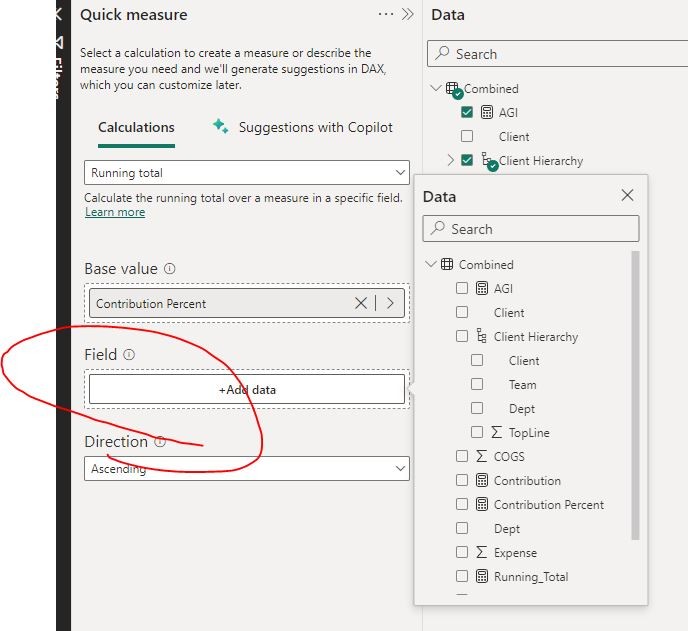
Any help would be greatly appreciated.
Hi Nate,
The running total measure, like ANY measure, will need a field from a data table. You can't use filters for running totals or any measure.
Thanks. Does that mean that any time I am going to want a running total, I need to add a column in Power Query with the field that I'll want to use instead of adding that as a Measure in Power BI?
No.
You have to answer a simple question: On what field you need the running total to be applied? That is the field you need to drag into the measure.
PBI does not know which column has the VALUES for the running total, it needs you to indicate that values column.
Hi,
in the spirit of keeping running total topic in this thread, Does anyone know what the syntax should be for a runing total? Best if the answer could use the example below.
The table shows capital requests to be fulfilled from a main fund and a reserve fund. The requests are done quarterly.
Description of the table:
The following columns are a pivot table.
First column: Quarter
Second column: number of requests
3rd: Dollars requests (sum of all requests)
4th: Main fund total dollars
5th: reserve fund total dollars
the following columns are excel calculated fields.
6th column: Quarter remainder =(Main fund+reserve fund)-dollars requested.
7th column: Running remainder = (quarter remainder+running remainder previous row)
HOpe this makes sense when viewing the image attached.
What I am looking for is the DAX syntax to create this measure. Anyone has done this before?

IF this has already been addressed somewhere else, please point me in the right direction; preferably with a link if possible.

Please watch the tutorial in the link below. If that's not what you need, please upload your file.
https://www.myonlinetraininghub.com/power-pivot-running-total
@riny , That worked ! Thank you.
Could you help me understand the formula in layman/conceptual terms? I understand the 'calculate' function, the 'filter' function but do not understand the usage of 'ISONORAFTER' and relationships with the 'MAX' and 'DESC' function; all withing the filter.
Unfortunately the standard DAX documentation you find on-line is far from perfect and I would be the last to suggest that DAX is intuitive. That's why I experiment with something like ISONORAFTER to see what it's actually doing. And than I make up my own reasoning.
The attached file shows what ISONORAFTER and DESC and ASC are doing. ISONORAFTER suggests that it only takes dates, but you can compare it to the logic "is equal to or greater than", comparing two values. The DESC puts these two values in reverse order and the ASC leaves them in place.
Compare these two partial DAX codes:
ISONORAFTER( 'Calendar'[Date] , MAX( Actual[Date] ) , DESC )
ISONORAFTER( MAX( Actual[Date] ) , 'Calendar'[Date] , ASC )
In the attached example file you see that they give the same result and produce a running total up to the latest (i.e. MAX) Actual date.
Now look at this one:
ISONORAFTER( 'Calendar'[Date] , MAX( Actual[Date] ) , ASC )
It returns a running total starting with the sum of all values and reducing it by the value of the previous day, next time around. Until there are no more actual values and then returns the total value for all remaining dates in the calendar. Weird and not intuitive at all.
Hope this helps and if someone else who reads this has a better way of explaining is, please jump in.