

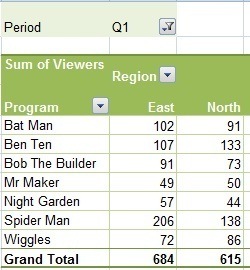
A pivot table is an incredibly powerful tool in Excel that can be used to analyze, explore and summarize your data.
Pivot Tables are in their element with huge amounts of data and allow you to create reports from this data in seconds.
Below is a list of our best tutorials on Pivot Tables.
First of all you need to make sure your data is in a Tabular Format, otherwise you can't use PivotTables.
Pivot Tables Explained Step by Step including Video
Excel Pivot Tables to Extract Data
Create a Pivot Table Direct From Access
Add a Percentage of Total Column to a PivotTable
Compare Columns in a PivotTable
Excel PivotTables Unique Count 3 Ways
Display Missing Dates in Excel PivotTables
Want More PivotTables
Get up to speed with PivotTables in less than 1.5 hours with our PivotTable Quick Start Course.
If you'd like to learn more tricks like these and master everything about PivotTables, then go ahead and join thousands of others and take our Xtreme PivotTable course.
hi,
thank you very much for the videos they really help.
i want to add a percentage column in the pivot table with calculated items and fields.
how can i do that, i want a P&L with Budget Vs, Actual in numbers and % and i want to add percentages for the P&L as well
Hi Roy,
Please see this tutorial on creating a PivotTable Profit and Loss Statement.
If you get stuck, please post your question on our Excel forum where you can also upload a sample file and we can help you further.
Mynda
Hi , 1000 tnx for awesome movies i need find best dashboard for oil and gas project for managment reports i was wondering do you have a any good dashboard can i use it,
Hi Mohammad, unfortunately I don’t have any oil and gas project report examples, however my Excel Dashboard course teaches you the skills to build dashboards for any industry.
Hello,
I am having trouble using a complex budget sheet coming late into a project where its about 500 rows down and and up to column AB, the Pivot Chart wont work because they are subtotals within column messing up my sum totals on pivot.
do you have any recommendations on what I can do? this is time sensitive and willing to do what I can for help.
I would like to be able to pull up a complete chart and say heres what our original budget was and heres what we billed to date in these months but having issues.
Can you not filter one column and keep the entire rows data?
my email is [email protected] i would love to send you more info this is demanding project and inherited an awful spreadsheet lol trying to create my own but project is already 30 columns in and would require serious manual entry as well all know.
let me know what you think
Hi Brenden,
You can use power query to clean data for a pivot table.
Can you upload a sample file on our forum (create a new topic after sign-in) where we can see the data structure and an example of the desired result?
Hey
I have been learning a lot from your videos. I agree that you truly provide meaningful and practical guidance.
I am trying to build a Recruitment Dashboard for my organization. Might you have one that I can build on as I learn and get better?
Thank you
Great to hear! I don’t have any recruitment dashboards, but this HR dashboard might give you some ideas.
Hi,
I have pivot tables/charts that produce data based on % for audit compliance data, my problem is I cannot get the tables/charts to display actuals, I can only seem to get an average of compliance %’s from the value field settings, is there a way I can display only the actuals from the tables?
Any help would be greatly appreciated,
Regards,
Tony
Hi Tony,
It sounds like the PivotTable is aggregating as designed. However, please post your question on our Excel forum where you can also upload a sample file and we can help you further.
Mynda
Hello, I am trying to add some % as Total Sales in a P&L built with a Pivot Table but I can’t. Could you pls help me? Thanks
Hi Anne,
I’m not sure what you’re trying to do, but perhaps this tutorial on PivotTable Profit and Loss Reports will help.
Mynda
Is there a way to have a pivot table update correctly when the source data column/headings change? I have column names of personnel with the percentage of their capacity per project in each column over time the names will change, but when I change the column names the pivot table that is based upon this data loses all the data. Is there a way to implement the column changes without “breaking” the pivot table or having to re-create it? Thanks
Hi Charles,
There’s no way for PivotTables to automatically handle column name changes. You will have to rebuild the PivotTable each time you change a column name as it doesn’t assume you want the field in the same place once the name is changed.
Mynda
Following instructions in you P&L pivot table video; I could not insert a calculated item. Once the formula was inserted and I click add I got the error message “PivotTable formulas can only refer to items in the same field as the calculated item”. Is this because my data is not formatted the same as in the video?
Yes, it’s most likely to be because your data isn’t in a tabular format.
Your P&L pivot table is very helpful, but is there a simple way to format the data from what you get when you export it from say quickbooks, into what you show in the video?
Hi Greg, Yes, you can use Power Query to transform the data into the correct tabular layout. If you get stuck please post your question on our Excel forum where you can also upload a sample file and we can help you further.
Thanks mem, your worksheet very yousfool thanks mem
Great to hear 🙂
Just watched the tutorial on calculating percentages on a Pivot table. I need help calculating the percentage of work that needs to be completed on a Friday to keep from being in the negative on Saturday. Just started using PivotTables on my new job.
Hi Linda,
Please start a topic in the forum and attach your workbook so we can see the data you are working with.
Regards
Phil
The notes is good.
hi. i need to get the option in pivot table in which if i drag any option in column then its effect only be apply at only one value. lik have four column in excel naming size on hand disp qty and store name. if i drag store name in rows and drag size in column and drag disp qty and on hand in values then size should be display in only on hand not disp qty. please please help me on this. i will be wait for your positive and prompt reply. thank you
Best Regards,
Farhan Alam
Hi Farhan,
Please prepare a sample file and upload it on our forum. Make sure you prepare a manual result of how you want it to be displayed.
Thanks, Mynda. Very helpful.
Your Exteme Excel Pivot Course is very interesting . Future I will join . Now I have attended so many course, sometime no time to see vedio. Expected Near future , I will join your course
Good training!!!
.
Nice to see your interest for learning, good job!
Thanks for your appreciation.
Your Excel Expert 2016 was very informative. I found Jeff Honeycutt to be thorough and his spreadsheet examples tied-in nicely with each topic. Thank You.
I want to learn Pivot Table for Big wind Data calculation ,I am null about Pivot table use procedure.
Hi Lynda- Could you please share the raw data file for your tutorial titled HR Interactive Excel Dashboard. I want to practise.
Thank you
Hi Bhanu,
It’s available from this page.
Mynda
Dear Myanda
kindly guide me ” iferror ” formula how to use
Hi Salim,
IFERROR is explained here.
Mynda
Dear Mynda
kindly guide me how to put this formula =IFERROR(IF(Loan_Not_Paid*Values_Entered,Monthly_Payment,””), “”)
there is a combination of few sell such as amount, rate, installment period and start date
Hi Salim,
That formula is incomplete, there is no logical test. Please post your question on our Excel forum where you can upload your Excel file and we can see what you’re trying to do and help you further.
Mynda
I have a pivot table in column A and B. When I update the data in the data sheet the pivot table updates. I have a column C where I want to write some comments based on data I have in column B. When the pivot table updates, cells in column be get rearranged, cell in column C does not rearranged. Is there any way to link these cells?
Hi Anshul,
No, unfortunately not, unless you make them part of the source data and then include that field in your row labels. Alternatively you can put your comments in another table that has the data in columns A & B fixed and then use a lookup formula to fetch them and put them in column C beside the PivotTable. It’s tricky to describe without seeing your file. You could post your question on our Excel forum where you can upload a sample file.
Mynda
Hi Mynda,
I created a dynamic dashboard after watching your video on this topic. For a 56 year old, I shouldn’t be this giddy about accomplishing it but I am. I have a glitch that is keeping me from moving this into a production environment with my team. I has to do with obtaining and refreshing the data sets which exist on SharePoint. I pull in 5 Excel files into an Excel Table.
Are these the right steps:
1. For accessing Excel files on SharePoint, I am using “Get Data from Web”.
2. Choose Basic.
3. I paste in the URL (after removing “?web=1”) for the desired Excel file.
4. Choose Organizational and Sign In.
5. Choose Connect.
If I do it this way, can I easily refresh the data sets?
Kind regards,
Gary
Hi Gary,
Congratulations on building your Dashboard! Yes, you can easily refresh the data sets, but your co-workers may not be able to refresh if they don’t have access to the SharePoint files. I recommend you just try it and see. At worst you’ll have to do the refreshing of the queries when required, but once that is done your team should be able to interact with the report. I don’t have SharePoint so I can’t test it for you, sorry.
Mynda
Great instruction and information.
Thanks Bill
I liked this tutorial and it allowed me to successfully make some updates to my pivot tables.
Another problem I’m having is this- when I connect my pivot table to an external data source, the pivot table doesn’t show the results of my IF formula. Instead it shows (blank) in the cells. My formula reads =if(a2=””,”Open”,a2). My data sheet shows the word Open so I know the formula works, however the pivot table returns (blank) in the cell. If the data sheet is housed on the workbook that has my pivot table, then the table shows the word Open. (there is too much data to have the data sheet in the same workbook as the pivot table). Is this happening because the pivot table is pulling from an external source? This has me perplexed
Hi Ellen,
Your formula is returning a blank as a result of “” which to the PivotTable is not an empty cell, hence the (blank) result in the PivotTable. Not much you can do about this with your formula as is, but you can simply select any cell in the PivotTable that contains (blank) and delete it, and it will delete all of them in the PivotTable. Or you can filter them out.
Mynda
My company has Excel 2013 and no power pivot software. How can we double sort pivot tables so our data is sorted in descending order by column “B”, then descending order by column “C”? The first sort is easy, but we’re not finding an easy way for the second sort on the same data in the same pivot table.
Thanks! Love your webinars and tutorials!
Hi Joy,
You should be able to select a cell in column B > right-click > sort. Then do the same for column C. If you still have trouble, please upload a sample Excel file to our Forum and we’ll help you further.
Mynda
Dear Mynda !
I found this site very useful to excel user. Please post something about Data Analysis & Data Cleaning.
Hi Muhammad,
You can see all of my Power Query ‘data cleaning’ posts here:
https://www.myonlinetraininghub.com/category/power-query
And my Power Query course here: https://www.myonlinetraininghub.com/excel-power-query-course
Data analysis is a huge topic, did you have something specific you wanted covered?
Mynda
i am creating a pivot table from rent data for a building that was recently built. The leasing starting in june 2016 and continued through feb 2017. When i group by months, the pivot table is using the 2017 jan feb data and then rolling into march april may june july of 2016. How do you get the table to start at june 16 and then roll into the next year?
Hi Paul,
Did you group by both months and years? That should prevent months from multiple years being added together. If that doesn’t work please upload your file and question to our Excel Forum.
Cheers,
Mynda
awesome thanks
I AM USING EXCEL 2013,
WHILE CREATING PIVOT TABLE OPTION OF ADD THIS DATA TO DATA MODEL IS NOT HIGHLIGHTED, PLEASE ASSIT ME.
Hi Praveen,
What are you trying to do? Data Model refers to Power Pivot, not to a regular pivot table.
Catalin
Dear Catalin
Brief you in simple terms it is as below:-
I have excel file with various sheets, say Bank A ,bank B, Bank C and Bank D.
We are purchasing commodities and we pay to the suppliers from all banks, we are able to create pivote table for each sheets, but to check the sumamry any single client then we were adding totals of these client from all banks seperately. I was looking a solution whereby we can use date of various sheets and get the pivot result in one sheet with all filter options.
Please assist.
Kind Rgs
Praveen.
Hi Praveen,
You have to add a command to your quick Access toolbar. Click on Customize Quick Access toolbar, choose More Commands, Choose Commands from: All Commands, then browse for the Pivot Table And Pivot Chart Wizard. Add it to your Quick Access Toolbar. Now you can click on this new icon from your QA toolbar, it will open a 3 step wizard: on first step, choose Multiple Consolidating Ranges, Next, Next, choose ranges and click Add after selecting all ranges from all sheets, Next, Finish. Now you have a pivot table made from multiple sources.
Cheers,
Catalin
Hi Mynda,
I created a pivot table, and inserted few new columns next to pivot and put in some comments on each row next to pivot table.
The root cause of my problem is that those edits on each row outside pivot table is not linked to the row within the pivot table, so when i add some new data and refreshed the pivot, the information move to new rows in pivot table, but the “matching” information outside pivot stayed on the old row, resulting a mis-match.
I would like to have those comment to move together with the pivot, my question is how do i tag the comment on each row outside pivot with each row within pivot? or is there better alternative to achieve what i want to do? Many thanks
Hi,
Please upload a sample pivot table with details, i have to see your formulas , it’s hard to give you an advice without seeing the data structure and a desired outcome.
Use our Help Desk to upload a sample file, i’m sure we can find a solution for you..
Catalin
This is my question. I use Pivot Tables. I like them. But this is my problem.
I open a file on a server at work. Save it to excel. I then create a query to this file and select the columns that I want in my query. Once I do this I open the table, I insert a column. I type in some data.
I save it.
The Next day I open the file on the server. Save it to the excel file. Close it.
I open the excel file that was created from the query. I hit refresh.
It wipes the data I type in out.
Is there a way to prevent this from happening?
Hi Charles,
I can’t see anywhere in your process where you write the new data back to the ‘file on your server’. So, the next day when you open the file on your server you’re looking at the original data, not the new updated data. Refreshing the query brings in the original data from the server again, not the updated data you created in your Excel file.
I think it’s the process of ‘inserting a column and typing in some data’ but not sending that data back to the server that seems to be the problem.
I hope that helps you troubleshoot a solution.
Kind regards,
Mynda.
Hi Mynda. Going through the Dashboard course slowly. I would like to ask if anybody has a dashboard to dynamically capture and present beginning budget, current usage and amount left of overtime for 8 units (users) with a total of 155 employees. This dashboard has to be updated and presented every two weeks. I already have a tabular excel file with all the units, employees, bi-weekly pay periods and overtime hours worked for the first two periods of this fiscal year. I would like to show usage by unit and employee, regardless of the unit, how much overtime used and how much budgeted overtime remains at the end of each pay period. Furthermore, I would be adding tasks by unit and employees and show which units/employees are the most efficient when performing these tasks with overtime. I would appreciate any ideas.
Mynda, the 8 units and 155 employees is the population I am working with right now. I can try to adapt any templates or similar examples to my case. I have gone over the examples in the course and I am far away from producing something similar. Thanks.
Hi Victor,
I don’t know of any templates that are similar to your requirements that I could recommend. Since you haven’t finished the course I recommend you complete it so that you have an understanding of how you can use Excel to create the dashboard that you want.
Once you’ve completed the course start by mocking up the different measures you want to report in your dashboard on a piece of paper. This will give you a layout for your dashboard and you can then go about analysing your data and creating your charts and tables required to complete the dashboard.
If you have any specific questions along the way I’d be happy to help. You can email me via the help desk.
Kind regards,
Mynda.
Thanks Mynda.
You’re welcome, Victor 🙂
Hi Mynda,
I am currently working my way through your excellent Dashboard Course and have come across an issue which I haven’t been able to sort out so would appreciate your assistance.
I have a data table set up with columns containing year, month, date and then columns with the various types of material we mine by each pit (eg Pit 1 Waste, Pit 1 Ore, Pit 2 Waste, etc) with the quantities going down by row against the relevant year, month and date. Is there a way I can set up a slicer in a single pivot chart so that the user can select the desired material mined (ie Pit 1 Waste, etc) against the relevant year and month slicers, which work fine, without me having to create a separate chart for each material type mined.
I have played around with the format of the data table (I have adopted your suggested tabular format) but so far had no success other than getting one or more of the selected material types appearing in the one pivot graph at the same time.
Alternatively, is there another way to achieve the desired result.
cheers Jeremy
Hi Jeremy,
Great to hear you’re enjoying my Dashboard course 🙂
You need one column that contains the ‘type of material’. Not separate columns.
I would also recommend having just one column in your source data that contains the date. When you split the year, month and day into separate columns Excel may give you erroneous results. For example, March 2012 and March 2013 are both ‘March’ because you have the year in a separate column.
I would put your date into one cell and use the Group tool in the PivotTable to group them into months and years.
If you’re still having trouble please send me your workbook via the help desk and I’ll take a look.
Kind regards,
Mynda.
Hi Mynda and collegues,
Your site, blog posts and tutorials are very helpfull. Nice…thank you!
I’m rumbling around to find a way to add columns in a Pivot table. Situation: 40 columns named A1, A2, A3 till A10 en then columns B1, B2, B3 till B10 and columns C1, C2, C3 till C10 and D1, D2, D3 till D10. I’ve to add column A1, B1, C1 and D1. Then A2, B2, C2 and D2 and so on. Is there a pivottable trick??
Thanks in advance for a solution.
Kind regards. Eric
Hi Eric,
You just need to add a calculated field.
Here’s what you need to do:
1) Select/Activate your pivot table.
2) By selecting it, it will expose the Options ribbon.
3) Select the Options ribbon.
4) In the Options ribbon, select Formulas-Calculated Field
5) In creating the formula, simply add your columns/fields like this:
=c1+c2+c3+c4
Make sure that there is a unique field/description in your source data
as this will segregate your calculated field results.
For example:
Cheers,
CarloE
Its Very Useful Site I Will tell all my friend
Thank you, Said 🙂
gud its help me lots
I find your website quite useful and I have added it to the list of my favorites at work and even on my personal laptop.
Thanks for all the tips.
Hi Funmi,
On behalf of Mynda,
You’re welcome!
Cheers,
CarloE
Hi — I would like to get the median (instead of mean) calculated in my pivot table because I have highly skewed data. Do you know of any effective work around? Thanks.
Hi Anita,
I have tried to search for answers but the best thing to do is calculate median outside of the Pivot Table.
There may be some VBA workarounds here but it is outside the support we are providing. The good news is that
we are currently building a VBA program for our site.
Cheers.
CarloE
I have many pivot tables and want to assign dynamic print area to all those. The print area should change automatically with the change in data. How to do it. There may be null row values in some case.
Hi Nik,
Sounds so vague to just say it.
Please send it to Help Desk and let’s see what we can do about it.
Cheers.
CarloE
I have two sets of spreadsheets which at the end of the month i have to integrate, the challenge is for me to integrate the two i need a sum if formular which incorporates two variables
Hi Hamilton,
You can use either SUMIFS or SUMPRODUCT.
Kind regards,
Mynda.
Please provide me pivot table how to edit and ennter calculation field, and also details of array formula all type, and all details of database function.
I am regular reader of this site.
Thanks
Chandrashekher
Hi Shekher,
You can find an index of Excel formulas and other tools here, including arrays, database functions and the like.
I’m not sure you’ll find a tutorial on how to enter a calculated field in a PivotTable though. I am yet to write about that, sorry.
Kind regards,
Mynda.