
Excel IF AND OR functions on their own aren’t very exciting, but mix them up with the IF Statement and you’ve got yourself a formula that’s much more powerful.
In this tutorial we’re going to take a look at the basics of the AND and OR functions and then put them to work with an IF Statement. If you aren’t familiar with the IF function, read this first > Excel IF Statement Explained.
Download the Workbook
Enter your email address below to download the sample workbook.

IF Formula Builder
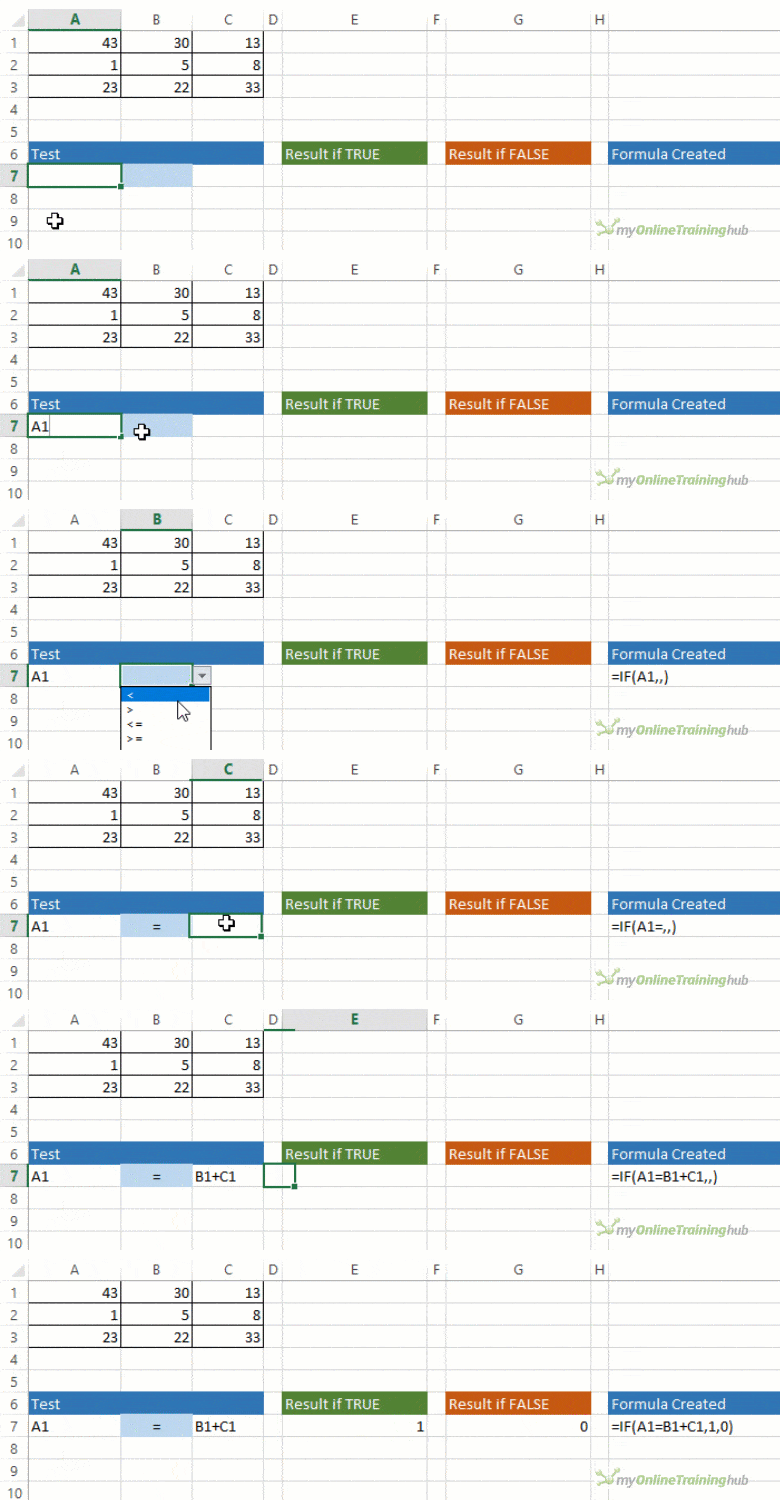
Our IF Formula Builder does the hard work of creating IF formulas.
You just need to enter a few pieces of information, and the workbook creates the formula for you.
AND Function
The AND function belongs to the logic family of formulas, along with IF, OR and a few others. It’s useful when you have multiple conditions that must be met.
In Excel language on its own the AND formula reads like this:
=AND(logical1,[logical2]....)
Now to translate into English:
=AND(is condition 1 true, AND condition 2 true (add more conditions if you want)
OR Function
The OR function is useful when you are happy if one, OR another condition is met.
In Excel language on its own the OR formula reads like this:
=OR(logical1,[logical2]....)
Now to translate into English:
=OR(is condition 1 true, OR condition 2 true (add more conditions if you want)
See, I did say they weren’t very exciting, but let’s mix them up with IF and put AND and OR to work.
IF AND Formula
First let’s set the scene of our challenge for the IF, AND formula:
In our spreadsheet below we want to calculate a bonus to pay the children’s TV personalities listed. The rules, as devised by my 4 year old son, are:
- If the TV personality is Popular AND
- If they earn less than $100k per year they get a 10% bonus (my 4 year old will write them an IOU, he’s good for it though).
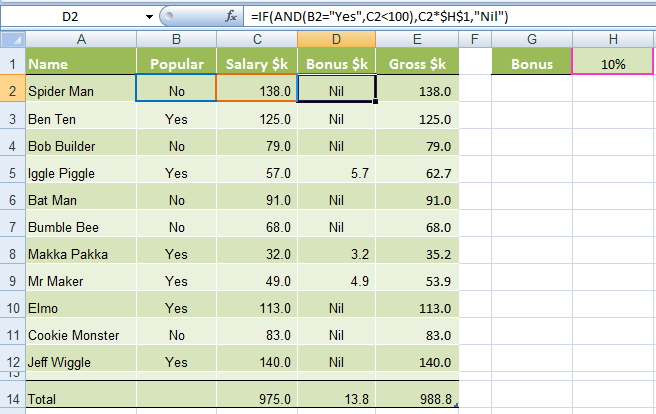
In cell D2 we will enter our IF AND formula as follows:
In English first
=IF(Spider Man is Popular, AND he earns <$100k), calculate his salary x 10%, if not put "Nil" in the cell)
Now in Excel’s language:
=IF(AND(B2="Yes",C2<100),C2x$H$1,"Nil")
You’ll notice that the two conditions are typed in first, and then the outcomes are entered. You can have more than two conditions; in fact you can have up to 30 by simply separating each condition with a comma (see warning below about going overboard with this though).
IF OR Formula
Again let’s set the scene of our challenge for the IF, OR formula:
The revised rules, as devised by my 4 year old son, are:
- If the TV personality is Popular OR
- If they earn less than $100k per year they get a 10% bonus.
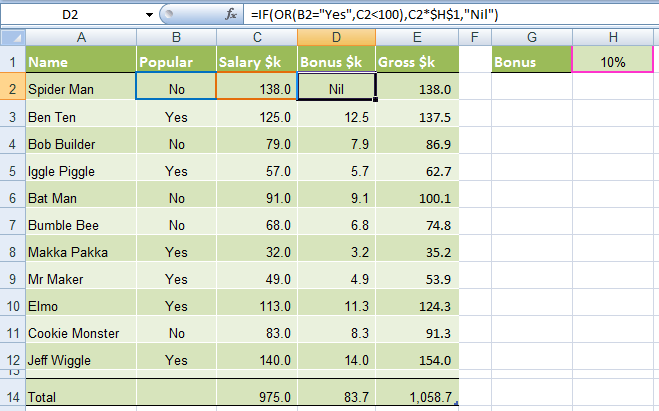
In cell D2 we will enter our IF OR formula as follows:
In English first
=IF(Spider Man is Popular, OR he earns <$100k), calculate his salary x 10%, if not put “Nil” in the cell)
Now in Excel’s language:
=IF(OR(B2="Yes",C2<100),C2x$H$1,"Nil")
Notice how a subtle change from the AND function to the OR function has a significant impact on the bonus figure.
Just like the AND function, you can have up to 30 OR conditions nested in the one formula, again just separate each condition with a comma.
Try other operators
You can set your conditions to test for specific text, as I have done in this example with B2="Yes", just put the text you want to check between inverted comas “ ”.
Alternatively you can test for a number and because the AND and OR functions belong to the logic family, you can employ different tests other than the less than (<) operator used in the examples above.
Other operators you could use are:
- = Equal to
- > Greater Than
- <= Less than or equal to
- >= Greater than or equal to
- <> Less than or greater than
Warning: Don’t go overboard with nesting IF, AND, and OR's, as it will be painful to decipher if you or someone else ever needs to update the formula in months or years to come.
Note: These formulas work in all versions of Excel, however versions pre Excel 2007 are limited to 7 nested IF’s.
Excel IF AND OR Practice Questions
IF AND Formula Practice
In the embedded Excel workbook below insert a formula (in the grey cells in column E), that returns the text 'Yes', when a product SKU should be reordered, based on the following criteria:
- If Stock on hand is less than 20,000 AND
- Demand level is 'High'
If the above conditions are met, return 'Yes', otherwise, return 'No'.
Tips for working with the embedded workbook:
- Use arrow keys to move around the worksheet when you can't click on the cells with your mouse
- Use shortcut keys CTRL+C to copy and CTRL+V to paste
- Don't forget to absolute cell references where applicable
- Do not enter anything in column F
- Double click to edit a cell
- Refresh the page to reset the embedded workbook
IF OR Formula Practice
In the embedded Excel workbook below insert a formula (in the grey cells in column E) that calculates the bonus due for each salesperson. A $500 bonus is paid if a salesperson meets either target in cells C24 and C25, otherwise they earn $0 bonus.
More Excel Formulas
Why not visit our list of Excel formulas. You'll find a huge range all explained in plain English, plus PivotTables and other Excel tools and tricks. Enjoy 🙂














 Excel Nested IF’s Explained

Ann Marie
How do I write formula for:
If value of cell A1 is between 18 and 65 or value of cell B1 is less than 20
If true populate “Owe”
If false populate “Exempt”
Philip Treacy
Hi Ann Marie,
Try this
=IF(OR(AND(A1>18,A1<65),B1<20),"Owe","Exempt")
You need data in A1 and B1 for this to work otherwise you'll get inconsistent results. Alternatively, adjust the formula to check for data in A1 and B1 before producing a result.
Phil
EMILIE PRONOVOST
If I want to create a formula or a conditioning formula where the example cell D6 if it is equal to “Done” to put the cell E6 to Available for Testing
What should I do?
=IF(D6=”Done”,E6=”Available For Testing”)
Don’t think that this is it XD Can someone shed some light for me on this?
Mynda Treacy
Almost there.
=IF(D6=”Done”,”Available For Testing”,””)
Mynda
So
Date Product ID Previous Stock Quantity In Quantity Out Current Stock Formula for Previous Stock
01-06-23 Product A 50 10 5 55
01-06-23 Product B 50 5 10 45
01-06-23 Product C 50 10 5 55
02-06-23 Product A Here must be 55 (F55) 20 12 63 =IF(B5″”, IFERROR(INDEX(C$1:C4, MATCH(1, ($B$1:B4=B5) * ($A$1:A4<MAX(IF($B$1:B4=B5, A$1:A4)))), ""), "")
02-06-23 Product B 45 10 50 =IF(B6″”, IFERROR(INDEX(C$1:C5, MATCH(1, ($B$1:B5=B6) * ($A$1:A5<MAX(IF($B$1:B5=B6, A$1:A5)))), ""), "")
02-06-23 Product C 55 15 60 =IF(B7″”, IFERROR(INDEX(C$1:C6, MATCH(1, ($B$1:B6=B7) * ($A$1:A6<MAX(IF($B$1:B6=B7, A$1:A6)))), ""), "")
03-06-23 Product A 63 15 71 =IF(B8″”, IFERROR(INDEX(C$1:C7, MATCH(1, ($B$1:B7=B8) * ($A$1:A7<MAX(IF($B$1:B7=B8, A$1:A7)))), ""), "")
03-06-23 Product B 50 15 55 =IF(B9″”, IFERROR(INDEX(C$1:C8, MATCH(1, ($B$1:B8=B9) * ($A$1:A8<MAX(IF($B$1:B8=B9, A$1:A8)))), ""), "")
03-06-23 Product C 60 15 65 =IF(B10″”, IFERROR(INDEX(C$1:C9, MATCH(1, ($B$1:B9=B10) * ($A$1:A9<MAX(IF($B$1:B9=B10, A$1:A9)))), ""), "")
Mynda Treacy
It’s not clear what you’re asking. Please please post your question on our Excel forum where you can also upload a sample file and we can help you further.
Shameer
3. VIOLATION STATUS – REPEATED & DELAY (20 POINTS)
A-Repeated Violation B-Delay Violation Closure
Point Issued Repeated % Repeated Score* Point Issued Repeated % Repeated Score*
4 0 0 0.
1 0 0 0.
3 0 0 0.
2 0 0 0.
10 0 0 0
=IF(F183,F186,F1810,F1815,F18<=20),C18*0.6,0)))))
Is this formula is correct ? Please correct me
Philip Treacy
Hi Shameer,
No it’s not correct as the syntax is wrong, but without seeing your file it’ll be hard to give you a formua that works.
Please start a topic on our forum and attach your file.
Regards
Phil
Shameer
HOW TO ATATCHE THE FILE ?
Philip Treacy
https://www.myonlinetraininghub.com/excel-forum/forum-rules-and-guides/read-this-first
Navin
No 0
Being 1
Yes 2
Anoop
if there are three columns in excel ,I want “YES” if all the columns are “ok ” or “na” otherwise “no”.
Ex- ok , ok , ok = YES
ok , na ,ok = YES
ok , ok , no = NO
na , na ,na = YES
Mynda Treacy
Hi Anoop,
Mynda
Navin
Yes = 2
No = 0
Being = 1
Mynda Treacy
I’m not sure what you’re asking, Navin. You’re best to post your question on our Excel forum where you can also upload a sample file and we can help you further.
OM TANEJA
i WANT THESE TWO FORMULAE IN CELL ax8
IF(X8=”VACANT”,””) AND IF(Z9=””,”UNPAID”,IF(Z9<Y9,"PARTIALLY PAID","PAID"))
HOW CAN I COMBINE THEM
Mynda Treacy
Try this:
Aymen T.
Hell Sir I am working on a sheet (data given below). I have a time and want to check if it falls between a given time range or not. The formula i am using is “If(AND(C72>A72,C72<B72), "TRUE", "FALSE")". Column C is extracting value from another timestamp column. It works (Column D) if I add the value manually in Column C but it doesnt work on automatically extracted value. Please help!
A B C D
11:33:48 11:53:48 12:50 FALSE
12:20:22 12:38:21 12:21 TRUE
12:39:27 13:00:09 12:40 TRUE
14:16:23 14:20:49 14:17 TRUE
14:20:54 14:22:56 14:21 TRUE
4:00:00 16:00:00 12:00:00 TRUE
Catalin Bombea
Hi Aymen,
How are you extracting the values automatically?
Normally, if calculation is set to Automatic, formulas are recalculated when the source cells change.
Aymen Tasneem
I am taking the timestamp if certain column is filled, formula is “IF(H36″”,IF(U36″”,U36,NOW()),””)”
Catalin Bombea
Can you please provide a sample file that replicates the problem on our forum? (create a new topic)
Joy
I need your help in one topic.
As the Sumifs function does the different criteria with Different range. I need the same in IF condition Kindly help.
For instance
Joy is the employee and he does three task need to check the condition in every task he must have quality of above 98%.
If quality is less than 98% in any of the three task it must return value as Quality is Low for all three columns else if quality is more than 98% for all need to return as Selected in all three columns.
Consider below as given in excel sheet
Name task quality Remarks
Joy. Adhoc. 99.
Joy. Pinning. 97.
Joy. Tagging. 100.
Kindly please help me with the condition
Philip Treacy
Hi Joy,
if your Quality column is D3:D5 then try this
=IF((COUNT($D$3:$D$5)/COUNTIF($D$3:$D$5,”>98″))=1,”Selected”,”Quality is low”)
Note that you haven’t said what do do when the Quality score equals 98.
If you are still stuck please start a topic on our forum and attach your example file with data.
Regards
Phil
Michael Cruz
Hi there! I just wanna seek help with this problem I encounter regarding prevention of duplicate entries. Here’s the scenario if the “couple with the same name and same birthdate that encoded already” must prevent to be encoded again as it will be a duplication. Is it possible that two rows will and 2 columns will be the criteria? Thanks for the help
Catalin Bombea
Hi Michael,
Multiple columns can be used as a unique key, but not multiple rows, that is unusual. You should review the way you store information, a unique record should not be split into multiple rows.
Michael Cruz
Noted with this, Thanks!
Paygan
Hi Everyone.
Just looking to see, if anyone could help me under stand what this formula is and the meaning behind it =IF(D7>0,0.7,0) im new to IF functions and slowly learning.
ive notice a friend has used this IF Function =IF(D7>0,0.7,0) to calculate milage.
can anyone explain to me how it works, so im able to create one myself, but so i fully understand the meaning behind it.
Thank yous all
Mynda Treacy
Hi Paygan, in English that formula reads:
If the value in cell D7 is greater than 0, return 0.7, otherwise return 0.
Mynda
Stanley Prentice
=IFS(B15=””,D15=””,B15>0,J$10. Sorry, the previous had the wrong formula. This is the correct one however the rest of the previous post was correct. Does anyone have an answer?
Mynda Treacy
Hi Stanley,
The IFS function syntax is logical test, result, logical test, result…
Please see the IFS function tutorial. If you’re still stuck, please post your question on our Excel forum where you can also upload a sample file and we can help you further.
Stanley Prentice
=IFS(B15=””,D15=””)+OR(B15″”,D15=J6) This formula was written in cell J19. I want the results to be placed in cell D15 not in cell J19. the word in cell J6 is: Pension. I have other words in col. J that I may want to use depending on Dxx=Jxx. with xx being the cell number
Prem Aradhya
Could you suggest me a formula for scoring from 0 10, for the percentage of marks from 35 to 100.
Ex. For 35% the score is 0 and 100% the score is 10.
Mynda Treacy
Hi Prem, please use this VLOOKUP on a sorted list technique.
Naweed
Hi Guys,
can anybody help me out for below amount distribution?
if the bases is 2300 how to divide 100% on different 4 amounts
1. 2250
2. 1760
3. 1250
4. 1240
what amount percentage will be applied on each from 2300?
thank you
Mynda Treacy
Hi Naweed,
I’m not sure what you mean, sorry. Pease post your question on our Excel forum where you can also upload a sample file and we can help you further.
Galaxy Eduaction
Thanks for sharing this is aweesome.
Mynda Treacy
Our pleasure 🙂
kayane kumarasamy
Hi i have an excel project and really struggling with this question. No idea which function to use to label specific words: please see question below.
Use IF, data cleaning and / or lookup formulae to populate the columns for Type, Category and Detail.
>> Type: Codes beginning with “R” should be labelled “Revenue”. Codes beginning with “E” should be labelled “Expense”.
Exampes of codes ” EDA7001″ , RNC2001
>> Category: refer to the Lookups worksheet for the Categories.
>> Detail: refer to the Lookups worksheet for the Detail.
Philip Treacy
Hi Kayane,
You should post this kind of question in our forum along with the workbook that contains the data, because I can’t show you how to do the lookups without your data.
For the Type, you can use string functions:
but if there are only two Types you can use a single IF function for both
For the lookups you could use either VLOOKUP or XLOOKUP
Regards
Phil
James
Hi all,
I have 5 students – Adam, Oliver, George, Harry, Jack, Jacob – in cells A2, B2, C2, D2, E2, F2
and I have their grades 4, 4, 5, 6, 7, 8 – in cells A3, B3, C3, D3, E3, F3.
I am trying to figure out a formula for the following
1. To give me the lowest grade (i.e. 4) in cell G3 and the respective student’s name in cell H3.
2. To give me the 2nd lowest grade (i.e. 5) in cell I3 and the respective student’s name in cell J3.
Any help would be more than highly appreciated.
Mynda Treacy
Hi James,
You can use the SMALL function, to find the 2nd lowest grade and then use INDEX & MATCH to lookup the corresponding name, but it’s not clear what you want to do in the event of a tie. Please post your question on our Excel forum where you can also upload a sample file and we can help you further.
Vic
Hey all. I am trying to figure out a formula for the following. I have 14 variables of data. If a cell equals a certain number, it will populate with that text. if not, it will show up as false. What I would like to do now, is if the range of X:X = false, look for other text and put that text into another cell. If its:
A1 False B1 text via formula needed in A5
A2 Text
A3 False
A4 False
A5 =formula for what i’m looking for.
I want it to look at the 4 cells and determine what text isn’t false and put it in a different cell. Something like If A1:A4=False, then B1=1 of 14 random texts.
Any help is appreciated! Thanks
Catalin Bombea
Hi Vic,
How can the formula decide which one of the 14 texts should be displayed? Can you describe all conditions (assuming that each of those 14 texts should be displayed when a specific condition is met)?
If there is no rule and one of 14 texts should be randomly displayed:
=IF(COUNTIF(A1:A4,”False”)=4,INDEX({“Date_GR”,”What_GR”,”Where_GR”,”What purchase_GR”,”Tip_GR”,”Sub_total_GR”,”Total_Cost_GR”,”Remarks”,”Where_GR”,”What purchase_GR”,”Tip_GR”,”Sub_total_GR”,”random text 1″,”random text 2″},RANDBETWEEN(1,14)),””)
Vic
Catalin, thank you for your response. I am only going to use 5 texts for example. Okay, I have the following table:
A B C D
1 Txt1 3 Txt3
2 Txt2
3 Txt3
4 Txt4
5 Txt5
When the data shows a number 1-5, it displays the corresponding text.
Since I have 5 values, I have a line for each option.
If the formula is false, it displays false.
Id like to find a formula that selects the range and selects the line automatically that does not read “False”, and displays that text in another cell
A B C D
MODEL# 1 1 Txt1
WANT NAME DISPLAYED HERE: XXXX 2 Txt2
=IF($B$1=$CF$1, “Txt1”) 3 Txt3
=IF($B$2=$CF$2, “Txt2”) 4 Txt4
=IF($B$3=$CF$3, “Txt3”) 5 Txt5
=IF($B$4=$CF$4, “Txt4”)
=IF($B$5=$CF$5, “Txt5”)
Now, I want to take B3:B7 and if #2 is the model number, B4 will read Txt2 and B3,B5,B6,&B7 will read FALSE. I want a formula to look through B3:B7 pick the text that isn’t “FALSE” and display that text in cell B2.
Does this make sense? Please let me know if you have any more questions. Thanks!
Catalin Bombea
Can you please upload a sample file with your data and the expected results? will be much easier to help you.
Use our forum to create a new topic and upload a sample file.
Vic
I tried registering, but when I went to log in, it will not let me.
Mynda Treacy
Hi Vic, please reach out via email (website at MyOnlineTrainingHub.com) so we can help you troubleshoot. What I can say here is the email address you used for this comment does not have an account set up in our system, so I suspect you haven’t registered properly. Mynda
Vic Trolio
I successfully registered and posted a sample file in the forum. Title of the topic is: IF and OR Function Help Needed.
Thanks!
anvitha
hey, I want a function to solve this problem
Customers who want to avail of an Early Bird discount must place their orders on weekdays between 11:45 a.m. – 12:00 p.m. (for lunch) or 6:45 p.m. – 7:30 p.m. (for dinner).
column D has delivery day(number) details and column E has delivery timings (12-hour format)
please help me solve this. thanks in advance
Catalin Bombea
Hi,
Can you please upload a sample file with an example of expected results? Will be much easier for us to understand your situation and help you.
Create a new topic on our forum after you sign up to upload the sample file.
Brian Coombs
Hi,
I am trying to do a formula involving multiple “IF” for the same cell, I have 4 possible answers for the same cell with different outcomes for each, so if (A1) is 0:051(or)0:151 0:2.51.
I have tried the nested ifs from the tutorials and the help in excel, and the “and” “or” but I just can’t seem to get it to give me an increase in the “value” cell…need help if you can please.
Brian Coombs
If A1 [is less than ?? in cell A2] then A3 “=” +3 or if A1 is greater than?? but less than?? [in cell A2] then A3 “=”+4….etc for all four variations
Philip Treacy
Hi Brian,
I’m afraid the problem isn’t quite clear. What kind of value is 0:2.51? Text? But you are trying to check if a value is greater or less than something so you must be working with numbers?
Also with this part if A1 is greater than?? but less than?? [in cell A2] if you have a value in A2 then you can’t check if something else is greater than and less than it. It can only be one or the other.
Please start a topic on our forum and attach the file you are working with so we can understand things better.
Regards
Phil
NAVAJITH.N
IF THE SALES IS LESS THAN RS.10001,THE COMMISSION IS 10% OTHERWISE YOU WILL GET 11% COMMISSION FOR THE AMOUNT ABOVE RS.10000. Please answer my question and give if formula.
Mynda Treacy
It’s difficult to give you a formula without cell references for your source data. Please post your question on our Excel forum where you can also upload a sample file and we can help you further.
Flower
Hi… I am trying to work out a formula for a pricing excercise at work and am very stuck.
This is the information I have…
Base cost to service up to 3 fire extinguishers is $45
Cost to service any additional fire extinguisher is $4.05
Trying to set up a formula that shows this.
For example…
# of extinguishers Total Service cost
3 $40.00
4 $44.05 (base cost of $40.00 + 4.05 for the additional unit)
5 $48.10 (base cost of $40.00 + 8.10 for the additional units)
Are you able to help set this up?
Mynda Treacy
Please post your question on our Excel forum where you can also upload a sample file and we can help you further.
Ana
HELP :,(
3. The seniority bonus is calculated at the employment salary and is determined according to the seniority in work as follows:
pt. seniority 20 years – 25%
Mynda Treacy
This looks like a homework question, Ana. We don’t do homework, but if you have a go at writing the formula yourself then we can help you if you get stuck.
Philisha
Can you tell me the formula to use for:
If J1 is $10,000 or more put a “2” in cell B1
If J1 is less than $10,000 put a “1” in Cell B1
Thank you
Catalin Bombea
Hi Philisha,
Try this formula in cell B1:
=IF(J1>=10000,2,1)
John Lim
Hi all, Happy New year. can you help me on this, i want to display the monthly due dates automatically in each column. Example the contract is 6 months and the start date is Jan.31, 2021. and the due date is every 31st day of the month, So when i input 12 months, automatically the 12 columns will display the due dates of each month.
Column A – January 31, 2021
Column B – February28, 2021
Column C – March 31, 2021
Column D – April 30, 2021
Column E – May 31, 2021
Column F – June 30, 2021
Thank you
Catalin Bombea
Hi John,
Use this in the first cell:
=IF(Column(A1)>B1,””,EOMONTH(A1,Column(A1)))
Drag it to the right.
in A1 there should be the start date, in B1 the number of months.
John Lim
Hi everyone, i need help….
D5 = Tenant
E5 = monthly rental payment ( P 10,000.00)
F5 = +VAT 12%
G5 = – EWT 5%
H5 = PEZA accredited
i want the result that if the tenant is PEZA accredited there is no additional of 12% VAT
is it possible to add the current formula?
Current Formula =(E5+F5)-G5
thanks
Catalin Bombea
Hi John,
Instead of F5, put a condition:
=(E5+IF(H5=”PEZA accredited”,0,F5))-G5
John Lim
thank you Ms. Catalin Bombea
and also ask for your assistance on how can i monitor aging request.
Example i requested a report to be summited but i want to reflect that requested report is 3 days ago pending and also i want that the font text should be highlighted in red font color for the entire row
A5 = date request
B5 = Daily Time Record (Report status)
C5 = Remarks
thank you
Catalin Bombea
Hi John,
Can you please upload a sample file on our forum? will be much easier to help you on your real data structure.
Thank you
Priya
Hi, i need a help to findout the formula for the below condition.
here there are multiple columns, the first column will have the “A,B,C..etc..” and the 2nd column represent the value for each row. here if i enter the text in the “Text” column then the respective value should display in the Value column.
For Ex:
if i enter A then the value should be “1”
if i enter AB then the value should be “!2”
if i enter ACH then the value should be “138”
Heading1 Heading1 Text1 Value
A 1
B 2
C 3
D 4
E 5
kindly help!
Mynda Treacy
Hi Priya,
You should use a lookup table for the values and then you can use VLOOKUP or XLOOKUP (Microsoft 365) to return the value for the letter entered.
Mynda
Priya
Can you please help me with the query this would help me
Mynda Treacy
Please post your question on our Excel forum where you can also upload a sample file and we can help you further.
Priya
i couldnt upload the excel file. but this is the formula i used for one value,
=IFERROR(VLOOKUP(D4,$B$4:$C$13,2,FALSE),””)
Code Number Serial Rate
A 0 E 4 (i used the above formula)
B 1
C 2
D 3
E 4
F 5
G 6
H 7
I 8
J 9
if i choose “AA” then 00 should display, if i choose “BCA” 120 should display, if i choose “A” then 0 should display, if i choose “ABCDEFGHIJ” then 0123456789 should display. kindly help!
Mynda Treacy
Hi Priya, please get in touch via email with the error you get when uploading the file. I can’t help you here in the comments. The forum is the best place for support like this where an example file is required.
Mynda
sree
Hi
I need a formula in excel like, if the amount in C6 is 10000 and less the product should be 2.36, if it is 10001 and less than 100000 it should be 4.72, if it is 100001 and less than 200000 it should be 14.16.
Pls help
Catalin Bombea
Hi,
Try this one:
=INDEX({2.36,4.72,14.16,0},MATCH(A1,{0,10001,100001,200001},1))
Catalin
TRUSHAR
PLEASE HELP ME TO SET FORMULA WHERE ONE CELL VALUE IS FIXED SAY 1000 AND I WANT TO SET FORMULA WHICH WILL CALCULATE AUTOMATICALY RANGE IN OTHER 2 CELL FRM FROM THE BASE PRICE 15%-20% & 25% TO 33%. EXAMPLE: 1000(B1 CELL VALUE) CALCULATE RESULT IN C1 CELL (1150-1200) AND IN D1 VALUE (1250-1330).
Philip Treacy
Hiya,
Sorry the problem isn’t clear. Can you please start a topic on our forum and attach some sample data with an example of your expected results.
Regards
Phil
sabeen
ITEM NO DESCRIPTION QTY UNIT PRICE DISCOUNTED UNIT PRICE
5101 330ML (40 PC BOX) 300 13.00 9.50
=IF(C21=0,”0.00″,IF(AND(C2149,C21100,C21<301),"9.50",9))))
2 criteria checking.
i want one extra criteria also check it,
1) if ITEM=5102 and if QTY
(C21=0,"0.00",IF(AND(C2149,C21100,C21<301),"9.50",9))))
2)if ITEM=5100 and if QTY
(C21=0,"0.00",IF(AND(C2149,C21100,C21<301),"2.50",2))))
Mynda Treacy
Hi Sabeen,
Aside from adding the extra criteria, there are some issues with your formula that you may not be aware of. i.e.
1. =IF(C21=0,”0.00″ this will return text in the form of 0.00 not a zero. I presume you actually want a zero. Likewise for “9.50” should be 9.50 and “2.50” should be 2.50.
2. AND(C2149,C21100,C21<301), is only testing if C21 is less than 301. C2149 and C21100 have no logical test. I presume you want to test all 3 cells are < 301.
Assuming the above, then you can use this formula:
=IF(C21=0,0,IF(AND(cell containing the item=5102,C2149<301,C21100<301,C21<301),9.50,IF(C21=0,0,IF(AND(cell containing the item=5100,C2149<301,C21100<301,C21<301),2.50,9))))
Mynda
Jem
Hi there, Please help me with the correct formula for this question;
If the invoice is paid in full as of September 30,2020, display Yes; otherwise display NO
Mynda Treacy
Hi Jem, please post your question on our Excel forum where you can also upload a sample file and we can help you further. Mynda
Shaylen
Hi there im struggling with a question in an excel assignment, so it goes like this.
“The delivery date should be within 10 days from today expect if the invoice is created in December, then we need 21 days time, hint use an IF statement”
I’ve tried doing the IF statement but it’s just not working, I’ve done.
=IF(TODAY()=”December”, Today()+21,Today()+10)
It does add on 10 days since we not in December, but if i change today’s date to December it still adds on 10 days
Mynda Treacy
Hi Shaylen, the question isn’t clear to me, but looking at your formula, TODAY returns a date, not a month name. If you want to check if the month is the 12th, you’d do this:
If you’re still stuck please post your question on our Excel forum where you can also upload a sample file and we can help you further.
Mynda
Sayali
hi I need help for below formula,need to set the “GTS IS….” part mapped as per the E54 col.input
=IF(AND(OR(E54=”100″,E54=”101″,E54=”104″,E54=”105″,E54)),” GTS IS:New logo”, IF(AND(OR(E54=”102″,E54=”103″,E54=”106″,E54=”107″,E54=”108″,E54=”109″,E54)),”GTS IS:Project /RFS” , IF(AND(OR(E54=”213″,E54=”214″,E54=”215″,E54=”217″,E54=”218″,E54=”222″,E54=”223″,E54=”301″,E54=”302″,E54=”303″,E54=”300″,E54)),”GTS IS:Other”,IF(AND(OR(H54=”211″,E54),(H54=”216″,E54)),”GTS IS:Skills for Value”,”GTS IS:Center to Center”))))
Mynda Treacy
Hi Sayali,
I think it would be better to use VLOOKUP or XLOOKUP if you have Microsoft 365/Office 365. You can have a list of the categories (GTS IS:New logo etc.) in a column beside the numbers they match. See links for more detailed tutorials. If you’re still stuck, please post your question and a sample Excel file on our forum where we can help you further.
Mynda
So
hi
i need a help with avarege data row , that gived number 1-4 and 1 is 50%, 2 is 75%, 3 is 85%, 4 is 100%
=AVERAGE(H4:AG4,(IF(AND(H4:AG4=4),100,IF(AND(H4:AG4=3),85,IF(AND(H4:AG4=2),75,IF(AND(H4:AG4=1),50))))))
Mynda Treacy
Please post your question on our Excel forum where you can also upload a sample file and we can help you further.
Terri P
I need help with adding a formula to an existing MOD formula in a timesheet. I have in column B, Time IN, in column C is Time OUT and column D is Project Hours. The formula I have in cell D2 is =MOD(C2-B2,1). Cells B2 & C2 are formatted as h:mm AM/PM and cell D2 is formatted as h:mm.
If I type 9:00 am in cell B2, and leave cell C2 blank, it shows 15:00 in cell D2 for the Project Hours. I know this is because the formula is based on time and it is showing how many hours between 9:00 am and 12:00 midnight. We have some employees who clock in at 11:00 pm and will clock out after midnight, which is why I have the MOD formula.
Eventually, the employee will type in their Time OUT in cell C2, but until they do so, I don’t want D2 to show 15:00 hours, instead I would like for cell D2 to be blank until cell C2 is typed in. Is there a formula for this that can be included with the existing MOD formula or even a conditional format set?
Thank you.
Mynda Treacy
Hi Terri,
=IF(C2=””,””,MOD(C2-B2,1))
Mynda
Terri P
Thank you so much Mynda, that worked!! Have a great day!
Terri
Jonathan A. Del Rosario
Please help me make a formula for my data, scenario is this:
Where column B2 is the Release Date and column B5 is the 1st Amort Date.
f the release date (B2) Range from 1 – 25 of the month the 1st Amort Date (B5) should be the 10th of the following Month,
then if the release date (B2) Range from 26 – 31 of the month the 1st Amort Date (B5) should be the 5th of the following Next Month.
Example: B2 – July 15, 2020
B5 – August 10, 2020
then
B2 – July 26, 2020
B5 – September 5, 2020
Mynda Treacy
Hi Jonathan,
Try this:
=IF(DAY(B2)<26,DATE(YEAR(B2),MONTH(B2)+1,10),DATE(YEAR(B2),MONTH(B2)+1,5))
Mynda
Jonathan A. Del Rosario
Thanks for the help..I will try it..
Jonathan A. Del Rosario
Thank you very much Mynda!! Just try it and got it exactly what I want.
Mynda Treacy
Glad I could help 🙂
Dev P
Hi,
I’m trying to calculate Surcharge where condition should be like this. If C18 is > 50,000,000 then surcharge is 10%, if C18 is >10,000,000 then surcharge is 20%, if C18 is >20,000,000 the surcharge is 30%. But unfortunately, when calculating surcharge value is still 10% even if this amount is more than 10,000,000
Rounded Total taxable income (C18) 10,000,000.00
Total Tax (C20) 2,812,500.00 =ROUND(IF(C18>1000000,(C18-1000000)*30%+112500,IF(C18>500000,(C18-500000)*20%+12500,IF(C18>250000,(C18-250000)*5%,0))),)
Surcharge (C21) 281,250.00 =IF(C18>=5000000,C20*10%,IF(C18>=10000000,C20*15%,IF(C18>=20000000,C20*25%,1)))
Please help.
Philip Treacy
Hi Dev,
IF stops evaluating when it gets a True result and your first test says is C18 >= 5 000 000, which it is. So you get C20*10%.
You need to reorder the tests like this
=IF(C18>=20000000,C20*25%,IF(C18>=10000000,C20*15%,IF(C18>=5000000,C20*10%,1)))
Regards
Phil
Dev P
Hi Phil,
Working perfectly. Thanks a lot. 🙂
Philip Treacy
no worries.
Liz M
I’m trying to work out the costs of a booking depending on hours booked against different prices. I’m not sure about the IFs function and tried nested Ifs but I can’t get it to work. I need the formula to count three time ranges and then multiply the count by a price. Thank you in advance.
=IFs((F9:I9=”8.30 – 15.30″,COUNTIF(F9:I9,”8.30 – 15.30″)*28),+ (IF(F9:I9=”8.00 – 17.00″),COUNTIF(F9:I9,”8.00 – 17.00″)*35) + (If(F9:I9=”8.00 – 18.00″,countif(F9:I9,”8.00 – 18.00″)*38.5)))
Philip Treacy
Hi Liz,
Try this
=COUNTIF(F9:I9,"8.30 - 15.30")*28 + COUNTIF(F9:I9,"8.00 - 17.00")*35 + COUNTIF(F9:I9,"8.00 - 18.00")*38.5
Regards
Phil
Liz
Thank you, that’s brilliant and it totally worked.
Philip Treacy
You’re welcome.
Sumit Singh Chaudhary
We would like to see which of our orders are generating the most revenue. If an order has an Order Total of more than $1,000, we will call this a “Star” order.
Populate column AG: Star Order Proposal A with the value “Star” if the Order Total is more than $1,000. If it is not, the cell should simply remain blank. How many “Star” orders are there?
Philip Treacy
Hi Sumit,
Without your data it makes it difficult to write the formulae for you. You can post a topic on our forum and attach your file.
However, you could try
=IF(A1>1000,”Star”,””)
You should consider using Conditional Formatting to visually indicate your Star orders by, for example, filling the cell with a colour.
In order to count how many Star orders you have, you can use COUNTA e.g.
=COUNTA(A1:A5)
Regards
Phil
suzu
how to make formula in this condition after 8:30 and before 16:30, fill the cell color with red
Catalin Bombea
You should use:
=AND($B2>=8.5/24, $B2<=16.5/24) Adjust the starting cell range for conditional formatting as needed. I assume you have time values in the range.
mohammed ab Sheriff
A B C D E F
1 FIRST NAME SURNAME POSITION FULL NAME AGE ANNUAL SALARY
2 JOHN SMITH MANAGER 35 85
3 JIMMY MICHAELS SALESPERSON 26 60
4 MICHELLE LEVINE RECEPTIONIST 37 55
5 LEVI JOHNSON TECHNICIAN 40 75
6 JENNA MASTERSON PROGRAMMER 32 100
IF Age of a worker is >= 35, then ALLOWANCE should be 15% of his/her age, else allowance should be 9% of his or her age
Mynda Treacy
Hi Mohammed,
This is a simple IF formula e.g.:
=IF(age>=35,age*.15,age*.09)
Mynda
Tonyo Godinho
If J3>K3 Sell and If J3<K3 Buy
Mynda Treacy
Hi Tonyo,
=IF(J3>K3, “Sell”, “Buy”)
Mynda
Hlobsile
Hello
Can you please help me, I don’t understand more about AND and OR. can you please explain and justify this for me: =AND(E2=”Married”,F2=1)*1
Mynda Treacy
The AND part of this formula: =AND(E2=”Married”,F2=1) returns a TRUE or FALSE. When you perform a math operation on TRUE or FALSE, like in your example, *1, it converts TRUE and FALSE to their numeric equivalents of 1 and 0 respectively, so the result of the formula will always be 0 or 1, depending on whether both logical tests are TRUE or not. I hope that helps.
Mynda
jennifer michaels
Hi, i know could you help me understand what this says? also, direct me a page that may explain max & mins? this page was very helpful for the If statements.
MAX(0,MIN((B9-IF(B10=”Y”,B5,0))*B13,B7))
thank you!
Catalin Bombea
Hi Jennifer,
Without context and real practical use, they mean nothing.
There are 2 parts, MIN is used here to put a limitation, the result should not be higher than the limit set in B7, BUT can be lower : MIN( (B9-IF(B10=”Y”,B5,0))*B13, B7)
Then, the result has another condition applied: the result of the MIN function should not be negative, in this case MAX(0,negative number) will always be 0. If MIN returns a positive value, it will obviously be the value returns by MAX calculation.
=MAX(0, resultFrom MIN function )
Grace
I am not very savvy on Excel and I am trying to figure out a macro that is in my spreadsheet. =IF(D2=””,””,IF(D2=E2,”Pass”,”Check”))
Mynda Treacy
Hi Grace,
In English, your formula reads:
If D2 is empty, then return nothing, if the value in D2 is the same as the value in E2, then enter the text “Pass”, otherwise enter the text “Check”.
I hope that helps.
Mynda
Kuba
Hello, dear pros!
I need to calculate the following:
I am paid 25 cents for the first 150 miles. And if I drive more than 150 the difference is multiplied by 40 cents. What the formula would be?
Thank you for your help in advance!
Catalin Bombea
Ok, so for the first 150 miles your get 25 cents, if you have 190 miles, you get 25 cents for the first 150 and 40 cents for the rest of 40 miles?
Try:
=IF(A1<150,A1*25,150*25+(A1-150)*40)
Bharath
Please help. I need your help to correct the below formula. .
=IF(AND(G1>=DATE(2019,12,15),J1=”Listed”),”Yes”,”No”)&IF(AND(G2>=DATE(2019,12,31),J2=”Listed”),”Yes”,”No”)
basically i want
G1>=DATE(2019,12,15),J1=”Listed” to be “Yes”or G2>=DATE(2019,12,31),J2=”Listed” to be “Yes” if not “No”
I just need answer to be one “Yes” or “No”. At the movement I am getting 2 answers like “YesYes” or YesNo” etc because of the & symbol I used in the formula and I am not sure what to use instead of & or if I can use a different formula.
Philip Treacy
Hi Bharath,
I think this is what you need
=IF(OR(AND(G1>=DATE(2019,12,15),J1="Listed"),AND(G2>=DATE(2019,12,31),J2="Listed")),"Yes","No")
Regards
Phil
Bharath
Thanks Philip
I tried this formula earlier but it does not work.
what i want is
if a date is greater than or equal to 15 December 2019 and if it is Listed the Yes if not No
i also need to add a formula in addition to the above
if a date is greater than or equal to 15 March 2020 then Yes if not No
Philip Treacy
Hi Bharath,
Without seeing your data and examples of the values in the cells, along with the expected results you want for those values, it’s too easy to misunderstand the the problem when explained merely in words.
For example, what exactly do you mean by ‘I also need to add a formula’? How exactly? How does the 2nd formula interact with the first one?
Please start a topic on our forum and attach your workbook with sample data and expected results from that data.
Regards
Phil
Siyabonga
Hi There,
Quick question is it possible to have the (And,Or,IF) in one function and where logical tests are made up of different small referencing formulas.
Mynda Treacy
Yes, it’s possible!
Corr
This if what I could come up with….=IF(Inverter!D$19=1;Inverter!$C3;IF(Inverter!D$19=2;Inverter!$D3;IF(Inverter!D$19=3;Inverter!$E3;IF(Inverter!D$19=4;Inverter!$F3;IF(Inverter!D$19=5;Inverter!$G3;IF(Inverter!D$19=6;Inverter!$H3;IF(Inverter!D$19=7;Inverter!$I3;IF(Inverter!D$19=8;Inverter!$J3;””)))))))), but the problem is that I need 15 IF statements and I am sure you can get the sequence. Is there a different formula to do the same. So I want to check cell D19 what ever the number in that cell return the same value in that numbers column.
Catalin Bombea
Hi Corr,
Try:
=INDEX(Inverter!$C3:$J3,MATCH(Inverter!D$19,Inverter!$C2:$J2,0))
The formula will search the D19 value into Inverter!$C2:$J2 range and will return the values from Inverter!$C3:$J3 range, you will have to organize your data this way.
Tomáš Martínek
hello, i want do a teble where i can see % of income foreach hour that is shop that i work in open. I would liek to do it like from 10:00 to 10:59 was sold stuf worth 75€ and from 11:00 to 11:59 25€ so from 10:00 to 10:59 my shop get 75% of income. i want to run in for like 1 month of days and i don´t want to do it manualy is there a way to make a function for it? if so can you help me how to make it? I think it should be someone think like— found everywhere IF date from 10:00:00 to 10:59:00 them get sum of 5 to left on x. … but how to write it in code … 😀
Catalin Bombea
Hi,
If you have store data, you don’t need formulas, a simple pivot table report will do.
Can you upload sample data on our forum? This way we will be able to give you a functional solution.
Catalin
Smita
In excel using formula/function If any two months sale is less than 70% out of 3 months result should be “More work” otherwise blank. Even one month sale is less than 70% it should be also blank. Please help to solve.
Mynda Treacy
Hi Smita,
The formula will depend on the structure of your data. Please post your question and sample Excel file on our forum where we can help you further.
Mynda
Freddie romero
If average is greater than 100 then show the date today else add 3 on today’s date
Mynda Treacy
Hi Freddie,
Mynda
Minhas Mehmood
I need help please.
if(a1>0,”1″,if(a2>0,”2″,if(A3>0,”3″,”0″)))
I have 3 column and I need that if one column having value greater than 0 than its shows 1, if two column have values greater than 0 than shows 2 ….and so on…
Can anyone help me please in this?
Philip Treacy
Hi Minhas,
Use COUNTIF
=COUNTIF(A1:A3,”>0″)
Regards
Phil
Catalin Bombea
A COUNTIF should give you the count: =COUNTIF(A1:A3,”>0″)
Saif
if j5>0 then j5*g7,if j6>0 then j6*h7, if j5 & j6>0 then j5*g7+j6*h7
L.E.: Please help formula for this equation
Catalin Bombea
=IF(J5>0,J5*G7,0)+IF(J6>0,J6*H7,0)
Faisal Shahzad
Hi
can you help me to find a value
if A1,B1,C1,D1,E1 have values like that
0, 0, 2, 0, 0
How we found this value
C1 value not specified its Formula based value
Regards
Catalin Bombea
Hi Faisal,
Only one of the sample cells can have a value greater than zero? Or there can be more than one?
Please provide more details about what is needed, if more than one cells is greater than zero, which one should be returned, the first value, the last?
Nikil
Please my formula
IF(((G4-F4=0, “+” & TEXT(ABS(G4-F4),”hh:mm”)))
Catalin Bombea
=IF(G4-F4=0, "what should happen if result of logical test is zero?", "+" & TEXT(ABS(G4-F4),"hh:mm"))
Megan L Funneman
I’m trying to do a formula so that if B1= “s”, then P7. If B1=”m”, then Q7. If B1=”h”, then R7. I’m able to get a formula for just two of the possibilities, but when I add the third option, I’m retrieving an error.
Mynda Treacy
Hi Megan,
Try:
Mynda
LISA HAYS
In cell B8, enter an IFS function to return 0 earned if the Total Lessons in cell B6 is less than 5, return 1 earned if the Total Lessons is less than 10, otherwise return 2 earned.
Hint: Type TRUE as your logical_test3 argument so that the function returns 2 earned if the other logical tests are false.
Totally lost on this one problem involving multiple work sheets in workbook. Keep getting an error
Mynda Treacy
Hi Lisa,
This sounds like an exam question, so I don’t want to solve it for you, but here is a tutorial on the IFS function, which they’re asking you to use. Hopefully that will point you in the right direction. If you’re still stuck, please post your question on our forum where we can help you further.
Mynda
Gerhard Bester
Good day.
I have a start date and a estimated end date. (normally 3 years plus from actual start date). I have an additional cell that needs to have 1st, 2nd and 3rd which is supposed to update automatically linked to a today date.
=IFS(TODAY()>=EDATE(L2;24);”3rd”;TODAY()=EDATE(L2;12);”2nd”;TRUE;”1st”)
Actual Starting Date Estimated Completion Date (Trade Test) Progression (1st / 2nd / 3rd)
2019/01/07 2021/01/07 1st
The problem is that the formula does not calculate the 2nd.
Actual Starting Date Estimated Completion Date (Trade Test) Progression (1st / 2nd / 3rd)
2019/01/07 2021/01/07 1st should have been a 2nd year based on formula. Anniversary date2020/02/07 = 2nd and 2021/02/07 = 3rd
Catalin Bombea
Hi Gerhard,
The order of the arguments is important. Also, EDATE returns a date that is exactly 12 or 24 months after start date, so EDATE(DATEVALUE(“2019/01/07”),12) returns 2020/01/07, if you compare it with TODAY(), only in a very specific start day-today combination the logical test will be true, I guess you have to review the logical test as well.
CLAIRE BROWN
Hi I’ve done this before but cant remember the correct formula…
I’m looking at getting an answer to a sum depending on if a number is 25 or 50. Ie if 50 then the sum be needs to be multiplied by 2.
I am using this formula but i just get the answer saying FALSE when i actually need to the figure in numbers.
=IF(D43=”25″,(G43/C43),IF(D43=”50″,((G43/C43)*2)))
Mynda Treacy
Hi Claire,
When your criteria is numbers you don’t use double quotes. Double quotes are only for text. Try:
=IF(D43=25,(G43/C43),IF(D43=50,((G43/C43)*2)))
Mynda
Mandy
Hi, I am trying to do a formula but I think I am missing something or have it completely wrong. What I need to do is determine the data in cell A2 based on what I type in A1. e.g
If if type “Blue” into cell A1 then I want cell A2 to say “Green” but if I type “Red” into cell A1 then I want cell A2 to say “Orange”, but if A1 is blank, I want A2 to be blank too.
I have tried doing an IF and an IF/OR formula but it still doesn’t seem to work. Any help you could give would be gratefully appreciated.
The formula I had is =IF(A1=Blue,Green,)IF=(A1=Red,Orange,),” “)))
Thank you
Mandy
Philip Treacy
Hi Mandy,
Try this
=IF(A1="Blue","Green",IF(A1="Red","Orange",""))
Regards
Phil
Mabel
I have a checklist that must be checked with an “x” for Excellent, Satisfactory or Needs Improvement columns. Each Row has categories that need to be judged. The categories range from 2 to 6 per section. I want the overall judgment row to automatically show “x” when there are four or three let’s say excellent judgment in those rows with four. If there are six categories, if there are six, five or four x, the x automatically shows in the overall, and so on. I have been trying to use the If formula but cannot figure it out. Thank you.
Mynda Treacy
Hi Mabel,
We’d love to help, but it’s a bit difficult to picture your data. If you post your question on our Excel forum you can also upload a sample Excel file and we can help you further.
Mynda
Jason Mack
I’m having an issue with the following formula.
=if(OR(E2=”Jason”,”June”),D2,D2/2)
I want to display the value in D2 if E2 is either ‘Jason’ or ‘June’ and if anything else(not ‘Jason’ or ‘June’) divide D2 by 2.
Any help would be welcomed! Thanks!
Here is the error produced:
Error
OR expects boolean values. But ‘June’ is a text and cannot be coerced to a boolean.
Catalin Bombea
Hi Jason,
You’re close:
=if(OR(E2=”Jason”,E2=”June”),D2,D2/2)
Desmond
=IF(E17>1277777.78,23000,(1.8/100)*E17):IF(E17<138,888.89,2500)
Can someone says what wrong with this statement
Catalin Bombea
Before the second IF you have a colon: “:IF”
What are you trying to do?
“:” is a range operator, works with ranges, not values. A1:A10 will work, as it’s a valid range
Robin das
facing a simple problem. I want to put a formula if cell a6=p then I need 500 to be on a cell, and if cell a6=a then I need 0 or blank on the same cell.
Mynda Treacy
Hi Robin,
Try:
Mynda
LeAnn
Good Evening,
I have a graded vesting table and I need to have a formula for the following:
Less than 2 years = 0
2 years but less than 3 = 20%
3 years but less than 4 = 40%
4 years but less than 5 = 60%
5 years but less than 6 = 80%
6 years and thereafter = 100%
I’ve tried some IF statements but cannot get it to work correctly. Any help would be appreciated.
Thanks!
Catalin Bombea
Hi LeAnn,
Try:
=INDEX({0,0.2,0.4,0.6,0.8,1},MATCH(A1,{0,2,3,4,5,6},1))
Mynda Treacy
Hi LeAnn,
You should use a sorted VLOOKUP formula for this, as explained here: VLOOKUP Sorted List Explained
Mynda
Faisal
Hi,
Please help me to correct my farmula for incentive sheet
=IF(F5105%,H10, )
The formula shown Result is #Value!
Philip Treacy
Hi Faisal,
I don’t know what you want to do with the formula so I’m guessing to give you an answer.
It looks like you are testing the value if F5 to see if it is 105% of something.
If this is true then you’ve written that the answer will be the value in H10. You then have a comma but haven’t specified an answer if F5 is not 105% of something.
Really, everything you need to fix this is already in this article.
But, if you have a value in A1 then you could write this
=IF(F5=A1*1.05,H10)
which omits a value if the test is false, in which case the answer will be the Boolean value False.
You could also explicitly specify a value for the false result like this
=IF(F5=A1*1.05,H10,A2)
Regards
Phil
Faisal
Thanks for Reply Phil
Actually i am making a Incentive Calculation Sheet for our employees
and i am stuck off and need your help
Example
if D2 is = to 100%, 101%,102%,103%,104%,105%
then shown the unit that is calculating in slab 100%. 101%,102%,103%,104%,105%
Regards
Philip Treacy
Sorry Faisal still not clear.
Is D2 100% of what? What am I testing D2 against?
Also not sure what you mean by ‘shown the unit that is calculating in slab …’
Please start a forum topic and supply a workbook – that will make things easier to understand.
Regards
Phil
Mynda Treacy
Hi Faisal,
Cell E6: =IF(C6>=100,100,0)
Cell F6: =IF(C6>=105,5,0)
Cell G6: =IF(C6>105,C6-105,0)
In future, please post your questions on our Excel forum where you can upload your sample file and we can help you more promptly.
Mynda
Philip Treacy
Hi Faisal,
Cell E6: =IF(C6>=100,100,0)
Cell F6: =IF(C6>=105,5,0)
Cell G6: =IF(C6>105,C6-105,0)
In future, please post your questions on our Excel forum where you can upload your sample file and we can help you more promptly.
Phil
Amol Gharpure
I want to set a excel formula as follows:
I want assign 0 marks for persons scoring up to 74.99% and from 75 to 100 % marks scored, assign 20 marks on pro-rata basis.
Kindly suggest the formula.
Catalin Bombea
Hi Amol,
Try this:
=INDEX({0,20},MATCH(A1,{0,75},1))
U T
Kindly suggest formula to find pass or fail in different cell as c2, f2, h2, k2, n2, and q2 but need to pass in 4 subjects out of 6 and passing marks is 40.
Catalin Bombea
Hi,
It’s best if you can upload a sample file with your data structure and details about what you are trying to achieve, hard to visualize what you have in those cells you mentioned.
Simply create a new topic after signing up to our forum, you will be able to upload there.
UT
I don’t understand you reply only in indirect way that pretend you cannot give answer
Mynda Treacy
Without seeing your data it is too hard to write an answer that will be accurate. You will then reply asking for modifications so if we can see your data all of that can be avoided.
So, if you can start a topic on the forum and attach your workbook that will help us help you.
We also need a clear explanation of what the inputs are and what the expected outputs are. As it is what you have already stated is not clear enough.
Regards
Phil
Ali Rehman
Hi,
I want to calculate the sum of the cells if in column B have text “paid” then calculate values from Column A in respective cell and if Column B have text “Un-Paid” then the values from Column A will not calculated… reference list is below…
Column A Column B
Rs 3,000.00 Paid
Rs 30.00 Paid
Rs 50.00 Paid
Rs 5,000.00 Paid
Rs 10,000.00 Un-Paid
Rs 10,000.00 Un-Paid
Rs 5,000.00 Un-Paid
Rs 330.00 Un-Paid
Rs 650.00 Paid
Rs 785.00 Un-Paid
Looking forward for prompt response please…
Thanks
Mynda Treacy
Hi Ali,
You need a SUMIF formula for this.
Mynda
Ali Rehman
Mynda kindly describe the SUMIF formula in details..
i.e write the formula for my task please….
Thanks
Catalin Bombea
Hi Ali,
You have here an article about SUMIF.
Joseph P K
i need a help if i put above 1 in i4, it will be reflected in i5 the value of i4*8-8, that means if i4 is 1.25 the value of i5 is 2 (1.25*8-8)
how i given if formula
pl. help
Catalin Bombea
Hi Joseph,
In cell I5 you should have this formula:
=I4*8-8
BHUSHAN CHHAGAN LANJEWAR
I need help to put formula in excel. If 1-50 then rate is 9.85, if 51-100 then rate is 9.55, if above 100 then rate is 9.10. Please calculate the formula for excel sheet.
Mynda Treacy
Hi Bhushan,
Where the value you’re checking is in cell A1.
Mynda
Catalin Bombea
Try a simple index match version:
=INDEX({0,9.85,9.55,9.1},MATCH(A1,{0,1,50,100},1))
Vix
A. B. C. D. E.
1. 20. 30. 40 50. 60.
2. 59. 62. 79. 80. 81
3. 78. 98. 108. 118. 128
If someone has a salary let’s say 30(B1) and our promotion process is 2 steps front {50}and the move one grade down to closest number 59(a2).
L.E.:
Sorry the question was what formula would help.
Catalin Bombea
Hi Vix,
Please upload on our forum a sample file with a few manual examples, it will be easier to understand the situation and provide a functional solution.
Catalin
Andy
B2*C2=E2 then E2+B2=F2 then F2=B3
18,185.78 X 12.8% = 2,327.78
18,185.78 + 2,327.78 = 20,923.83
20,923.83……..
all im trying to do is have the excel automatically track the financial interest, where all I have to do is change the interest of the given year.
I’m still green behind the ears.
Thank you
Andy
Mynda Treacy
Hi Andy,
Thanks for your question. Can you please post it on our Excel forum where you can upload a sample Excel file to explain your requirements as I’m not following the explanation here, sorry.
Mynda
deena
i need help with this question {Write a formula for Gross Pay column for each employee as 40*(Rate per Hour) +(Hours Worked-40)*1.5*Rate per Hour if Hours Worked is larger than 40 and Rate per Hour*Hours Worked if Hours Worked is less than 40} and thank you.
Catalin Bombea
Try:
=IF(A1-40>=0, Rate*(40+(A1-40)*1.5), Rate*A1)
Sherry Roark
I am trying to figure out the formula for : IF function with a nested AND function to test for lunch profits (in cell B2) greater than or equal to $100 (Cell E2), that returns the work BEST when both conditions are met. I have gotten this far but then I am lost .. IF(AND(B2=”lunch”,E2=>=100), “BEST” but this is not working please help !
Thank you so much for your assistance. !
Catalin Bombea
Hi Sherry,
You can try:
=IF(AND(B2="lunch",E2>=100), "BEST","not best")
garry edmunds
Found the problem and it works great! Thanks Mynda you are the best!!
I realized I need a new step in the formula and wonder if it may be possible to do.
with the same formula and if A1 was cat could I add the number in E1, and if A1 was dog could I subtract the number in E1?
Mynda Treacy
Yes, just modify the formula in the ‘value if true’ argument.
Garry
thanks for the quick reply
so would the formula would be =if(A1=”cat”,C1-D1+E1,if(A1=”dog”,D1-C1-E1,0))
or would it be different?
Mynda Treacy
Probably. If it doesn’t give you the result you want, then modify the formula. You can always create the formula in another cell and when it’s working as desired, copy that formula into the value_if_true argument of the IF formula.
Garry
I have been racking my brain on how to write a formula for this.
in cell F:1 if A:1 = “cat” then sum C:1- D:1, or if A:1 = “dog” then sum D:1-C:1
This is probably a simple formula but I am having a hard time figuring it out.
Thanks
Mynda Treacy
Hi Garry,
Mynda
Garry
Thanks for responding, but when I use that formula I get an error that says I have entered too many arguments for this function and doesn’t give me the results I need.
Garry
also I don’t want a value of 0 returned if false, i wanted the sum of if first statement is met to be c1-d1, or if second statement is met the sum d1-c1, i don’t need the word “false” to show up in the cell
Mynda Treacy
Sorry, Garry. Parenthesis in the wrong place. Try this:
=IF(A1=”Cat”,C1-D1,IF(A1=”Dog”,D1-C1,0))
Replace the zero with whatever you want to show up in the case that cell A1 doesn’t contain Cat or Dog.
Mynda
Garry
Thanks for the correction, it got rid of the error but it still isn’t giving me what I need. f1 just gives me a 0 no matter what is in A1.
I am probably not explaining it clearly so I will try to explain it one more time. In the cell f1 I would like a calculated numerical value if A1 has the word cat in the cell I would like the sum for c1-d1 but if A1 has the word dog in the cell I would like the sum for d1-c1.
Example: A1 will either have the word cat or dog in it and nothing else, so if c1 has the number 50 and d1 has the number 45 I would need: if cat then subtract 50 – 45 = 5 or if dog subtract 45 – 50 = -5
The formula as written, regardless if it has cat or dog in A1 always comes back 0 which isn’t correct.
I hope this makes sense. Thanks
Mynda Treacy
I tested the formula using the criteria you provided and it works for me. I wonder if cell A1 doesn’t just contain the word ‘Dog’ or ‘Cat’ but perhaps this word is one of many text characters in the cell. Have you checked to make sure there isn’t a space after Dog or Cat e.g. ‘Dog ‘ These spaces are not visible on the face of the cell. You need to edit it and see where the cursor stops. If that’s not it, please post your question on our Excel forum where you can upload a sample Excel file and we can troubleshoot further.
Mynda
Mudita Nangia
Hi,
I want to excel for the training program, where I have around 90 employees who need to complete 4 training. this training need to be refreshed every two year. so for every year I want the percentage complete and not complete data, this data should also include the employee who need the refresher course and whether they completed or not.
Can you help me with the formula.
Catalin Bombea
Can you please upload a sample file on our forum?
Mudita Nangi
How can I upload the file. I tried but cannot see any option for uploading.
Mynda Treacy
Hi Mudita,
On the forum, when you create a new topic there is a button under the section where you type your question for ‘Attachments’.
Mynda
Mudita Nangia
I have uploaded the sample report under the post “Training Record – Query”, can somebody please reply. It is urgent.
L.E.:
Forum: General Excel Questions & Answers
Topic: Training Record – Query
Avatar Mudita Nangia – 17 hours ago
Here is where I posted the query with sample report
Connie Jensen
If Sheet Jan 18 cell A1 is >135 result should be FT if Sheet Jan 18 A1 is <136 result should be PTE if Sheet Jan 18 A1 is 0 result should be PT
Is this formula possible?
Thank You
Mynda Treacy
Hi Connie,
On sheet Jan 18 enter this formula:
Mynda
Hazeez-ur-Rehman
I am making result I wanted to do if a student fails in 1 subject then excel shows supply if he fails in 2 subjects then excel shows 2 supply but if he fail in 3 or more than 3 subjects then excel shows it Fails Whats the formula I can apply?
Catalin Bombea
How is your data organized? You just have the number of passed exams in a column, or each exam has a separate column?
Please use our forum to upload a sample file, it will be easier to help you.
Catalin
Jalen
Hello, Im working with alot of data trying to find a formula that will help me with it. Myt example is that if columns B and C match H and I then use the information in J and K to fil in columns D and E.
Any assistance would be appreciated. Thank you
Philip Treacy
Hi Jalen,
You’ll need to provide more specifics for us to give you a good answer. What type of data is stored in Cols B and C? Are we checking for a date, a string, a number?
How exactly do you want to use the info in Cols J and K?
If you open a topic on the forum and supply your workbook with data it’ll be easier to give you some help.
Regards
Phil
hailey
How do I enter an IF,OR function to find out if D2 is greater than or less than 2 or G2 is “yes” or “no”
Philip Treacy
Hi Hailey,
Did you give t a try yourself?
Here’s the formula
=IF(OR(D2<>2,G2=”yes”,G2=”no”),TRUE,FALSE)
So if D2 is not equal to 2 or G2 contains either yes or no, you’ll get the result TRUE, otherwise the result is FALSE.
Regards
Phil
Sol Wize
Hi,
I’m trying to fill a cell value based on whether another cell has any value whatsoever. So if value of Cell A2 is ABC, Cell E2 should have value 1.
I use the value in E2 to sum up the total.
Now the problem I face is that although I’m getting the Value 1 in E2 using IF function. The data is not considered numeric & the sum is always zero.
But if I manually enter 1 in each cell, it is ok. Kindly help.
I’m using the below formula:
=IF(([@BARCODE]>1),”1″)
Here barcode is the name of the field.
Catalin Bombea
Hi Sol,
Whatever you put between double quotes will be text.
Try:
=IF(([@BARCODE]>1),1)
Fazal
Need help urgently please
I am using – formula like
=H8-i8-f8
Now i want to write in the answer that if the answer of above formula is in “-” then type 0. And if answer in positive then write the answer….
Catalin Bombea
Try:
=IF(H8-i8-f8<0,0,H8-i8-f8)
WASEEM.NM
=IF(E3=”above”,F3=D3,””))
I am using this formula to evaluate true or false as the answer. But not sure by what logic it is showing wrong as false /true in some of the cells and some of the cells the output is correct.
Regards,
Waseem.Nm
Mynda Treacy
Hi Waseem,
In English your formula says:
If the contents of cell E3 is “above” then F3 equals D3 otherwise blank.
In other words, if E3 contains “above” then Excel tests to see if F3 equals D3, if it does then it returns TRUE, if it doesn’t then it returns FALSE. I suspect you want something else in this argument.
Mynda
Chris
VBA for following function:
If a1 > b1 and c1 > d1 or a1 < b1 and c1 < d1 then lock cells e1 and f1 else unlock cells e1 and f1
Catalin Bombea
You almost finished writing it:
If ([a1] > [b1] and [c1] > [d1]) or ([a1] < [b1] and [c1] < [d1]) then [e1:f1].Locked=True else [e1:f1].Locked=False End If
Mzamo
Hi, I need help, I want to delete G3 if W3 is blank, how do I do this using which function?
Mynda Treacy
Hi Mzamo,
Formulas can’t delete values from cells. Only VBA can do that. The best you can do is have the formula return a blank e.g.
=IF(W3=””,””,the result you want)
Mynda
candice
I have a workbook with Sheet 1 and Sheet 2. In Sheet 1 colume B, each cell (going down the colume) has a number in it from 1.0-9.23. Each number has a matching statement of meaning. The numbers and their matching meaning are listed in Sheet 2 in columes A and B (A has the number, B has the definitions).
In sheet 1 colume B, when every a number is entered from 1.0-9.23, I want it to pull the matching defintion in the cell from Sheet 2 colume B. Can I do that?
Catalin Bombea
Sure, you can try a simple INDEX-MATCH combination in cell C2 of Sheet1:
=INDEX(Sheet2!B:B,MATCH(B2,Sheet2!A:A,0))
kay
hello can anyone help me. my formula doesnt work
=IF(H4=380000,”10000″,IF(H4>380000,”20000″,IF(H4>570000,”30000″,IF(H4>850000,”40000″,IF(H4>1050000,”60000″,IF(H4>1300000,”80000″,IF(H4>1800000,”100000″,IF(H4>2000000,”120000″))))))))
Mynda Treacy
Hi Kay,
It looks like you’re testing numbers, but returning text because all of your ‘value_if_true’ arguments are surrounded in double quotes. If you want numbers returned then you don’t need double quotes. Double quotes are only for text.
That said, you should use this VLOOKUP on a sorted list technique for formulas like that.
Mynda
Ared
I am in need of a nested formula that would allow for the following in one cell:
If A2=”A”, and B2=”I”, then C2=”Low”, or, If A2=”A”, and B2=”II”, then C2=”Low”, or, If A2=”A”, and B2=”III”, then C2=”Low”, or, If A2=”A”, and B2=”IV”, then C2=”Moderate”, or, If A2=”A”, and B2=”V”, then C2=”High”
My issue is there are 25 data possibilities. How do I write that in a formula?
I II III IV V
A Low Low Low Moderate High
B Low Low Moderate High Unacceptable
C Low Moderate Moderate High Unacceptable
D Low Moderate High High Unacceptable
E Moderate Moderate High Unacceptable Unacceptable
Catalin Bombea
You can try an INDEX MATCH formula:
Assuming that you have that table f values in a sheet named Sheet2, with I,II,III,IV, V in cells B1:F1, and A,B,C,D,E in cells A2:A6, try:
=INDEX(Sheet2!A1:F6,MATCH(A2,Sheet2!A1:A6,0),MATCH(B2,Sheet2!A1:F1,0))
Theo
Please help. how can I get Cell A1 to auto update with values from the information in the cells below the dates, on a daily basis?
Eg. Cell A1 = -1,26% (currently ties up with 02-Oct)
01-Oct / 02-Oct / 03-Oct / 04-Oct
6,56% /-1,26% /-1,63% / 0,00%
Cell A1 should now have -1.63% (should tie up with 03-Oct) and update daily thereafter with the value for that day.
Catalin Bombea
in A1 you should have:
=INDEX(A3:AA3,MATCH(TODAY(),A2:AA2,0))
In row 2 you should have dates, not dates in text format.
Jax
Hi
i need to auto fill data on column B when i write column A
like IF A:A =”done” then B:B =”done”
so if i write done on column A i need it to update automatically on Column B
please Help out
Mynda Treacy
Hi,
In B1 you have =A1 and just copy that down Col B
Phil
Siddu Goudar
80% -90%
91%-99%
100%-110%
111%-120%
>120%
how i can solve it
Catalin Bombea
=INDEX({1,2,3,4,5,6},MATCH(A1,{0, 0.8, 0.9, 1, 1.1, 1.2 },1))
Kalyani Jayram Kharde
There are 7 subjects out of 25 but having a rule if 1 subject having less than(<=7) then show result F1, for two subject having less than 7 then F2 otherwise Pass if greater than 7.
I can did it with countif function. It give me a count but i want count like 1 for F1, 2 For F2…..7 for Fail.
Please Help me…
Its Urgent
Mynda Treacy
Hi Kalyani,
Please post your question on our Excel forum with a sample file because our answer will depend on your data and file set up.
Mynda
Tara
NEED URGENT HELP
I need a column to spit out “Yes” when the term “Optum” or “United” is anywhere in the cell in another column.
So if any of these two terms are there, it should say ‘Yes’ in a new column.
Catalin Bombea
Try:
=IF(OR(ISNUMBER(SEARCH(“optum”,A1)),ISNUMBER(SEARCH(“united”,A1))),”Yes”,”No”)
Md. Hasnain
Basic Salary 600000 taka and House rent 60% of basic but I do not give him more than 20000 taka in House rent in this case what is the formula I should follow when I make a salary sheet.
Philip Treacy
Sorry, I don’t understand what it is you ar trying to do. Can you please try explaining it again in a different, clearer way.
Phil
JD
Hi. Can you please help me. I already have the IF formula where i want to generate a specific value from a column if between date range.
Example:
Column A1 Start Date, Column B1 End Date, Column C1 Headcount
Data in 2nd row: Start date Jan. 1, 2014 up to Jan.31, 2015, Headcount 6
FOrmula in Column D1
=IF(AND(D1>A2, D1<B2), C2, 0)
The formula is working fine but the problem is when there is blank or no date in End date column, there is no data generated. I would like to make use of one formula only that will work whether the End date has data or not.
Your help is very much appreciated. Thanks
Reply
Catalin Bombea
Hi,
It’s not clear what means for you “no data is generated” when there is no End Date. Your formula returns a zero in this case. What should be the expected result if End Date is missing?
Oggi
Hello,
has anyone have solution for this task.
I have kilometer range and the prices in onother column.
0-15 = 4,67
16-30 = 5,86
31-45 = 6,61
and so on.
I would like to input price for any range via some function.
For example if I input 19 km in another column gets te value 5,86.
Thank you guys for yor help.
Have a nice day
Mynda Treacy
Hi Oggi,
You can use a VLOOKUP on a sorted list as explained here.
Mynda
v
Total Days Income Expenses Remained Days remaining per day exp Days can spend
31 2000 200 1800 20 500
i want formula for how many days i can spend by per day 500 in remaining cash
Philip Treacy
Hi,
This isn’t clear to me.
If you have 200 income and 200 expenses then your remaining cash is 1800.
Where did you get 500 from?
Is 20 the number of days you want to split the 500 over? If so you just need 500/20?
You can get a whole number of days by using
=ROUNDDOWN(500/20,0)
Regards
Phil
jay
please help me regarding to my formula,
i just want to identify the days of pending, if cell C2 = 20/07/2019 05:21 then cell E2 my formula =IF(ISBLANK(C2),””,TODAY()-$C$2) “i want if c2 is blank so nothing will showed and if c2 have date and time will calculate the days of pending old date – date today,, example answer like this “2 days”
Catalin Bombea
Like this one?
=IF(ISBLANK(C2),””,Round(TODAY()-$C$2,1) & ” days”)
jay
i already try this one but not working the days not counting if how many days of pending. it showed only 0days, even i try to adjust the date.
jay
anyone can help for this one,,
C2(date and time) = 20/07/2019 05:21
D2(status, Pending or Resolved) = Resolved
E2(days of pending)=IF(ISBLANK(C2),””,IF(COUNTA(C2),$U$1-(C2),IF(D2=S2,E2=”Resolved”,””)))
i want to count the days of pending date today – C2 and if the c2 is blank e2 also blank, and if the d2 was pending still counting the days of pending but if the d2 is Resolved E2 will showed Resolved please help to correct my formula thank you and advance.
Catalin Bombea
Please use our forum, it’s much easier and faster to get help, you will be able to upload sample files so we can see your data structure.
Catalin Bombea
Hi Jay,
Please upload sample file here, on our forum, no idea what you’re actually doing there.
Val
“If they are full time, their bonus is 10% multiplied by the average of everyone’s salary, otherwise the bonus is 5% multiplied by the average of everyone’s salary”
I’m not sure about how to perform this on my excel worksheet.
Are they asking for the average of each person or all the employees’ salary?
Mynda Treacy
Hi Val,
I’m assuming there is only one salary listed per person, so you can’t find the average of a single salary therefore it must be the average of ‘everyone’s salary’, as stated in the question.
Mynda
eshwar
i want calculate the discount offer ,,, if the order value is 1000 the percentage of discount is 20% up to amount of 200 in excel
Catalin Bombea
Hi Eshwar,
What if the order value is less or higher than 1000? Can you provide some examples?
Karen Gustafson
Formula is =IF(($B$9+$B$13-$B$20)<0,0,round(($B$9+$B$13-$B$20),2)). Please define "<0,0,round" and ",2".
Catalin Bombea
Hi Karen,
Here is a translation:
“IF the sum of those 3 cells is less then zero, return a zero, otherwise round the sum of those 3 cells to 2 decimal places.”
Georgiana
Please help me with the function for this conditions, in one:
3 + 1 >240
2 + 1 >360
1 + 1 >480
Thanks!
Catalin Bombea
Hi Georgiana,
What 3+1, 2+1, 1+1 represents? They can never be over 240, or 360 or 480.
Hope
How do i calculate individual rating score as per rating scale of a staff using staff id as reference?
I need to find all 1 score ratings until 5 as the highest score rating
For example:
Rating Score Score
Staff Name: 1 2 3 4 5
Anna 5 3 7 8 9 – Total number of Ratings
Mynda Treacy
Hi Hope,
It’s difficult to picture the layout of your data to provide you with a solution. Please post your question on our Excel forum where you can upload a sample Excel file and we can help you further.
Mynda
Hari Lamichhane
I would like to use if function to pull data from certain cell, for example formula in cell B9, if value in H9 is greater 0, put data from B9 to B9, if value in H9 is greater than 0 than put data from C9 to C9, and so on and if value in H9 is greater than 0, then put value from H9 to H9.
If H9 is blank, go to the next cell and put value from next cell to B10, C10, D10. Below is sample data.
Date:B9 Chk# C9 Memo#D9 Payee#E9
01/05/2019 19757 May 2019 Rent City of Toronto
Account#F9 Amount#H9
22-01-00 – Accounts Payable $31,313.55
Data to be tested contained in column H. Column G contains other data.
Thanks in advance
Hari
Mynda Treacy
Hi Hari,
Thanks for your question. It’s a bit tricky to follow. Are you able to post it on our Excel Forum where you can upload a sample Excel file so we can see your question in context and help you further?
Thanks,
Mynda
Nageeb
I want Excel to do following in cell P3:
1- if N3 is Not Blank then Now()-N3, and if result of Now()-N3 equal to or grater than 3 years then it return “DUE” but if result less than 3 Years it return “VALID”
2- if N3 is Blank and L3 is Not Blank then Now()-L3, and if result of Now()-L3 equal to or grater than 3 years then it return “DUE” but if result less than 3 Years it return “VALID”
3- if N3 is Blank and L3 is Blank then Now()-J3 and if result of Now()-J3 equal to or grater than 3 years then it return “DUE” but if result less than 3 Years it return “VALID”
Looking for your support
Catalin Bombea
Hi Nageeb,
Try this:
=IF(MAX(N3,L3,J3)=0,””,IF(NOW()-MAX(N3,L3,J3)>=365.25*3,”DUE”,”VALID”))
Appiah Yaw Kusi
Hello, i want to get total aggregate of my students score in exams who offers 8 subjects. 4 of the subjects are compulsory to add up their grades after which i select two best out of the remaining four and add them up get my total aggregate. How do i go by that.
Example if i have 1, 3, 4, 1, 2, 5, 4 and 5 as the grade. The first four is compulsory to sum up their grades after which i select two grades out of the remaining four and sum all 6 grades up as my total aggregate. Pls what excel formular should i use.
Mynda Treacy
Hi Appiah,
Thanks for your question. Can you please post it on or Excel forum where you can upload a sample Excel file so we can better understand what you’re trying to do and help you with a solution.
Thanks,
Mynda
Amin Suchwani
income exceeds 1200000 but does not exceed Rs. 2,500,000 the rate of income tax is 5% of the amount exceeding Rs. 1,200,000 or Rs. 2000 which one is greater
Mynda Treacy
Hi Amin,
Where A1 contains the Income value.
Mynda
Hillary
I am having trouble with my if/and formula. I looking at ranges 0-.89=1, .90-1.09=2, 1.10+=3. My formula is =IF(AND(A2>=0,A2=0.9,A2=1.1,3)))
I am getting FALSE on .89, .90, 1.09 and 1.10 but everything else is assigned the correct 1,2 or 3. Example: .88 is coming back with 1 but not .89 is coming back as false and should be 1.
Any thoughts?
Thanks!
Hillary
=IF(AND(A2>=0,A2=0.9,A2=1.1,3)))
Not sure why my formula above didn’t copy correctly
Philip Treacy
Hi Hillary,
Copy from where?
Without knowing what your desired result is I can’t be sure how to fix the function, but this is valid syntax, although logically it will always be False as you have two tests for A2 to be equal to a value.
=IF(AND(A2>=0,A2=0.9,A2=1.1),3)
Regards
Phil
Philip Treacy
Hi Hillary,
Try this
=IF(AND(A2>0,A2<=0.89),1,IF(A2<=0.9,2,3))
Please note that if A2 is empty, 0 or negative, this will return a result of 2. This shouldn’t be the default answer but the AND condition makes it that way.
Either make sure A2 has a value inside your ranges, or include another IF to prevent erroneous output:
=IF(OR(A2<0,A2=0,A2=""),"",IF(AND(A2>0,A2<=0.89),1,IF(A2<=0.9,2,3)))
This will return an empty string “” if A2 is negative, 0 or empty.
Phil
Sanchez
Hi Sanchez again,
Thank you but the COUNT will just work for one department. I have multiple departments so would essentially need a formula to look at department and whether FTE or PT then grab number of positions and sum them.
Department FTE/PT # of Positions Available
HR FTE 1
HR FTE 1
HR FTE 1
HR PT 1
HR PT 1
IT FTE 2
IT PT 1
IT PT 1
Finance FTE 20
Finance FTE 3
Finance PT 2
Finance PT 1
Customer Support FTE 10
Customer Support PT 1
Customer SUpport PF 1
Catalin Bombea
Try:
=SUMPRODUCT((A$1:A$10=A1)*(B$1:B$10=B1)*(C$1:C$10))
Nora
IF CELL A1 =Jennifer then value will be 2000 please help me generate a formular for this
Catalin Bombea
Hi Nora,
=IF(A1=”Jennifer”,2000,0)
Sanchez
Department FTE/PT # of Positions Available
HR FTE 1
HR FTE 1
HR FTE 1
HR PT 1
HR PT 1
Jan
FTE
PT
Can you please help me with a formula to group and sum FTE and PT? Please use example above. The formula should be something like IF department is “FTE” = 3 and IF department is “PT”=2. Thank you!
Catalin Bombea
Hi Sanchez,
The easiest way is to add a pivot table: select the data range, from ribbon-Insert-Pivot Table-New Worksheet, then from the list of headers add the department to the row section, and the same department to the values section.
Or use: =COUNTIF(A1:A10,”FTE”)
Marc
Hello, i am running some assessments with various criteria to be met by candidates who are scored. Is there a way i can show their total score against a pre-populated “maximum possible”? So:
A B C D E Total
1. John 3 3 2 3 2 13/20 (or 13 out of 20)
2. Sue /20
3. Paul Out of 20
4. Chris
5. Abby
So the words “out of ‘total'” (or number equivalent) are already in col. F, but column F would also have a formula that calculates the candidates score and then puts the 2 together. I know we could simply write the words out of 20 in the column F header, but there are reasons (long, boring ones) why it has to be done this way
Thanks in advance
Marc
Catalin Bombea
Just use:
=SUM(B2:F2)&”/20″
A percentage will be relevant too, 100% means 20/20:
=SUM(B2:F2)/20 (format the cell as percentage)
Crispin
You guys are good
Mynda Treacy
🙂 thanks, Crispin! Glad we can help.
Robert
HI!
I am making a calculator which multiplies a value by a percentage. in some cases, we need to enter the word “Special” instead of the calculation.
Obviously I am getting the #Value! error.
I am not sure if this is correct:
=IF(OR(D4*I8), “SPECIAL”)
so I want it to enter the total of the multipliaction from D4*I18 in cell D13, or if the cell has the word “Special” in it, I want it to show Special in D13 instead.
Mynda Treacy
Hi Robert,
Assuming D13 is the cell that you want to test to see if it contains the word ‘Special’:
In English the formula reads:
IF D13 contains the word ‘special’, then return ‘special’, otherwise C4*I8.
Mynda
Sabrina
I need help with this formula, I have a multi worksheet workbook, in the summary worksheet I need the cell to just return a yes if there is text or a number in the other worksheet cell and a no if there if the cell is a blank on the other worksheet. I tired this. =IF(ISTEXT(vlookup(A7,’csa’!$A:$AC,14,False),”YES”, IF(ISNUMBER(vlookup(A7,’csa’!$A:$AC,14,FALSE)), “YES”, IF(ISBLANK(vlookup(A7,’csa’!$A:$AC,14,FALSE), “NO”, “”))) but it is too many arguments
Catalin Bombea
Hi Sabrina,
You are missing some paranthesis(after FALSE, there should be 2 closing paranthesis):
=IF(ISTEXT(vlookup(A7,'csa'!$A:$AC,14,False) ) ,"YES", IF(ISNUMBER(vlookup(A7,'csa'!$A:$AC,14,FALSE)), "YES", IF(ISBLANK(vlookup(A7,'csa'!$A:$AC,14,FALSE) ) , "NO", "")))
Sha
How do I write a formula IF cell A1= <4 then value will be a defined number…say 69?
Mynda Treacy
Hi Sha,
The formula above reads; if cell A1 is less than or equal to 4 then return 69, otherwise return 0.
Mynda
sha
Perfect.
What if there are more than one criteria? If cell A1 is less than 4 then return 69 or if cell A1 is between 5-9 then the return is 79?
Thank you
Mynda Treacy
Then you should use VLOOKUP on a sorted list like this.
Sha
Formula that will automatically calculate total price for any amount of units placed in C12.
Unit Quantity Price per unit
Below 4 36
5 to 10 34
11 to 30 31
31 to 5 26
51 above 20
# of Units C12
Total Price: ____
Mynda Treacy
Hi Sha,
You should use a VLOOKUP formula for this, as explained here: VLOOKUP approximate match.
Mynda
Abubakar Isiaq
Hi, what would be the formular to access the first 1000 from 20000, second 1000 from the 20000 and so on
Catalin Bombea
Hi,
Try this one:
OFFSET($K$1:$K$1000000, (ROW(A1)-1)*1000,0,1000)
In the first cell, this formula will return a range with first 1000 cells. If you copy this down, the second cell will have the second 1000 items, and so on. Use SUM, COUNT or your desired function with this range.
Shae
I am wanting to group employees into 3 categories (good, better,best) based off of their yearly averages but I was wanting that to auto populate. So if there yearly average false into a range (10-15%) they are good is there a formula for that. It’s seems as thought the if and works but would be very complicated seeing that it’s 3 categores
Philip Treacy
Hi Shae,
Yes this can be done. You haven’t specified the ranges for each of the 3 categories so it’s hard to give you a solution without all the information.
Can you please open a topic on our forum and supply a workbook with the data needed to provide you an answer.
Regards
Phil
Harry Staniforth
In a measured audit the auditor can give a 1,2,3,4 or 5 score. I want to transfer these to 0,25%,50%,75% and 100% respectively in the final sheet. Is there a formulae for this?
Mynda Treacy
Hi Harry,
If you have Office 365 you can use the SWITCH function. Otherwise, you’d have to write an IF function for each score.
Mynda
Catalin Bombea
Hi Harry,
You can try this:
=INDEX({0,0.25,0.5,0.75,1},Score)
Replace Score with a cell reference where you have that value.
Elizabeth Reading
I would like to highlight a row of cells if 3 or more cells in the row meet the criteria – is there a way to do this please? Alternatively, if a rule could be created to put a word in a cell if three or cells in a row meet the criteria then I could use auto formatting to highlight those rows. The difficulty I am having is trying to identify those with 3 or more (out of a maximum of 9) meet the criteria. Any help would be much appreciated.
Mynda Treacy
Hi Elizabeth,
You can use conditional formatting to highlight the row, as explained here. If you get stuck please post your question and sample Excel file on our forum where we can give you a specific answer.
Mynda
Rachel Vickers
Hiya. I have a list of cost types. If the cost type is Staff Costs, I need to be able to take the value of that staff cost (appears in another cell), find 15 percent of it, and detail what that is in another cell. I’ve got to that point, but it’s taking the value of costs from rows detailing other cost types, which means when I total it in ANOTHER column, it’s adding double.
I don’t know if that makes sense!
But this is what i have so far:
=IF(C4=”Staff costs (direct and external)”,M4 *0.15,M4)
But when I then sum this, as I said, the cells that dont have staff costs as the type are still pulling through, so any total is including this. How do I negate anything BUT staff costs (direct and external) in this formula.
ANY HELP much appreciated! Thank you
Philip Treacy
Hi Rachel,
Can you please open a post on the forum and supply you workbook, it’ll make it easier to understand your problem and offer a solution.
Regards
Phil
Elly
Hi Phil,
I’d need your advice on the following:
I currently have 2 columns of value – Column A and Column B. However, there are some “0” value and or “*KEY_ERR” in Column A.
I’m hoping for Column C to pick values in Column A as priority. However, if Column A has “0” or “*KEY_ERR” value, I’d then want Column C to pick the values in Column B. I was able to get the formula to work in Column C if Column A value is “0” but I’m not able to get the formula to work to reflect Column B’s value if Column A value is “*KEY_ERR” at the same time.
Could you advise? Thanks in advance!
Philip Treacy
Hi Elly,
In Col C you want this
=IF(OR(A1=0,A1=”KEY_ERR”),B1,A1)
Regards
Phil
Lisa Nelson
I tried to post a comment, but not sure if it went through.
I am trying to use an if then statement to get a date in column A to show up in COlumn B as just the month (but i am using it in a pivot table so it has to not be a date that is just formatted to show up as a month).
so i need if A2 contains or starts with January or 1, then return January in B2. eg. A2 is 1/2/19 and i want B2 to say Jan but as text.
dont know if you can help or not!
thanks
Philip Treacy
Hi Lisa,
In B2
=TEXT(A2,”mmm”)
Regards
Phil
Frances
I need the formula that would look at a cell and compare to another cell….
If cell i7 is equal to J7 then it is true if not it is false.
Thank you
Philip Treacy
Hi Frances,
There are multiple examples of this on the page, have you tried to work this out for yourself? The best way to learn is by doing.
=IF(I7=J7,TRUE,FALSE)
Phil
Racel
Hi there,
I need help with a simple formula in excel.
I’m creating a table for Debts.
So the actual sheet are consists of cells namely –Amount I owe– then several cells for –Payment– then a cell for the –Remaining Balance–.
The scenario is, if I owe 2000 then I wasn’t able to pay full but I only pay it for like 1000 then next time 500 then lastly 500.
So what could be the right formula for this matter.
Can you please help me if how the formula should be?
Hoping for your kind answers.
Thank you
Racel
Philip Treacy
Hi Racel,
Its always better to provide your data in a workbook.
This can easily be done but I need your workbook, it’s too complicated to explain clearly in writing.
Please open a topic on the forum and attach your workbook.
Regards
Phil
Nicole Villangca
Im doing a computation of tax. Here’s the scenario, for the Tax Exempt, the limit is 90,000.00.
What formula will I use if the total tax exempt not exceed 90,000 then there should be an excess amount, but if the total tax exempt exceeds 90,000 it should be zero.
Please correct this formula
=IF(D3>1,”Copy the number in D3″, “0”
Mynda Treacy
Hi Nicole,
Mynda
Jason
I am really new to excel and not too sure what formula to use.
Basically what I am trying to do is, if the value in B5 = 5 units, then for every 5 units that must equal to 15 points.
E.g. For every 5 units sold, that will then equal to 15 points
Not sure if this makes sense
Philip Treacy
Hi Jason,
I’m not entirely clear. Is what you are trying to say that for every 5 units sold, you get 15 points? So 10 units = 30 points etc?
If so you can use this =FLOOR(A1,5)/5*15
You can read up on FLOOR and CEILING
Regards
Phil
Steve Loveland
Hi all,
I am looking for a variation of what is proposed here. I am looking to autopopulate a list that goes something like this…
IF Cell A1 = x AND Cell B1 = y THEN C1 = z
where x is a service; y is a supplier and z is a shortcode.
While the formula is quite simple, I have 190 conditions! I am not sure if there is a better approach to this. I’m not sure if reading an array is the right approach.
Ideally, I will ‘teach’ the worksheet the codes for each service and supplier and run a macro or piece of VBA code over the list for the first two columns.
Is this the most useful approach? Should I be using VBA for this?
Philip Treacy
Hi Steve,
Impossible to say without seeing your data.
Can you please open a topic on the forum and supply your workbook.
Regards
Phil
JOE
CAN YOU USE AN IF STATMENT AND ALLOW FOR USER INPUT IN THE SAME CELL? I WANT TO USE AN IF STATMENT TO REFERENCE ANOTHER CELL; IF IT IS TRUE IT WILL ALLOW THE USER TO ENTER A NUMBER IN THE ACTIVE CELL AND IF FALSE IT WILL RETURN A STRING.
E.G. =IF(B5=”FIG #2″, USER INPUT, “N/A”) THIS WOULD BE TYPED INTO CELL C5 FOR EXAMPLE
Philip Treacy
Hi Joe,
No you can’t do this with IF, but you could use VBA.
Regards
Phil
Fabio MUscedere
I would like a formula for excel if cell G32 = 6.00 to 13.00 = ATHLETIC or 14.00 to 17.00 = FIT or 18.00 to 24.00 = AVERAGE or 25.00 Over = OBESE
Philip Treacy
Hi Fabio,
You’ve specified ranges of values where you have a specific result, but not specified what happens if the value is in between those ranges.
For example, what is the result if the value in G32 is 13.5? Or 17.5, 18.5 etc?
You can use this formula and adjust as needed
=IF(AND(G32>=6,G32<=13),"ATHLETIC",IF(AND(G32>=14,G32<=17),"FIT",IF(AND(G32>=18,G32<=24),"AVERAGE",IF(G32>=25,”OBESE”,””))))
Regards
Phil
Anwar Ali
I have a question for calculating incentive
If one sales man sales more than 75% of his target than 1% of sales amount and if sales was more than 100% than 2% or if sales was less than 75% than incentive will be “0”
Example
Sales Amount Target Achievement Incentive Amount
1130 1500 75% 1% ? (Need formula)
1510 1500 100% 2% ? (Need formula)
1000 1500 66% 0% ? (Need formula)
All need in one formula
Philip Treacy
Hi Anwar,
If Sales are in ColA and Target is in ColB the in ColC:
=IF(A1/B1>1,A1*0.02,IF(A1/B1>0.75,A1*0.01,0))
Regards
Phil
Michael Loewen
I have two sheets in an excel workbook. I need Sheet 2 to show the whole row 3 of Sheet 1 if the value in column 1 of Sheet 1 is 56
Philip Treacy
Hi Michael,
Do you really need to copy the entire row or can you limit it to certain cells? It would be better to limit it.
You also don’t say which cell in Col1 is 56, so I am working with A1
Try this on Sheet2 in A1 which will copy A3:Z3 from Sheet1. =IF(Sheet1!A1=56,Sheet1!A3:Z3,””) and you will need to enter this as an array formula by using CTRL+SHIFT+ENTER
https://www.myonlinetraininghub.com/excel-multi-cell-array-formulas
Regards
Phil
Ron Schmidt
Sheet 1 has rows of data on individuals. One cell value in the row determines if the entire row is copied from sheet 1 to sheet 2. Example: if K2 = 1 in sheet 1, all of row 2 (A through M) needs to transfer to sheet 2 automatically.
Philip Treacy
Hi Ron,
On Sheet2 in A1 you can enter =IF(Sheet1!K2=1,Sheet1!A2:M2,””) but you will need to enter this as an array formula by using CTRL+SHIFT+ENTER
https://www.myonlinetraininghub.com/excel-multi-cell-array-formulas
Regards
Phil
Abdul muneer
i need formula if A coloum(0 to 9)b colum(9 to 1)c coloum (0 to 9) ,d coloum a1(0 )then answer a1,a2,a3,a4,a5.same e coloum b2 then answer b3:b8 ,
Philip Treacy
Hi Abdul,
It’s not clear what you want or how your data is structured.
Please open a post on the forum and supply your data in a workbook.
Regards
Phil
Rena
Hello,
I am in need of a formula to find duplicates in 2 columns.
For e.g.
cell A1: 123 & cell B1: 1
cell A2: 345 & cell B2: 0
cell A3: 123 & cell B3: 1
cell A4: 123 & cell B4: 2
I need to identify that A1,B1 & A3,B3 are a duplicate.
Meanwhile A2,B2 & A4,B4 are not duplicate.
Catalin Bombea
Hi Rena,
Add a helper column with those 2 columns joined: =A1&B1
Then, in another column, just count how many times the current row values appear in the helper column:
=Countif(C1:C10,A1&B1)
Benjamin
Thank you so much for explaining all this. But i’m still a bit lost with this. I’m trying to add in a lunch break time in the formula below – if the total hours are over 6.
IF(OR(ISBLANK(C2),ISBLANK(D2)),DURATION(0),D2−C2)
Employee Date In Out Break Hours
Benji 12/18/18 12:00 PM 6:00 PM :30 6
Catalin Bombea
Hi Benjamin,
You are mixing time and decimal values. Keep in mind that the numeric value of 1 day is.. 1, that means 6 hours cannot be used as is, the unit of measure should be consistent. Therefore, 6 hours will be correctly represented by =6/24, because hours are just fractions of a day (6 hours=6/24=1/4=0.25= 1 quarter of a day).
On the other side, whenever you see a time format in a cell, 12:00 PM for example, keep in mind that it’s just a formatted value, the number in that cell cannot be over 1 unit, in this case 12:00 PM will be 0.5 decimal units. Just change the format of that cell to Number, and you will see the real value excel is using in calculations.
In your example, 6:00 PM – 12:00 PM will be 0.75-0.5=0.25. A lunch break of 30 minutes will be expressed as: 0.5/24, this is the value you need to add to your calculations.
Dejen
Hi sir, it is a question;
What is mean =IF(I4=N6,”-“,+H4/I4*31) in English.
Thanks,
Dejen
Mynda Treacy
Hi Dejen,
If the value in I4 equals the value in N6, then place a – in the cell, otherwise divide H4 by I4 x 31.
Mynda
Yugal
If value is between 27601-27649 then round down to 27600, if > 27650 then value should be 27700
the numbers may be any
Mynda Treacy
Hi Yugal,
Where your value is in cell A1.
Mynda
Desley Bee
How do I calculate the ‘age’ (B3) from dob (B2) AND if dob (B2) is Blank than to leave the ‘age’ column blank
Catalin Bombea
Hi Desley,
Here is an article about date calculations that should help.
If B2 is blank, just use a conditional formula in B3:
=IF(Len(B20=0,””,put here the age calculation formula)
Deb
I am trying to get my formula to return a certain dollar amount based on the number entered and where it falls related to the goal. There are 3 levels, therefor 3 tier payouts possible. The first part of my formula is working and returning the correct dollar amount but the part that has 100 in the formula is not working.
=IF(E5<B5,"$0",IF(E5=C5,75,IF(E5=D5,100)))))
Mynda Treacy
Hi Deb,
The formula looks ok except it has two too many closing parentheses.
I suspect that one of the first two conditions is being met and so the third condition E5=C5 isn’t getting an opportunity to evaluate. It’s difficult to say much more without seeing your file. You can post your question on our Excel forum where you can also upload your Excel file so we can help you further.
Mynda
DanielleK
I am trying to find a formula and am looking for some help. I have a spreadsheet of different grants that were put into a home. For some of the overall project dollars, the acquisition price of the home is counted and for others it is not. For example
House 1= grant $25000, owner contribution $25,000, acquisition $10,000, we are NOT counting acquisition.
House 2= grant $25,000, owner contribution $30,000, acquisition $40,000, we ARE counting acquisition.
Right now I have a Yes or No under column G for whether we are counting or not. How do I get a formula to automatically count the E column (acquisition cost), if G is Yes and not count it if G is No.
Philip Treacy
Hi Danielle,
When you say you want to ‘count’ the value in the E column, it’s not clear what you are doing with that value. But I can still write something that you can start with.
If your formula is in H1 then you could use something like
=IF(G1=”Yes”,E1+YourCalc,YourCalc)
Where I have written YourCalc is where you need to insert your calculation for whatever you are trying to calculate. Please note I have just added the value in E1 to YourCalc if G1 is “Yes”. You’ll need to incorporate E1 into your calculation in the way that is correct for you.
Regards
Phil
Zahir
I have data in two different columns like…
Description Amount
Tanveer Rs 460.00
Faisal Rs 50.00
Ahmad Rs 480.00
Tanveer Rs 550.00
Tanveer Rs 50.00
———————————
Grand Total Rs 1590
Now i want subtotal without adding these values where in the same row text is “Tanveer”.
Is there any formula which i use condition when in one column text is “Tanveer” then on this row in other column’s value will not add in total sum of all values without using filter or specify each cell number in formula…
I will be very thankful if someone help out on this situation.
Catalin Bombea
Hi Zahir,
Looks like you want to recreate what a pivot table does, with formulas. You should try a pivot table.
If you want formulas only, please upload a sample file with a sample manual result on our forum.
Grant Penney
Hi can you help with this please?
I have a formula in Cell A1 that shows a % to goal. I need a formula for Cell A2 that will show a number based on the % to goal showing in Cell A1.
>=102% = 5
>= 110%=10
>=125%=15
>=150%=30
thanks in advance,
Grant
Catalin Bombea
Hi Grant,
try this:
=INDEX({0,5,10,15,30},MATCH(A1,{0,1.02, 1.1, 1.25, 1.5},1))
Emilyn
I am struggling with a nested IF question. Trying to calculate which employees get how much percentage of a bonus at year end.
if E2 is greater than 9, they get 2%
if E2 is greater than 7,and less than or equal to 9, they get 1.5%
if E2 is between 5 to 7, they get 0.75%
is E2 is less than 5, they get 0.25%
Catalin Bombea
Hi Emilyn,
Try this one:
=INDEX({0.25, 0.75, 1.5, 2},MATCH(A1,{0,5,7,9},1))
Kristy
I am struggle on getting a formula to work correctly. Working on a rebate calculator.
If total>=3500=$100 rebate, if total >=7000=$250
>=15000=$750
>=25000=$1500
>=35000=$3000
What I write: =IF(A20>=3500,100,IF(A20>=7000,250,
Etc
I only get the lowest level calculated. What am I doing wrong?
Thank you.
Catalin Bombea
hi Kristy,
try this one:
=INDEX({0,100,250,750,1500,3000},MATCH(A20,{0,3500,7000,15000,25000,35000},1))
Kristy
Thank you. Trying now. Help much appreciated!!
Phil
Hi Catalin
I am not very good with Excel and formulas and I presume what I want to do can be done, I am just not sure how and what the formula might be.
In the first line I have headers There are 20 in total, but only 11 of these are colour coded. I was able to search how to add a “check box” and put these into the 10 spaces to show a different stage of progress, and when one of these boxes are checked there is the 11 cell that I would like to show as the “Status, so for each line in the status column and be the same colour as the checked tab. If I were to write the code it might look like this (remember I suck at code writing)
=D(COUNTSIF($E:$N)BOX MARKED IS CHECKED), COLOUR FILL WOULD = D
I am hoping to capture multiple lines, based on a line by line series
Catalin Bombea
Hi Phil,
Please upload a sample file with some data, and an example of the desired result. It’s not easy to visualize the data structure based on a description, a file will be more helpful than 1000 words.
Use our forum to upload (create a new topic.)
Phil
I need help to try and figure out a formula for a template I am working on. I am going to insert 10 “check Boxes” each with a colour code, when any of these boxes is checked, I want another cell in the line to change to the same colour as the checked box. It is meant for production and to signify each stage of that production so at a quick glance I can see what the “status” is and for argument sake let’s say column D is the status cell, and from E to N are the progress steps each with its own colour code. When one of these 10 columns is checked, I want the D cell to change to that colour, for every row item (and there could be hundreds), in any line there should be only two colours highlighted, The D and one of the E-N both with the same colour code. Does this make sense? It would be easier to show a chart I think
Catalin Bombea
hi Phil,
Each check box can be linked to a cell at your choice, right click the check box and select Format Control, in Control tab select a linked cell. In your formulas, you can refer to the linked cell to display colours as needed.
Dewald Serfontein
How do I do a calculation example. my answer is 49 then the IF statement says less than 50 and if my answer is 51 it says greater than 50 but now i also want a statement to say if it is between lets say 50 and 70 i want it to say between 50 and 70.
Catalin Bombea
Hi,
Try this formula:
=INDEX({“Less than 50″,”between 50 and 70″,”greater than 70”},MATCH(A1,{0,50,70},1))
In cell A1 (change as needed), you should have those values: 49, or 51 that must be evaluated by the formula.
Shazia Classen
need the cell to show “1” if B4 equals 7 and “0” if B4 is greater than or less than 7.
Catalin Bombea
try this:
=IF(B4=7,1,0)
Slim
Before entering the data under Product Unit Price, use a policy to accept price between $2 and
$20. Input text Title is “Input Range” with message=”Price between $2 and $20”, and Error Alert
having Title= “Wrong Input” and Error Message=”Invalid Value Entered”.
what formula do I use and how to do it ??
thank you
Mynda Treacy
Hi Slim,
You need Data Validation for this. If you’re still stuck after reading that tutorial, please post a question on our Excel Forum where you can also upload a sample Excel file.
Mynda
bETH
If Cell A is >= 9 AND Cell B is => 9 then Cell C = YES and both Cell A and B must have a number 9 or more. i am trying and it is allowing a blank cell B to still but a Yes in cell C
=IF(AND(a>=9,b>=9), “Yes”,” “)
Philip Treacy
Hi Beth,
You need to specify specific cells, not just ‘a’ or ‘b’
=IF(AND(A1>=9,B1>=9),”Yes”,””)
Regards
Phil
Wisk Derifond
Hi,
I am trying to calculate P=P1XP2 (Column K4) but I am finding errors.
P1=Improbable (Column G4), P2=Unlikely (Column J4)
I want P= Improbable
Thanks,
Philip Treacy
Sorry Wisk without seeing your data it isn’t clear how to calculate what you want. If you are trying to calculate P1 * P2 then isn’t it just P1 * P2?
Please open a post on the forum and attach your workbook.
Regards
Phil
Lea
Hi, may i asked you what is the meaning of this formula?
=IF(F3-5>0,(F3-5)*30+5*15,F3*15)
Philip Treacy
Hi Lea,
If you break it down into its parts it’s quite straightforward.
The syntax for IF is
=IF( TEST, Value if True, Value if False)
TEST = F3-5 > 0 in other words is F3-5 > 0 ?
Value if TEST is True = (F3-5) * 30 + 5 * 15
Value if TEST is False = F3 * 15
So if we have the number 10 in cell F3 and the formula evaluates to
=IF (10-5>0 , (10-5)*30+5*15, 10*15)
well 10-5 = 5 which is greater than 0 so this test result is TRUE which means the IF formula gives you the answer
(10-5)*30+5*15 = 225
Regards
Phil
SUMESH R KAMATH
Hi,
i need a formula for following calculation,
if X =< 21,000, then value should be 1.75*X , else the value should be 0(zero) [ ie, when X is greater than 21,000 then value should be 0(zero) ]
Mynda Treacy
Hi Sumesh,
Assuming X is in cell A1:
mYNDA
Masum
Dear,
I would like to request you, i have more than amount from one column,may be 1 to more than 1500,
i want to formula in excel under 50 of amount 10 %,up 100 of amount of 5 %, how to formula in excel,
please help me.
Lots of Thanks.
Masum.
Philip Treacy
Hi Masum,
It’s not really clear to me what you need. Can you please supply a workbook with real data so it’s easier to help you. You can create a forum post and attach your workbook to that.
Regards
Phil
Masum
Dear.
First for sorry.I can not explain to you. for Example 20,25,33,40,42,45,48,50 under fifty 10%
and 60,62,65……..100.105…..150 more of 5%
10=10%
20=10%
30=10%
35=10%
50=10%
51=5%
55=5%
58=5%
60=5%
70=5%
100=5%
150=5% etc.
condition of under 50 all sales of customer commission
for sales man 10% amount ,and up to 51 ,55,60,70,78,95,100,110 more,more
of 5% .
Philip Treacy
Hi Masum,
So what I think you are trying to do is calculate commission. 10% for values < 50 and 5% for values greater than fifty. Assuming values can't be less than 0, and the sales amount is in A1 =IF(A1<50,A1*0.1,A1*0.05) Regards Phil
Sanjay Gundlavkar
Can Anyone rectify my below formula.
Instead of Result, it shows me as #VALUE!
=IF(K3=0,”Nil”,TODAY()-C3)*AND(IF(K3>0,”Excess”,TODAY()-C3))*AND(IF(K3<0,TODAY()-C3,"Bal"))
Philip Treacy
Hi Sanjay,
With 0 in all the specified cells, you are multiplying a string (from the IF) with a Boolean result (from the AND) and you get #VALUE!
The use of IF inside AND isn’t correct either.
If you specify what you are trying to do and the expected result it’ll be easier to help you.
It looks like you are trying to say
IF K3 = 0 then the result is “Nil”
IF K3 > 0 then the result is “Excess”
IF K3 < 0 then the result is "Bal" I'm not sure where the TODAY() fits in. When asking questions like this please ALWAYS provide the source data otherwise we are guessing. You can start a post on the forum and attach your workbook to that. Regards Phil
Mohsin
Urgent Need Help in MS EXCEL FORMULA
Apply formula to fine the following result in above column “Result”:
If the student fail in Theory and pass in practical then result display “Fail in Theory”.
If the student fail in Practical and pass in Theory then result display “Fail in Practical”.
If the student fails in Both, Theory and practical then result display “Fail in B
Both”.
Mynda Treacy
Hi Moshin,
Please post your question on our Excel forum where you can upload a sample file. We need to know how Excel knows if the student fails or passes. How is your data laid out etc.
Mynda
Hasan
Hi,
I need If A1 (date) past 3 days then H1 cell color would be Blue, and If the A1(date) past 5 days then H1 color would be red. How can I do this ?
Can anyone give me shade light on this ?
Mynda Treacy
Hi Hasan,
It’s not clear how you’re calculating when a date is past 3 days/5 days. Is it from today’s date, or a date in another cell.
Either way, this post on how to apply conditional formatting using formulas should help.
Mynda
Hasan
Hi Mynda ,
Thanks very much for your effort and replied me so fast…..
Lokule
It was more helpful to me
Sujit Pereira
If column A contains month and column B contains names of clients. If the Name of a client has arrived before in same month earlier value in column C should be 0 and if it is first time value incolumn should be 1
Catalin Bombea
Hi Sujit,
Add a new column with this formula:
=A2&B2 (a simple concatenation of first 2 columns)Drag the formula down to your range.
In cell D2, add this formula:
=IF(COUNTIF(C$2:C2,A2&B2)=1,1,0)
Drag this formula down, it should return the expected results.
Catalin
hemant
how do i write formula in excel if cell A2 =Y then drop down list , if A2 =N then that cell should be non editable
Catalin Bombea
Hi,
A formula will never lock a cell, so you need to reformulate your question. Only with vba you will be able to set things your way.
Regards,
Catalin
Svea Mason
I am trying to copy a row of data from “PP Part 1” Tab (worksheet) to “SharePoint” Tab (worksheet) if AJ# <= 2. I want the formula to skip the copy if AJ# is not <= 2 and then evaluate the next row to see if it should copy without leaving blank lines on the "SharePoint" Tab (worksheet). # is equal to row number.
Basically "SharePoint" Tab (worksheet) should just be a list of all rows where AJ# <= 2.
Mynda Treacy
Hi Svea,
If you want to extract a set of values that match a criteria then I’d use a PivotTable with a filter for values AJ# <=2. If you need help setting it up, please post your question and sample Excel file on our forum where we can help you further.
Mynda
Jeremy
Hi there,
I am trying to have a cell automatically fill in a choice of two phrases depending on what the value is in another field.
So, here is what I am trying to achieve:
if P10 = Yes, then I want S10 to say “Required” as well as
if P10 = No or Unsure, then I want S10 to say “check requirements with provider”
Catalin Bombea
Try this formula:
=If(P10=”Yes”,”Required”,”check requirements with provider”)
For any value other than Yes, the formula will return “check requirements”
If you want those strict cases -No,Unsure, try this:
=If(P10=”Yes”,”Required”,If(OR(P10=”No”,P10=”Unsure”),”check requirements with provider”),”Other case”)
Rob
I have a spreadsheet that shows occurrence on a given date
Column A is the date, Column B shows “1” if there is an occurrence on that date EG
25/11/2018 1
26/11/2018
27/11/2018
28/11/2018 1
29/11/2018
30/11/2018 1
What I am trying to do is take the current date that the spreadsheet is open (that’s the easy part (today()) and look back over the total occurrences from the previous 90 days.
to put it simply what is the total number of occurrences in the last 90 days
Philip Treacy
Hi Rob,
Occurrence of what?
Are you trying to count how many times the workbook has been opened on a particular day? And then total that for the last 90 days?
Regards
Phil
Kamlesh Dhuria
I have to calculate who is L1 from three columns also if any duplicate values are there then the result should show FALSE
e.g.
Column A Column B Column C Result: FALSE
1 2 2
Column A Column B Column C Result: Column A
1 2 3
Catalin Bombea
Hi Kamlesh,
Question is: what L1 means for you? The smallest value?
Try this formula:
=IF(SUMPRODUCT(COUNTIF(A1:C1,A1:C1)*1)>3,FALSE,SUMPRODUCT((A1:C1=MIN(A1:C1))*COLUMN(A1:C1)))
It will return the column number of the smallest value.
mohan
find a calum this & if you found this count this as 1 & count this as 0.5 in excel
Philip Treacy
Sorry Mohan it’s not clear what you want. If you can open a forum post and include a workbook with data that will help us to help you.
Regards
Phil
Debojyoti Ganguly
Hi,
I Need a formula as below mentioned.
I have total material lifting date and after completion of work old material submission date. How can I get the ageing between them and also in that cases where I have not submitted the old material but lifted new material.
Catalin Bombea
Hi Debojyoti,
Can you please upload a sample file with your data and expected results? Hard to imagine your data structure. Use our forum to upload (create a new topic after sign-up).
Kat
Hi,
I need a formula that is a mix of IF, OR and AND. Can you help?
I need to stack a formula that says if column A = A or B and column C > year 2015 and column D has a value greater than 500, Column E must also contain the text “ABCD”, “EFG” OR “XYZ”. if this criteria is met “Include” if not then “exclude”. Is this level of criteria possible? I can’t get the criteria to meet it. Thanks
Catalin Bombea
Hi Kat,
try this in column F:
=IF(AND(OR(A2=”A”,A2=”B”),YEAR(C2)>2015,D2>500,OR(ISNUMBER(SEARCH(“ABCD”,E2)),ISNUMBER(SEARCH(“EFG”,E2)),ISNUMBER(SEARCH(“XYZ”,E2))),”include”,”exclude”)
Liz
I’m trying to get a formula to add 18 months or 36 month based on a word in a cell. For example,
If cell A2 has the word “Maintenance”, “Pressroom”, or “S/R” in it, I need the date in C2 to add 18 months to the date in B2, but if A2 has any other text, then C2 needs to add 36 months to the date in B2.
I have 3 departments that get reimbursed every 18 months, and all other departments get reimbursed every 36 months. How can I set up a formula to note when their time comes for another reimbursement?
Mynda Treacy
Hi Liz,
Try this:
Mynda
Shelly
Hi, I have a price in C2, that affects the rest of the sheet, if it goes up or down in price, what would be the formula? So that the other colums add or minus the £10 difference. Many thanks
Philip Treacy
Hi Shelley,
It’s not really clear what you want. I don’t know what formula you want in other cells. What $10 difference? Are you adding/subtracting 10 from a total somewhere? In which case wouldn’t you just use -10 or + 10?
Maybe if you open a forum post and supply some sample data in a workbook it will be clearer.
Regards
Phil
Shelly
Hi Phil
Sorry. I will try to explain better. The LME @ 4300 (in C2) can vary by £10; so I’m looking at when this changes happens, it will change the values C7:C20 C23:C30, and a few others across the book.
LME 4300
COPPER FRED CODE £
DRY BRIGHT WIRE (free from grease)
CLEAN ELECTRO (free from tinned ends)
CLEAN COPPER TUBE (free paint, solder)
HARD DRAWN WIRE (free from cd)
GREASY BRIGHT WIRE (max 5% greasy wire)
98% COPPER (HEAVY COPPER)
NO 2 COPPER (94%)
CLEAN COPPER TANKS (no scale/elements/brass 92% min)
BRAZIERY (88% min / no free brass)
LEAD WASHED RADS (78% min)
CLEAN PYRO CABLE(min 66%)
PVC PYRO CABLE (min 56%)
ELEMENTS (min 52%)
Philip Treacy
Hi Shelly,
I’m afraid it’s still not quite clear, that’s why I suggested you open a post on the forum and include your workbook with data, it’s much easier to understand when we can open a workbook.
One thing I don’t get is that you say the value in C2 changes various other cells, but how do you want it to change these cells? Where does IF fit into this situation? Haven’t you already written the formulae that determine the value of C7:C20, C23:C30 etc?
Regards
Phil
Jim Baker
Hello,
Need an hour formula to separate 40 hours from total hours or show total hours if >40.
example: Total hours in Cell A1 are 72. In Cell A2 I want to say if A1 is >40 than 40. If A1 is =to or 40,”40″)???
Philip Treacy
Hi Jim,
I’m not really clear on the logic of what you want.
show total hours if >40 is different to if A1 is >40 than 40
and I don’t know what this means
maybe try this in A2 and adjust it to suit
Phil
Kei
Hello ,
What is the formula if cell A is Negative I want to appear it to zero and if its positive i want it to multiply by 30%?
Thank You.
Philip Treacy
Hi Kei,
If you are testing a value in A1, then in A2 you can have
Regards
Phil
Damon Ak
I need a formula that allows me to assign a value to one box (i.e. D2), based on the value of another box (i.e. E2).
If E2 is between 0-10, D2 = 100
If E2 is between 11-20, D2= 75
If E3 is between 21-30, D2 = 50
If E3 is between 31-40, D2 = 25
If E3 is between 41-50, D3 = 0
Anyone can help me with that?
Mynda Treacy
Hi Damon,
You should use this VLOOKUP on a sorted list technique for this.
Mynda
Kent E Durbin
I want formula for IF D15 is more than 5 and less than 10 then “GOOD”
Philip Treacy
Hi Kent,
=IF(AND(D15>5,D15<10),"GOOD","BAD")
You haven't said what you want the result to be if D15 does not meet your criteria, so I've chosen to have BAD in the cell in such circumstances.
Regards
Phil
Leon Coetzee
How do you calculate the value of c1 using a reference in a1, in other words, excel must calculate the sum in c1 if reference in a1 is “TAM”
Mynda Treacy
Hi Leon,
=IF(A1=”TAM”,C1,0)
Mynda
K.RAJAGANAPATHY
sir, i want a formula for in excel to IFAND FORMULA OR VLOOKUP
H.R.A TO basic pay of 6% of subject to and minimum Rs-1400,and maximum Rs-2400
for example
basic pay 10,000 result 1400
basic pay 20,000 result 1400
basic pay 30,000 result 1800
basic pay 40,000 result 2400
basic pay 50000 result 2400
Mynda Treacy
Try this:
Mynda
Ayla
I am creating a form to request a guided tour. We offer our tours at different times depending on the day of the week. I have the Microsoft Date Picker on the form so that users may pick their date on a calendar and I would like another cell to show a certain drop down list if the date they chose is a Tuesday and another drop down list if the date they chose is a Wednesday, etc. How can I do this?
Philip Treacy
Hi Ayla,
If you can open a post on the forum and supply your code it’ll be easier for us to help you find a solution.
Regards
Phil
Sejohn
. PAYE is calculated as a flat rate of 8% on any amount in excess of $25,000. No PAYE is deducted if the salary is less than or equal to $25,000
i need a formula to help me work out if an amount is greater than 25,000 add 8% of the person salary if not no paye is deducted
so lets say my salary is in A1 and my qualifying income is in B1 then If(B1 is greater than A1 then 8% of A1 is Added to B1 formula
Catalin Bombea
Hi Sejohn,
Try this in C1:
=IF(A1>25000,B1+B1*0.08,B1)
Or:
=B1+IF(A1>25000,B1*0.08,0)
Zana
Hello all,
Im in this situation when i need to know when someone made a modification in the spreadsheet, meaning i need the date when the cell containment has been change.
I was trying with =IF(D2=”yes”, today()) … but is not working as in refreshing the date every time i open the spreadsheet.
And once i find the working formula, i would love to block it so no one could delete it or anything like that.
its for having control of the picking dates for specific parts.
Thank you so much!
Catalin Bombea
Buna Zana,
Only a custom code will be able to do that, as you noticed the formulas will update each time.
Can you upload on our forum a sample file with details of what you’re trying to achieve?
Catalin
Toni
I need help again. I’m stuck again it seems so easy. If and And formula. If sales are greater than 20,000 and have submitted a report (columns say yes or no) than they get 5000 dollars bonus if not 0.
Philip Treacy
Hi Toni,
Try understanding each function on its own before combining them.
So if Sales > 20000 then a bonus of 5000 is awarded. Otherwise 0 bonus. Assuming the value for Sales is in A1, the IF for this is
=IF(A1>20000,5000,0)
Looking at AND, it returns True or False. It returns True if the conditions you give it are both True, otherwise you get False. So, with either a yes or no in B1 you would write your AND like this
=AND(A1>20000, B1=”yes”)
This will give you True if both A1 is greater than 20000 AND B1 contains the text “yes”
Now all you have to do is insert that AND into the IF we wrote earlier
=IF(A1>20000,5000,0)
becomes
=IF(AND(A1>20000, B1=”yes”),5000,0)
Please note that checking for text like this is not case sensitive. “yes” is the same as “Yes” or “YES”.
Regards
Phil
Jay Soto
Looking for date formula calculation:
A1 cell is Widget 1, 2, 3, 4
A2 cell is date – I want to add 17 months if Widget 1, 2, and 3 are selected – if Widget 4 is selected I want to add 36 months.
Thank you for your time
Jay
Mynda Treacy
Hi Jay,
Try this:
Mynda
Toni
I need help with Or function. Employees receive 5000 bonus if their sales in 1St quarter or 2ND quarter are greater than 30,000. If not 0 bonus.
Philip Treacy
Hi Toni,
Without knowing how your data is set out I am assuming that Q1 Sales are in A1 and Q2 Sales are in B1
=IF(OR(A1>30000,B1>30000),5000,0)
I’d use another cell to store the threshold value of 30000 though, so it’s easier to adjust as needed. Assuming you store the value 30000 in D1 this would give you
=IF(OR(A1>D1,B1>D1),5000,0)
Regards
Phil
MIHA
HELLO
I NEED A FORMULA TO SHOW ME A TEXT IF ONE OF TWO STATMENTS ARE TRUE, SOMETHING LIKE THIS IF(OR(W3<0,W3=0),"TEXT"," ")
I TRIED TO USE IT LIKE THAT AND IT SHOWS ERROR
WHAT AM I DOING WRONG?
THANKS
Philip Treacy
Try this
=IF(W3<=0,"TEXT"," ") Regards Phil
Prabhakaran G
I want if formula in excel for Electricity bill calculate
That the concept is
0 to 100 units is free of cost
101 to 150 units is consumed, calculate amount Rupees 1.50/unit
and above 150 units consumed, calculate Rupees 2/unit
How is the if formula for Ms-Excel calculate , please send to my email
(0 to 100 Free, 100 to 150 *1.50, above 150 *2)
Mynda Treacy
Hi, I think this is what you’re after:
Mynda
AJ
Hello I need help making a formula for an Date Tracker. Essentially what I want to do is this:
Say:
A = Date of Training
B = Today’s Date
C= Color Red, Green, or Yellow.
Then I want a formula for multiple days that says, B is 365 days (or a year) passed A, then C will be red. Then if B is within 60 Days of 365 Days of B, then C will be yellow. Then if B is not passed 365 or within 60 days of 365 for A then C will be Green.
I wanted if the date is overdue a year to go red, within 60 days of that year to be yellow, and if they are not meeting those two then they are green
Catalin Bombea
Hi AJ,
Assuming that column C will contain the number of days between column B and column A, select the range from column C and insert a conditional formatting rule (Home tab, Styles section, Conditional Formatting – choose Icon Sets, any icon set you like.). In the next window, you will need to press the button Reverse Icon Order, they usually start with green, in your case must start with red.
The rules should be set as follows:
Red: when value is >= 365, type Number
Yellow: when < 365 and >= 60, type Number
Green: when <60
mangesh
Three products out of the 6 should achieve 100% of the unit wise target
– If achieved, 3% of the rupee value of any 3 out of 6 products
I want conditional formula of this condition
Philip Treacy
Hi Mangesh,
Please post this on the forum with a sample workbook. Its’s too hard to work out exactly what you want without seeing data and knowing what cells to reference.
Regards
Phil
JB
Hi, i have a sheet with a column (Q) thats adding with the basic sum formula. =Sum(K3+Q2) and it goes down in same column with same formula no more than 110 rows per sheet.
i made another column (R) and i want to use the =if(or formula. and im stuck.. i made another Column (Y) with starting value of 120 going down the column from Row2 down to Row 23. the are in increments of 120. so starts at 120 in Y2 end at 2640 Y23.
this is what i need help with. I would enter the formula in R3. If the value of Q3 is equal or greater than 120 but equal or less than 240, then Subtract Q3 – 120 , Or if its equal or greater than 241 but Equal or less than 360, then subtract Q3-240. or if its none add Q2+k3
and i would continue the formula until i reach 2640. Column Y signifies Hours and column Q as well
the purpose of this is to identify my operations by every 120 hours to reset and start a new day.
Mynda Treacy
Hi JB,
Try this:
If that isn’t what you’re after please post your question and a sample Excel file on our forum so we can better understand your question.
Mynda
Vir
in Column A, there are Buy and Sell.
Column B is Qty like 25,50,100,150
Column C is amount….like 500.00, 535.00, 600.00
now i wants to put the formula in “C” Column that if Buy then figure should be in Mines symbol (-500.00, -535.00, -600.00)
If Sell then it should be in + figure
how can i do?
plz suggest.
Thanks
Mynda Treacy
Hi Vir,
Try this in column D (note: you don’t say how column C values are arrived at, so all I can do is convert them to +/- in column D):
Mynda
Zackary Easley
What is the answer?!?!?! AHHHH
In the embedded Excel workbook below insert a formula (in the grey cells in column E) that calculates the bonus due for each salesperson. A $500 bonus is paid if a salesperson meets either target in cells C24 and C25, otherwise they earn $0 bonus.
Mynda Treacy
Hi Zackary,
The answer is in the workbook you can download for this tutorial.
Mynda
Loretta
Hi, I am trying to write a formula in conditional formation that evaluates a cell for >=and=90, F2<=100,"Excellent"))) but I have 6 evaluations for the same cell with different evaluation and a return different text, very good or good…..I understand I need to put the six different formulas together but I cannot seem to make it work.
Mynda Treacy
Hi Loretta,
A better function to use is VLOOKUP on a sorted list as described here.
Mynda
Dildar
Hi,
I need to put Note given below into this formula.
=IF(AT1350=400000,0,IF(AT1350<=800000,1000,IF(AT1350<=1200000,2000,IF(AT1350<=2400000,(AT1350-1200000)*5%,IF(AT13504800000,(AT1350-4800000)*15%+(300000)))))))
Note,{ Provided that where the taxable income exceeds Rs. 800,000/- the Minimum tax payable shall be Rs. 2,000/-
Mynda Treacy
Hi Dildar,
You can use the N function to add a comment/note to a formula e.g.:
=IF(AT1350=400000,0,IF(AT1350<=800000,1000,IF(AT1350<=1200000,2000,IF(AT1350<=2400000,(AT1350-1200000)*5%,IF(AT13504800000,(AT1350-4800000)*15%+(300000)))))))+N("Provided that where the taxable income exceeds Rs. 800,000/- the Minimum tax payable shall be Rs. 2,000/-")Mynda
Robson
I am trying to write a formula where if A2=65 and A2<75, the word "pass" appears on the cell, if A2<75, the cell is blank.
Philip Treacy
Hi Robson,
If A2 = 65 then it must be less than 75 too. And if A2 < 75 it can't be both 'pass' and blank? The logic there isn't quite right? Regards Phil
MONARK VADADORIYA
HELP ME :
if cell A3 is 0-50, cell B2 is 10-100 than cell B3 is 80
cell B5 is 20 as per A3, cell C5 is 60 as per cell B2 than cell cell D3 is 80 autocalculate by formula
than let me know which formula I use for cell D3
Catalin Bombea
Hi Monark,
Not sure I follow your logic, can you please upload a sample file on our forum (create a new topic after sign-in), with more examples of how the calculation should be? It will be much easier to understand your situation and provide a functional solution.Thanks for understanding.
Catalin
Dwarakesh A
If(A1>=B1:B10,1,0)
Please tell if this formula works, if not give me any alternate
Catalin Bombea
Hi Dwarakesh,
Depends on what you need: the value from A1 must be greater than all individual values from B1:B10 to return 1?
I yes, you can try this one:
=SUMPRODUCT(1*(SUM((A1>B1:B10)*1)=(ROWS(B1:B10))))
Derok
I am data in having 6 columns and many rows. I want to check if the date (column B) is less than today, then highlight the row. Rows will be getting updating.
I am using conditional formatting with formula =$B2<TODAY() to highlight the rows (A2:F2000). This is working but this is highlighting empty rows also. How to avoid highlighting the empty rows?
Catalin Bombea
Just add another condition, B2 should not be empty:
=AND($B2<>“”,$B2
Andy
This one doing my head in. I am sure its simple
For 1 – 50 widgets you buy you get 20 wingdings for free.
however for every additional widgets above 50 (to next 50) , you get an additional 5 wingdings and so on
so buy 49 widgets get 20 wingdings
buy between 51 and 100 widgets you get 25 windings
buy between 101 and 150 you get 30 wingdings, 151 – 200 widgets, 35 wingdings and so on.
Catalin Bombea
Hi Andy,
Yes, it’s simple, try this one:
=IF(A1<=0,0,20)+INT(A1/50)*5
Andrew McIntosh
Slight modification on the above;
Less than or equal to 600 widgets you get 0 wingdings
= to and above 651 you get 30 wingdings
than for every additional 50 widgets you get 2 wingdings
eg 651 widgets get 30 wingdings
704 widgets get 32 wingdings
810 widget get 36 windings
Thanks
Philip Treacy
Hi Andrew,
You don’t say what to do if the number is between 600 and 651?
Otherwise, you can use this
=IF(A1>=651,30+(INT((A1-650)/50)*2),0)
Regards
Phil
Moshood Oladimeji
I have an issue with the table below
Days of wk Time In Time Out Total Hrs Time In Time Out Total Hrs
Wed 12/28 3:30:00 PM 7:00:00 PM 7:00:00 PM 11:15:00 PM 7.75
Thu 12/29 12:00:00 AM 4:30:00 AM 8:00:00 AM 7:00:00 PM 15.50
Thu 12/29 7:00:00 PM 4:00:00 AM Nil Nil 9.00
Fri 12/30 8:30:00 AM 7:00:00 PM 7:00:00 PM 4:30:00 AM 20.00
Sat 12/31 8:40:00 AM 1:45:00 PM Nil Nil 5.08
Tue 1/3 8:40:00 AM 7:00:00 PM 7:00:00 PM 5:00:00 AM 20.33
Wed 1/4 8:55:00 AM 7:00:00 PM 7:00:00 PM 4:45:00 AM 19.83
Thu 1/5 10:35:00 AM 7:00:00 PM 7:00:00 AM 2:00:00 AM 15.42
Fri 1/6 9:10:00 AM 7:00:00 PM 7:00:00 PM 3:40:00 AM 18.50
Sat 1/7 9:00:00 AM 3:00:00 PM Nil Nil 6.00
1. How to calculate the total hours in the last column as it is shown ( take note how the figures are been written)
2. How do I remove the seconds aspect of the time i mean how do i change hh:mm:as to hh:mm
Catalin Bombea
Hi Moshood,
Can you please upload a sample file on our forum? It will be easier to work on your data, date calculations are sensitive.
Thank you
Catalin
marl
am trying to figure how to calculate this question on excel. please help if you can.
Pulitzer Photography pays young people to approach people in major department stores and offer them a free photograph if they come in to have their portrait taken.
They are paid $50, plus a commission of 2% of any sales of additional photos to the client up to $100, 5% of additional sales above $100 to $200, and 10% of additional sales above $200.
Mynda Treacy
Hi Marl,
Let’s assume your sales value is in cell A1, then you can use this formula:
Mynda
Mark
I have an issue.
I am setting up a chart based on units of run time for when it is due for a service and the cost. The example I have is:
0-2000 – cost $600 to maintenance
2001-4000 Cost $1750 maintenance and service
4001-6000 Cost $600 maintenance
I have the data as
C D E
1 0 2000 600
2 2001 4000 1750
3 4001 6000 600
Entry is:
A1 = 689 B1 =vlookup( A1,C1:E3,3,True) This displays the 600 total – all good
A2= 1378 B2 =vlookup( A2,C1:E3,3,True) This displays the 600 total – all good
A3= 2067 B3 =vlookup( A3,C1:E3,3,True) This displays the 1750 total – all good
A4= 2755 B4 =vlookup( A4,C1:E3,3,True) This displays the 1750 total – here is where I need help. How can I get it reconize that it had service at the 2067 mark and cost would go back to 600?
Can this be done or do I need to set it up differently?
Catalin Bombea
Hi Mark,
A4-2755 fits in the 4000-6000 range, with 600 cost, same as A3-2067, why are you saying that one should be 1750 and the other 600?
=INDEX({0,600,1750,600},MATCH(A1,{0,2001,4001,6001},1)) should give you the correct values.
Mark
Thank you!
I am saying that when the run time for the machine hits say 2001, there will be additional maintenance needed, but there isn’t additional maintenance needed until 6001 so the cost would go down to 600 for routine upkeep. I wanted a way that once it used the 1750 value it could go to the next cost which would be 600… if that makes sense.
Catalin Bombea
So between 2001 and 6001 there is no additional cost? What’s the 4001 limit for then?
I think you should provide a sample file with manual results, to clarify the problem, at this point it’s not very clear.
Create a new topic on our forum after sign-in and upload the sample file with a clear description and manual examples of how you need the results to be, there should be a solution.
Tonia
Hi,
Great article. I have a question. I have =A5-B5 cell to get C5 Value. But if I have no value in say B5, in C5 cell, I get 1. E.g A5=1, B5=0 , i get 1 in C5.
How do I write an IF statement to Say “none” in C5. If A5 has value and B5 has no value. say 1 – 0 = none.
Thanks
Catalin Bombea
Hi Tonia,
Try this in C5: =IF(B5=0,”none”,A5-B5)
Nakita
Hiya, I am currently doing a savings tracker based on countdown weeks to our wedding and how much money has been put into savings. Eg currently H32 has 21 weeks till our wedding written as 21 and H 33 has our goal left to save in those 21 weeks currently at 10,500. Each week we save $500. What I would like is that whenever I subtract a week so 21 to 20, i would like the savings box to move from $10,500 to $10,000 (subtract $500). Could you please help me with a code for this? There is not text in the grid, just the numbers 🙂
Catalin Bombea
Hi Nakita,
Can you please upload a sample file to our forum with a manual example of how the result should be? Hard to visualize the problem, a sample file will be a great help for us to understand hat you need.
Create a new topic after sign-in to upload the file.
Thank you
Javahar Babu
Hi Mynda, i need your help on below
155, 190, 250 and 300 value. in which these values should check 210 and should give the values as 155 – L1, where as it is less than 210, 190 – L2 it is next less vlaue when campared to 210, 250 – L3 it is bigger than 210 and finally 300 – L4. i have tried conditions in excel but i couldn’t through.
Catalin Bombea
Hi Javahar,
try: =INDEX({“L1″,”L2″,”L3″,”L4”},MATCH(A1,{155,190,250,300},1))
Catalin
vaibhav singh
i have 10+25 in one row and 13+28 in second row. I want that the total will come in third row but don’t want to use “=” before 10+25 and 13+28 as this data needs to show. Pls help
Mynda Treacy
Hi Vaibhav,
If you want to add values then they need to be entered as values/numbers for the formula in the third row. Without the = sign they are text and you cannot add text in your third row and return a value/number. In other words, it’s not possible. Perhaps you can put the text as desired in the column beside the proper values and then reference the correct values/numbers for your formula result in the third row.
Mynda
Kunjan Jain
My query is : say a cell contain pan no. AAACA1234A
whats the formula to get the result if fourth letter in the pan is “C” than generate result “company” and if letter is not “C” get result “non company”
Philip Treacy
Hi,
If your data is in A1 this is what you need
=IF(MID(A1,4,1)=”C”,”Company”,”Non Company”)
Regards
Phil
Kunjan Jain
Thanks a lot PHIL TREACY !!!!!!
Philip Treacy
You’re welcome.
Faisal Shahzad
Hi,
I need help to all of you
actually i am creating a incentive calculator for my Sales team
according to our incentive policy
if a sales person achive his monthly target then the total unit multiply with the rate,
here is 2 different situation apply
1st situation
if a person achive his monthly target >100%
for example
a person sale a product 110unit
100 unit is a monthly target
the 100 unit multiply with 100% slab and rest of the 10 unit multiply with >100% or 110% slab.
the slab are also mention here
<80% <89% <99% 100% 110%
56 62.3 69.3 70 87.5 105
kindly suggest me some better option for the calculating of these incentive
Philip Treacy
Hi Faisal,
Can you please open a topic on the forum and supply a workbook with sample data.
Thanks
Phil
Joanna
Hello everyone,
Desperate need of help as it is driving me insane. I am sure to myself that my formula is correct but not working for me at all so not so sure anymore.
I want cell F5 to have the value of 15 if Cell D5 and E5 have greater value than 1. The formula I am using is: =IF(AND(D5>=1,E5>=1),”15″,0)
Philip Treacy
Hi Joanna,
This formula works fine for me. You haven’t said what error you are getting and I don’t know what data you have in D5 and E5, is it text or numbers?
In your formula you have 15 in quotes “15” which means it is text, not a number. Nothing necessarily wrong with that if you want F5 to contain text though, but best not to store numbers as text.
Also, you have written ‘I want cell F5 to have the value of 15 if Cell D5 and E5 have greater value than 1’ but your formula is testing if the values in D5 and E5 are greater than or equal to 1.
If you can’t figure it out please post on our forum with your workbook so we can see the data.
Regards
Phil
Laura
Hi there,
I need some help with a simple formula I have to create. The description is the next one:
“If Stephanie has sales less than 600 in October, less than 750 in November, or less than 750 in December, the text No Bonus is shown, and if not, the text Bonus is shown.”
The table is this one:
” A B C D E
1. bonus entitlement___________________________________
2. sales person Oct.Sales ¦ Nov.Sales ¦ Dec.Sales¦ Bonus
3. Stephanie 637 829 726
4. Paul 819 939 826
5. Adam 512 721 637
6. Kaylee 728 843 945
7. Thomas 478 526 456
8.
I would really appreciate if you could help me cause I am really stock and I have no idea about excel formulas.
As far as I could get is this: =IF(A3<600
Which I dont even know if I am going well or not.
Kind regards
Laura.
Philip Treacy
Hi Laura,
For sales targets that have to be met every month :
This is assuming the values for sales start in cell B2.
Regards
Phil
NICOLE MCGUINNESS
i am trying to do a spreadsheet using sales – G10-14 have the profit in them, i need to then do a bonus column (K) – I need to do an IF formula selecting the highest profit and show they get a $2000 bonus. this is really getting me stuck!!
Catalin Bombea
Hi Nicole,
Can you please upload a sample file with some examples of how the results should be?
Use our forum to upload. (create a new topic after sign-up)
Regards,
Catalin
Nicole McGuinness
Have uploaded now on the forum
Catalin Bombea
Great, see you there.
hattan
I want to write this formula
If K: K=”in process” then calculate the number in E:E in E 300 otherwise don’t
Catalin Bombea
Hi Hattan,
What “calculate the number in E:E” means for you?
If it’s a sum, you can try this: =SUMIF(K:K,”in process”,E:E)
Cheers,
Catalin
satish
How to Add if value is
17/10
03/5
13/11
Total is
33/26
Please help to resolve it and share formula
Catalin Bombea
Hi Satish,
That’s not a value, it’s a text.
Split this into 2 columns, create the total for each column, then create the text string combining the 2 column totals.
Tracy
=if(and(B:B=”RR”,=A5:A300))
In other words, if Cells in B have RR in them, We want to count A5 thru A300. What am I doing wrong?
Mynda Treacy
Hi Tracy,
You don’t need IF, you need COUNTIF like this:
=COUNTIF(B:B,”RR”)
Mynda
Faisal
Sales Target 100% 90-99 89-80 70-79 <70
<80% 2.10% 1.9% 1.7% 1.3% 1.1%
<89% 2.40% 2.2% 1.9% 1.4% 1.2%
<99% 2.70% 2.4% 2.2% 1.6% 1.4%
100% 3.00% 2.7% 2.4% 1.8% 1.5%
106% 4.50% 4.1% 3.6% 2.7% 2.3%
i want to create a incentive sheet
if sales target is less then 80% and avg selling price is <70% then value cell*with 1.1
i am trying to calculate via this formula but the result shown false
=IF(AND(E8<80%,E9<70%),D12*N15,IF(AND(E8<90%,E9<70%),D12*N16))
plz correct it
Catalin Bombea
Hi Faisal,
The data table should look like this, in range A1:F7:
ST\SP 0% 70% 80% 90% 100%
0% 0% 0% 0% 0% 0%
80% 1.10% 1.30% 1.70% 1.90% 2.10%
89% 1.20% 1.40% 1.90% 2.20% 2.40%
99% 1.40% 1.60% 2.20% 2.40% 2.70%
100% 1.50% 1.80% 2.40% 2.70% 3.00%
106% 2.30% 2.70% 3.60% 4.10% 4.50%
Based on this setup, the formula is:
=INDEX($B$2:$F$7,MATCH(86%,$A$2:$A$7,1),MATCH(93%,$B$1:$F$1,1))
you can replace 86% used in the first match with a cell reference to your target sales, and 93% from the second match with your cell containing your average selling price.
Catalin
Faisal
AVG SELLING SLAB
Sales Target >=100% 90-99 89-80 70-79 <=69
106% 4.50% 4.1% 3.6% 2.7% 2.3%
actual table like this
Catalin Bombea
Hi Faisal,
I saw your current structure of your lookup table. If you want a formula to work, you will have to reformat your lookup table, like the one I sent, it’s the most simple structure that will need a simple formula. If you’re stuck with your structure, then the formula will be more complex, you will need helper columns to analyze an entry. Not recommended.
Ian
Hi, I’m hoping you can help me with a little problem that should be simple, i’m just missing it.
Basically what i want to return is:
Look up A1 on sheet 1 – Find A1 value on Sheet 2 in column A then return value for Column C in that row IF value from Column B from that row = xyz
ie, if i have a reference number on Sheet 1, i want to find that reference number on Sheet 2, and pull back a date value from Sheet 2 if the status = ‘in progress’.
Let me know if thats not clear?
Catalin Bombea
Hi Ian,
If you don’t want an array formula with multiple conditions, the easiest way is to set in column D a simple formula to merge columns A and B values, then your formula should look into column D:
=Index(Sheet2!C1:C100,Match(A1 & “in progress”,Sheet2!D1:D100,0))
If you want to use an array formula:
=Index(Sheet2!C1:C100,Match(A1 & “in progress”,Sheet2!A1:A100 & Sheet2!B1:B100,0)) (confirmed with CSE).
Ian
Thanks Catalin!! This worked out great (i used the Array formula).
Now, lets say i wanted to use an if statement, where if the value returned was an ‘#N/A’, then it would do a different function (A3-A5) for example.
So, IF (the formula you wrote) returns a number, leave the number, else perform (A3-A5)
Is that possible?
Catalin Bombea
It is possible, but you have to write the formula twice:
=IF(ISNUMBER(formula here), formula again here, A3-A5)
Array formula, of course. I would go for helper columns, if you have lots of formulas, it will be faster than array formulas.
Cheers,
Catalin
Ian
Hi Catalin,
I’m hoping i can call on your super expert help again for one more issue I am running into.
Everything we discussed prior is working as a dream. what i found is that on Sheet 2, there are multiple conditions that match (didn’t expect that initially) and it is only pulling back the first record in the sheet that it matches.
Here is what i’m using:
=INDEX(‘Sheet2’!$H$2:$H$100,MATCH(‘Sheet1′!B4 & “In Progress”,’Sheet2′!$A$2:$A$100 &’Sheet2’!$G$2:$G$100,0))
So this is basically a reference number on Sheet 1, that matches to a reference number on sheet 2, then when it MATCHES the reference number on sheet 2 it looks to match a second field “In Progress”, and if those two match returns a value from a 3rd cell.
What i’m running into is there are multiple rows that meet a condition where the reference number matches and it matches the second field “in Progress”. I need to have all the rows that meet this condition add the 3rd field together (the 3rd field is a numeric / time value)
Example:
match Reference number 001 in column A on sheet 1 to a reference number on sheet 2 in column A. then check that match to column B to see if column B for that same row has the text “in Progress”. then for each row that matches those two conditions, Add all the numbers from Column C and return the added number value.
hope i explained that so it makes sense? Any help you can provide would be super appreciated again!!
Catalin Bombea
Hi Ian,
It’s not an Index-Match any more, use this to sum all matches:
=SUMPRODUCT(Sheet2!$C$2:$C$100*(Sheet2!$A$2:$A$100=Sheet1!B4)*(Sheet2!$G$2:$G$100= “In Progress”))
Cheers,
Catalin
April
Hello,
I think what I am trying to do is relatively simple but I cannot get the formula just right or to apply to the whole spreadsheet. I need to take Column B of dates and have them automatically highlight red if they are more than 14 days from the dates in Column A.
For example I found that this formula works for each individual set of dates but I don’t want to have to type it in for each and every column.
=$B2>$A2+14 in the conditional formatting tools this works and but it’s not working for the whole table. I need A1 to coordinate with B1 and A2 to coordinate with B2 etc.
Anyone know how to do this? I know I am so close and it is driving me insane
Mynda Treacy
Hi April,
Your formula looks correct. You need to select the whole range of cells you want formatted before applying the Conditional Format. I explain how Conditional Formatting formulas work in detail here: https://www.myonlinetraininghub.com/excel-conditional-formatting-with-formulas
If you’re still stuck please post your question in our Excel Forum where you can upload a sample Excel file.
Mynda
Alex
Hi I have a problem that basically says that if B7=0 and B8>20000 then it’s a ‘yes’. If it’s false then I have to insert a nested if function (using AND) to determine if B7>0 and B8>200000 (when which case it’s a ‘no’ if false)
Basically it’s asking if the goal of 20000 was met if there were no fundraisers for the months of Jan, Feb, and April. But if there were fundraisers in the months of March and May then the goal of 200000 had to be met.
I’m just very lost and would love some help!
Catalin Bombea
Hi Alex,
Try:
=IF(AND(B7=0,B8>20000),”Yes”,IF(AND(B7>0,B8>200000),”>200000″,”No Condition met”))
Cheers,
Catalin
Wil
COLUMN A is a list of names, ROW 1 is a list of dates, intersecting cells have a value such as X: Can I write a formula to search by row 1 for the coordinating information from column A if the X value is present? For example, If A2 contains “Billy Bob”, A3 contains “Phil”, A4 contains “Charles” and B1 contains “April 3”, and B2, B3, B4 (the intersecting coordinates) has “X”, I want to be able to search by the B1 value with the result of all corresponding A values. So search: April 3, Result: Billy Bob, Phil, Charles. ANY HELP IS GREATLY APPRECIATED!
Mynda Treacy
Hi Wil,
I’d use a PivotTable. Put the names in the row labels and drag the date you want the list for into the values area. This will count the Xs against each name, then you can filter out any zero results.
If you get stuck please post your question in our Excel forum where you can upload a sample Excel file that we can put a solution into.
Mynda
Wil
THANK YOU SO MUCH! I will try that!
Rachel
Hi,
I am doing a leave tracker to record all the employees in a year.
There are 4 categories of staff with different leave entitled as well years of services.
Group M
2years is 18days, >5years is 22days
Group E, Group A
2years is 16days, >5years is 20days
Group C
2years is 14days, >5years is 18days
I need the excel will automatically define the correct leave entitled with group data
Is there any good formula to work up?
Seek for help, thank you.
Catalin Bombea
Hi Rachel,
Try this formula:
=INDEX(CHOOSE(INDEX({1,2,3},MATCH(C1,{0,2,5},1)),{0,0,0,0},{14,16,16,18},{18,18,20,22}),MATCH(D1,{“C”,”E”,”A”,”M”},0))
In cell C1, it should be a number representing the number of years, you can use a formula like this: =DATEDIF(A1,B1,”y”)
In D1, you should have the group name: C, E, A or M.
Cheers,
Catalin
jo
I need to have 5 emails sent from a worksheet with more than 50 attachments. The workbook would have 77 worksheet with this requirement.
And I want to share this with other people so that they can use it without any need to edit the code to personalize for them.
Mynda Treacy
What’s your question, Jo? Perhaps this tutorial will help: Create a PDF from Excel and email it with Outlook.
SPR
Hi,
Anyone can help me on this.
Current formula i am having now is below.
=ROUND(IF(AND(B6=”E”,C6=”BTT”),SUM(G6,I6)*5%,SUM(G6,I6)*3%),0)
Now i have a new condition. ie
A B C D E F G (E*F) H I(E*H) J
O 2 6000 3 18000 5 30000 480
O 1 3000 1 3000 2 6000 110
in “J” i need SUM of (1% OF “G” OR 50*”D” WHICHEVER IS HIGHER)+(1% OF “I” OR 50*D WHICHEVER IS HIGHER)
I need this criteria to be included in the above formula.
Catalin Bombea
Hi SPR,
Can you please uplload a sample file with your sample data and a manual result for that sample data? Use our forum to upload. (create a new topic after sign-up)
Catalin
Vinay Chavan
Merit List Decide the Eligibility of Student for the admission
Direct admission: if Total Marks is >600 & Sum of Maths Marks & science Mark is >=180
1st Merit List: If Total Marks is >=500 & Maths Marks >=55 & Science Mark >=55
2nd Merit List: If Total Marks is >=400 & Maths Marks >=55 & Science Mark >=55
3rd Merit List: If Total Marks is >=300 & Maths Marks >=50 & Science Mark >=45
Else not Eligible
Kindly solve the problems
Catalin Bombea
Hi Vinay,
Try this formula:
in column A: total marks, column B: Math marks, column C: Science marks.
ahsan
sum, count, average or any other formula not working on this below mention data. Furmulas worked when we rearrange cell with the help of F2 function key or double click on cell. Have any other option to rearange complete sheet or worksheet imediately?
Mynda Treacy
Hi Ashan,
I’m not sure what you mean, but maybe you have calculation set to manual? Check the Formula tab > Calculation options.
Mynda
maro
IF both A1+B1 7 but 9 but 20, return $200
I can not write it in Excel
Mynda Treacy
Hi Maro,
I’m not sure what you mean. Are you saying if A1+B1= 7, and are less than 9, then 20….???
Perhaps you can post your question and a sample Excel file on our forum we’ll be able to see what you’re trying to do.
Mynda
Uzma Razzaq
Some assistance needed please..
i need a formula for excel sheet. As i have record of fee of school students.
Condition: If more than one child of a parent studying in same school they will be granted fee compensation as
100% fee for first child
75% fee for Second child
50 % for all others & so on
if one child left the school, 100% will replaced by 75% &
75% will be replaced by 50%
what formula can i use for automatic replacement, pleas help me in this regard
Mynda Treacy
Hi Uzma,
It’s difficult to say without seeing the layout of your Excel file. e.g. do you have rows containing the names of each student and a corresponding column that has the count of family members for that student? If so it would be relatively easy, but if you don’t have that count then you need to calculate that first. Let’s assume you have the count of family members in column B beside each student listed in column A:
If you still have questions please post them in our Excel forum where you can also share the Excel sample file.
Mynda
Devon Chipman
Hello,
I have a formula that is giving me a headache. I am trying to do this:
Example:If cell B2=1 then cell C2 equals .043 or if cell B2=2 then cell C2 equals .087.
I am trying to type a number in B2 (1,2,3,4) and then have C2 put in the number that it is tied to or equal to.
Catalin Bombea
Hi Devon,
Try this formula in cell C2 please:
=IF(B2=1,0.043, IF(B2=2,0.087,”Other value in B2″))
Cheers,
Catalin
selvaraj
Landing Date & Time Delivery Taken Date & Time Del-Lan Result
3-4-18 22:00 3-6-18 12:01 38:01:00 Greater 24 Hours
3-5-18 10:30 3-6-18 12:01 25:31:00 Greater 24 Hours
3-7-18 4:14 3-7-18 6:35 2:21:00 LESS4
3-16-18 9:00 3-16-18 14:25 5:25:00 4 TO 8 HOURS
3-15-18 22:45 3-16-18 7:15 8:30:00 8 TO 12 HOURS
i did formula like this, but answer is not getting for greater 24 hours,
=IF(AI38<TIME(4,0,0),"LESS4",IF(AI38<TIME(8,0,0)," 4 TO 8 HOURS",IF(AI38<TIME(12,0,0)," 8 TO 12 HOURS",IF(AI38<TIME(24,0,0)," 12 TO 24 HOURS"))))
pl help me to share formula
Catalin Bombea
Hi selvaraj,
Date and time problems are very sensitive, there are many factors that can affect the calculation.
I think it’s best for you to upload a sample file with your sample data, this way we can analyze the formats you have and provide a functional solution.
Please use our forum to create a new topic and upload the file.
See you on forum.
Catalin
HABEEB RAHMAN
i have one doubt
i have one product 3600 PCS
last purchase date is 1st Jan 2018 -2300 pcs
last before 13th November 2017 -2300 pcs
whats is formula or program to calculate this ageing in excel
Catalin Bombea
Hi Habeeb,
Not sure what you want to achieve. Are you trying to calculate the difference between nov 2017 and jan 2018? This should be a simple deduction between those 2 cells.
Can you upload a ample file to our forum and clarify what you’re after?
Thanks
Catalin
Steve
Hello,
i am trying to do this formula
=IF(B3=1,AND(C3=5,15,PRODUCT(B3:C3)))
what i want to do is if cell B3 is equal to 1 and cell C3 is equal to 5, then i want it to return 15, Else i want Product of cell B3 and C3
Is this possible, if so What am i doing wrong?
Catalin Bombea
Try this:
=IF(AND(B3=1,C3=15),15,B3*C3)
Steve
That is Awesome, but i have 1 more condition to add in:
=IF(AND(B3=1,C3=5),15,OR(IF(B3=2,C3=5),15,B3*C3))
same thing, but i need to get the same result 15, or product if B3=2
am i doing too many steps?
if B3 is either 1 or 2 and C3 is 5, i need the result to be 15, or the product of the 2 cells
Catalin Bombea
Then it should be:
=IF(AND(OR(B3=1,B3=2),C3=5),15,B3*C3)
There are many ways to write this, here is another version:
=IF(OR(B3*C3=5,B3*C3=10),15,B3*C3)
In this case, it does not matter which cell has the 1 or 2 and which has the 5, so you should know better which one fits to your needs.
Steve
You are Awesome!!!!, have a great day
Catalin Bombea
You too 🙂
Cheers,
Catalin
Josh
Hi,
I’m trying to make a spreadsheet that can automatically assign a time slot to candidates that are successful in a test. For instance, Pass Test A then receive time slot. However, the difficulty comes in doing this for multiple candidates. For instance when the next person is entered as Pass Test A they would receive a timeslot 10 mins after the previous candidate. Is this something that can be automated?
Catalin Bombea
Hi Josh,
There is always a way, sometimes not exactly as your expectations, there may be design changes if something is not possible.
Can you upload on our forum a sample file so we can see your structure? (open a new topic after sign-in). A theoretical answer might not be what you need, we can try to find a personalized solution for you. Don’t forget to add as many detail as possible to clarify things, a fast response usually means that you did a good job explaining what you need 🙂
Regards,
Catalin
Pat
I need assistance. In the below chart if cells in column “A” equal 4656 AND the cell in column “G” equals 50, then I need to get the sum of only the cells in column F that correspond. I need it to look at the whole column of each.
A B C D E F G
1 8623 RHODES AARON 8623012287 3/1/2018 25.54 50
2 8623 HERRIN AARON 8623012288 3/1/2018 84.86 50
3 8623 JACKSON DYLAN 8623012286 3/1/2018 10.34 50
4 8623 RHODES DYLAN 8623012287 3/1/2018 47.88 60
5 8623 RHODES FRANK 8623012287 3/1/2018 31.92 80
6 4653 HEAD GLENDA 4653009783 3/2/2018 115.34 50
7 4653 HEAD GLENDA 4653009783 3/2/2018 154.81 60
8 4656 JOHNS GLENDA 4656017111 3/2/2018 388.59 50
9 4656 HART JADE 4656017109 3/2/2018 57.29 50
10 4656 JOHNS JERRY 4656017111 3/2/2018 477.12 80
11 8623 SIMMONS LATISHA 8623012293 3/2/2018 61.15 50
12 8623 MITCHELL LATONYA 8623012281 3/2/2018 28.8 50
13 8623 HARPER LATONYA 8623012292 3/2/2018 9.83 50
14 8623 SIMMONS PENELOPE 8623012293 3/2/2018 65.52 60
Catalin Bombea
Hi Pat,
You can try this formula:
=SUMPRODUCT((A1:A14=4656)*(G1:G14=50)*(F1:F14))
Johnson
I am putting together an inventory spreadsheet. I need 1 case to equal 24 units. (I’m inputting cases of beer). What formula do I use?
Mynda Treacy
Hi Johnson,
I suspect there are some details missing from your description, because at its most basic the formula is:
=1*24
If that isn’t what you were after please post your question and sample Excel file on our Excel Forum where we can better understand what you need.
Mynda
DJ
what is the formula to calculate to see if 3% is lesser than 30%
Catalin Bombea
Hi DJ,
Not sure what you mean, 3% will always be smaller than 30%. Can you give us more details?
Catalin
Kipp Play
=IF(C5>C3,”local”,IF(AND(C5>=5534,C5C3=local. Then I need two more answers, if C5>E3 = okay, but if C5<=E2 =More.
Catalin Bombea
Hi Kipp,
Try this:
=IF(C5>C3,”local”, IF(AND(C5>=5534,C5<>C3),”local”,IF(C5>E3,”okay”, IF(C5<=E2,"more","other")))) Nested ifs require a specific order of conditions, when the first true condition is met, the rest will not be evaluated.
Kipp Play
=IF(C5>C3,”local”,IF(AND(C5>=5534,C5C3, then place local in the filed. And if C5 is >=E3, then place Okay in the field, but if C5 is <= E2 then place Needs more in the filed.
I just can't seem to get the formula to work the way that I need it.
mohasin
in o26 value is 5000 and next cell o27 value is fix which is 10000 now i know that if cell o26 value is less than 10000 came cell o26 value but cell o26 value is more than 10000 than came only fix value 100000 plz tell formula
Catalin Bombea
Hi ,
Please use our forum to upload a sample file, your request is not clear, hopefully a sample file will clarify the request. Create a new topic after you sign-in to upload the file.
Regards,
Catalin
Subash
Hi Mynda,
Thanks for all the pains you and your team take to respond to queries of people visiting your site.
Regarding IF AND function, I am having a problem, kindly assist.
I have Nikhil in A1
in D1 I have put this formula
=IF(AND(A1=”Nikhil”,B1=0),”good”,IF(AND(A1=”Nikhil”,C1=4),” very good”))
even though I do not enter 0 in B1 I am still getting the result “good” in D1 whilst as I should get “very good” as I have put 4 in C1
I know excel treats 0 as some value, which I cannot remember.
Kindly assist as I have a list of 2600 rows to work with. -:)
Best regards,
Subash
Catalin Bombea
Hi Subash,
If B1 is empty, excel will consider it 0, so you need another check:
=IF(AND(A1=”Nikhil”,B1=0, Len(B1)>0),”good”,IF(AND(A1=”Nikhil”,C1=4),” very good”))
Or, put first the other condition, there is a specific behavior with nested IF statements: if a condition is met, the rest of IF statements will not be evaluated.
=IF(AND(A1=”Nikhil”,C1=4),” very good”),IF(AND(A1=”Nikhil”,B1=0),”good”,”other case”))
Subash
Thanks Mynda,
You guys are the greatest.
When I added the LEN function it worked. But it doesn’t work when I shifted the conditions as you suggested.
Thanks and best regards,
Subash
Catalin Bombea
You’re welcome, glad to hear you managed to make it work.
Catalin
Judy
I need help in getting a formula to help with the following. In my spreadsheet I have Hours earned for going to monthly training in cells D2 through O2. I also have the number 1 for each member if they attended the monthly meeting. I want to add the numbers in Cells D2 thought O2 ONLY if there is the number 1 in cell D5 through O5. An so on for the 75 members in the group. I want to put the answer in cells Q for each member.
I tried =SUMIF(D2,O2,D5,O5,1)
and I tried SUMIF(D2,O2,D5,O5,”1″)
Catalin Bombea
Hi Judy,
Can you please upload a sample file on our forum? (create a new topic)
It will be easier to provide a functional formula for your specific data structure.Thanks
Catalin
Carel van der Merwe
Good day,
I need your assistance please. I have two columns J & K which my information are in. “07/06/2017 05:06 PM” & “11/01/2017 02:08 PM” you can see the information in each cell contains the date as well as the time.. What i want to achieve is a true or false statement based on the time in each cell to calculate whether the difference between the two times are less than four hours of more than four hours difference. Meaning if less than 4 hours difference = true, more than 4 hours difference = false.
I hope and trust that my explanation makes sense. THANK YOU IN ADVANCE!
Catalin Bombea
Hi Carel,
If you want to ignore the dates and work only with times, you can try this:
=ABS(A1-INT(A1)-(B1-INT(B1)))>4/24
A time value will always be less than 1, as a day is an integer, one hour will be 1/24.
A1-INT(A1) will extract only the time fraction, ignoring the days, so it’s just a matter of deducting the time fractions and compare them with 4/24 (4 hours, converted to decimal system).
Catalin
Carel van der Merwe
Hi Catalin,
Thank you very much for you very much for your prompt response. I would like to take the dates into consideration as well seeing the i need to calculate the 4 hour difference =true/false? Is that possible?
So i basically need the calculation to be done on a calendar basis including time running on a 24 hour time format (am & pm) (“,)
Hiya did you get my response?
Catalin Bombea
Hi Carel,
Then simply deduct those 2 cells with dates:
=B1-A1>4/24
Carel van der Merwe
You’re a star! Thank you!
Catalin Bombea
You’re welcome 🙂
Sachin Vahile
IF THE GIVEN VALUE IN A CELL IS MORE THAN 3500 THEN DEDUCT 12 OR DEDUCT 6 FOR ANY VALUE
Catalin Bombea
Hi Sachin,
Try this:
=A1-IF(A1>3500,12,6)
Khan Fakhar
Dear i need help with the following formula , as i am making an estimation sheet for a paint company. for example a paint bucket is sufficient for 80 meter, if we take a job of 50 meter we have to use the same bucket and there will be wastage of 30 meter paint so we have to charge it to client. what i want is
if the value in the cell =if(i3 is greater then 0.1 but less then or equal to 1 then the value in cell E3 =1 ,but the i3 is greater then then 1 then its actual value to shown in E3 )
hope you can help me with this as i have be trying to figure it out since 3 days but i couldn’t make it.
regards
Catalin Bombea
Hi Khan,
Try this formula:
=IF(AND(I3>0.1,I3<=1),1,IF(I3>1,I3,I3))
Sahed
how to use in excel formula I’ll get 2,000 taka for every 3,000 taka
Sahed
i ll using this formula 12 column how can i use ?
Catalin Bombea
Depends on what you need to do. What do you have in those 12 columns? AND conditions, or IF conditions?
Please prepare a sample file with a manual result and detailed explanations, we can help only if the problem is clear. Use our forum to upload a file, create a new topic after signing-up.
Catalin
Catalin Bombea
Hi Sahed,
Try:
=ROUNDDOWN(A1/3000,0)*2000
Parveen Dhariwal
I want to put formula in excel like we have some students out of which some only understand english but not able to write and speak.
some understand and write but not able to speak.
some are able to read, write and speak all three.
then we have to categorized if someone is able to speak write and understand then he comes under excellent category.
If he understand and write comes under good category.
if he understand only then comes under average category.
if he is not able to speak write or understand then comes under poor category.
Kindly help in categorizing data as per requirement.
Catalin Bombea
Do you have 3 categories or 4? You mentioned Read, Write, Speak and Understand.
Each student should have 3 columns (or 4, if you have all those 4 attributes mentioned above), with values of 1 and 0. If a simple sum from those 3 columns returns the result 3, it will be “Excellent”, 2 will be “Good”, 1=”Average”, 0=”Poor”.
You can try a simple formula to return those categories:
=Index({“Poor”,”Average”,”Good”,”Excellent”},Match(Sum(B2:D2),{0,1,2,3},0))
This approach will return Good if the student has 1 ability, no matter which one, can be Read, or Write or Speak.
For more restrictive classification, you can use nested IF’s:
=If(And(B2=1,C2=0,D2=0),”Average”,If(And(B2=1,C2=1,D2=0),”Good”,”Other Case”)). You can add more cases until you cover all situations.
I assumed that in column A is the student name, column B is Read, column C is Write, Column D is Speak.
Sure
Hi i want a Coding that Cell J3 should be displayed as True if I3 < I4 to I9 I tried with this coding =If(I3<(I4:I9),"TRUE","") No rsults comes help me to solve this…
Mynda Treacy
Hi Sure,
I’ll assume that I3 must be less than all of the values in the range I4:I9. If so, you can use this formula:
Jean
Hi, i having situation as below. can the formula in 1 cell with below 2 IF situation.
in fty date later than produce date, can cell show late how many days, no late than show ok
if in fty date later than produce date <5 days and the production line start with K, can the cell show late how many days – ok
Mynda Treacy
Hi Jean,
Sorry, it’s a bit difficult to follow your example. Can you please post your question on our Excel forum and upload an example Excel file so we can see your question in context.
Thanks,
Mynda
Melinda Koite
HI! I think I need to use the IF function but please tell me if I’m wrong.
I’m making a spreadsheet for storage units. And I have columns with the months. I want to be able to put an x under the column month and it equal the amount of the storage unit rent in another column.
Mynda Treacy
Hi Melinda,
Possibly, but it’s difficult to say without seeing an example Excel file. Are you able to post your question on our Excel Forum where you can upload an example file so we can help you with a specific solution?
Mynda
lamees
If the amount is > 750, give a 10% discount.
Mynda Treacy
Hi Lamees,
Try this, where A1 contains your ‘amount’:
In English it reads; IF the amount in A1 is greater than 750, then take 10% off A1, otherwise the amount in A1.
Mynda
G.Harbs
I need some help on a statement. I recently made several changes to the way we track our estimating and I need to now track every project we bid as a count. Every week, we could bid on over 30 projects ranging from $20,000.00 to $2,000,000.00. I need to figure out a simple formula to track our bids as a count. In other words, I need to know how many bids we are submitting that are $0-100K, 100k-250k, 250k-500k, 500k-1M, $1M-$2M, and >$2M. Thank you for the help!
Mynda Treacy
Hi Gus,
I’d use a PivotTable for this. If you need pointers please post your question and some sample data in an Excel file on our forum and I’ll show you what I mean.
Mynda
Paul Smith
Excellent!! Very helpful.
Allen
All conditions are met in And If statement which should give True response, but it gives the False response.
‘=IF(AND($D66=”STPC”,$D66=”D-STPC”,I66>=10000),$I66/10000*3,5)
The STPC represents product type in column D, column I represents qty produced. If more than 10,000 are produced, since both logical conditions have been satisfied, should choose true, but it defaults everytime to answer 5.
Example: Row 71 = product type of STPC, and has a qty of 187000 in Column I which should give an answer of 18.70 * 3 = 56.10. But it defaults to 5.
My other And If statements work in other columns, but it is not working in column AN.
Mynda Treacy
Hi Allen,
There will be some anomaly in your data that’s causing the FALSE result. I’d have to see it to tell you why. Can you share the your question and file on our Excel Forum?
Mynda
samy
Thank you so much for the above explanation, however i have one scenario where i need help.
Excel Column A1. Excel Column B1
Price Highest price/ lowest price
1 NO
2
3
4
5 YES.
what i need is to populate yes & NO automatically wherever the price is high or low.
please help me with the formula on this.
Mynda Treacy
Hi Samy,
Assuming your values are in cells A2:A6, you can use this formula:
Mynda
Gk
Hello
If a person to get based on allocation,his billing type and he worked in full month so what function and what can I put the formula in excel…
Alloc:- allocation (based on )
B:- Billable
Nb:- non billable
Eg.
Name Alloc B/ NB start date enddate
ABC 100% B. 1/1/2017, 31/1/17
Plz help me
Awaiting ur reply
Thank you.
Mynda Treacy
Hi Gk,
Can you please post your question and a sample Excel file on our forum as it’s a bit difficult to understand from your description alone.
Thanks,
Mynda
RAJESH JOSHI
CELL VALUE IN PERCENTAGE A1 IS 50.00 SET CRITERIA IS BELOW MENTION
75-“3.00”
PLEASE URGENT REPLY …..THANKING YOU
RAJESH JOSHI
A1-50.00
A1 75 CELL VALUE IS “3.00”
Catalin Bombea
Hi Rajesh,
Assuming that A1 is a percentage, you should be able to use a very simple formula: =IF(A1=0.75,3,”This will be displayed for any values other than 0.75 in A1″)
Catalin
Jim Baker
I NEED TO WRITE A FORMULA THAT IS SIMPLE BUT FOR SOME REASON I CANT GET IT RIGHT. scenario. cell C1 has total hours worked. I want cell A1 to tell me that if C1 is greater than or equal to 40 than put 40 in A1. I also want A1 to tell me if C1 is less than 40 than put the number in C1 in cell A1
Mynda Treacy
Hi Jim,
Please post your question on our Excel Forum and include your example Excel workbook. Time calculations can be tricky so we need to see what format you’re entering hours etc. in order to help you.
Mynda
Sharlene Harding
Hi, Could I get help to fix this formula please
=IF(K4,”Y”)COUNTIF(B4:G4,”>0″)
Basically if a column has a “Y” count the amount of columns if the value is more than 0
Mynda Treacy
Hi Sharlene,
It’s a bit more complicated than an IF or even COUNTIF. You want to count data across multiple columns (B:G), as opposed to a single column, which is what COUNTIF is designed to do. You can use SUMPRODUCT like so:
Mynda
Paddy
Hi, I have a problem while using IF function.
See.. Am trying to use if function Column B & C with a formula that if column B contains CLOSED than C should be CURRENT date and the formula is ” =IF(B2=”CLOSED”,TODAY(),””) “.
It is working correctly, however, while opening the excel sheet in the next day, it is reflecting the current day and it is not reflecting the date which I actually enter CLOSED in column B on the particular date.
Can someone please help me to fix, what exactly am I doing wrong?
Thanks,
Paddy
Catalin Bombea
Hi Paddy,
Each time excel recalculates, TODAY function will return today’s date.
You have to use a simple macro that will react to column B values, when you type CLOSED, the code will put today’s date in column C.
Should be like this:
Private Sub Worksheet_Change(ByVal Target As Range)

Dim Cell As Range

If Not Intersect(Target, Range("B:B")) Is Nothing Then

    Application.EnableEvents = False

    For Each Cell In Target

        If Cell = "CLOSED" Then Cell.Offset(0, 1) = Date

    Next

    Application.EnableEvents = True

End If

End Sub
The code should be placed in that worksheet vb module.
Ashok
i want to check whether a number is in range a1:e1. suppose if that number is in cell c1, i want to find the largest number in range c1:c10. wats the formula in excel
Mynda Treacy
Hi Ashok,
Please post your question and example Excel file on our Excel Forum, as I’m not sure what you mean by your explanation here.
Mynda
MD.JAHANGIR ALAM
Hi. How I Can Round In Bonus after Using IF(AND) Formula
Mynda Treacy
Try wrapping your formula in the ROUND function:
Will round the result to 2 decimal places, assuming IF returns a number. It’s difficult to be precise without knowing the details of your formula.
Mynda
ishmail dumbuya
Please i need a formula for this spreadsheet.
This is the summary of the formula i need.
discount of $37.9/MT for every pound below 49lbs to 47lbs. And discount of $75.8/MT below 47lbs to 46lbs and rejection for outturn below 46lbs.
Discount of $5/MT for every nut above 210 to 215, and above 215 to be rejected.
Discount of $20/MT for every 1% above 10% to 12% above 12% to be rejected. please i need this formula assistance. Thank you.
Mynda Treacy
Hi Ishmail,
Please post your question and a sample Excel file on our Excel forum so we can see your question in context of your data.
Thanks,
Mynda
jay_excel
Hi,
I need a formula to sum the values based on their respective dates and once the due date appears(monthly), it should start over again from that date until another monthly cycle.
Thanks
Mynda Treacy
Hi Jay,
It sounds like you need SUMIFS
Mynda
Jay
Hi,
Please advise a conditional formatting custom formula to highlight last Thursdays of every month in selected cells.
Catalin Bombea
Hi Jay,
Depends on what you have in those date cells.
In case you have dates, not text, you can try this conditional formatting formula, assuming that data starts from row 2 in column A:
=AND($A2>=EOMONTH($A2,0)-7,WEEKDAY($A2)=5)
Jay
Hi Catalin,
This has been helpful, undoubtedly. I tweaked the function a bit as follows, considering date column is AK and my weekdays start from Monday.
=AND($AK2>=EOMONTH($AK2,0)-7,WEEKDAY($AK2)=4)
Although this is perfect in almost all months, there is some error in few months.
The months ending on Wednesdays’ such as Jan 2018, Feb 2018, Oct 2018, July 2019, Sep 2020, March 2021, etc. shows the first Thursday of the next month i.e. 1st Feb 2018, 1st March 2018, 1 Nov 2018, 1st Aug 2019, 1st Oct 2020, 1st April 2021, etc. respectively, as highlighted.
L.E.:
The months, which are ending with Thursday’s, the formula is considering to highlight the last two Thursday’s of those months. Examples of such months are Aug 2017, November 2017, May 2018, January 2019, February 2019, etc.
Kindly help.
Kindly advise. Thanks..
Catalin Bombea
Hi,
Simply change the formula from:
=AND($AK2>=EOMONTH($AK2,0)-7,WEEKDAY($AK2)=4)
to:
=AND($AK2>=EOMONTH($AK2,0)-6,WEEKDAY($AK2)=4)
jay_excel
It worked.. Thank u so much.. Cheers 🙂
Jay
I need to create a formula where the text of the target cell, changes from “ACHIEVED” to “PENDING” on a basis of due date reoccurrence, every month. The sum reference cell values are obviously taken from different cells.
Here is what I got so far. My current status is “ACHIEVED”, but need this to start over again as “PENDING” on 15th of every month, irrespective of any other influencing factors.
=IF(X3>=S3,”ACHIEVED”,”PENDING”)
Please Advise
Catalin Bombea
Hi Jay,
We have to see some examples, try uploading a sample file on our forum. (create a new topic)
Catalin
LeNor
Hello. I need a formula that adds up currency in one column if the criteria in another column is met. I have tried a few and can’t get it to work with a range.
A3:A5 (has either a 1 or 2) and C3:C5 (has currency) I need a formula that says if range A3:A5 is 1 then add C3:C5 that coordinates with 1.
I hope that makes sense.
Catalin Bombea
Hi,
Can you prepare a sample file with an example of how it should be? At this moment, it’s not very clear. Use our forum to create a new topic and upload the file.
Catalin
Robert
What is the IF function for C2>E2=G2
Mynda Treacy
Hi Robert,
Mynda
naveen
Hai,
If 0 to 1000 value is 23
please advise some formula
Catalin Bombea
Hi Naveen,
use this one:
Emma
Hi Guys,
If I am using the formula: IF(AND(B2=”TRUE”,C2>1),”A”,”B”) where column B’s outputs (True or False) have been calculated with the OR formula (i.e. not hard-typed); I get the wrong output for my IF formula.
Any ideas how you get the right output when relying on information that has got formulas on it?
Thanks
Catalin Bombea
Hi Emma,
Try to use B2=TRUE, without wrapping TRUE between double quotes.
Catalin
Emma
Brilliant!
Thanks 🙂
Amit
hi admin,
Pls help to make a formula for, if in a cell (J6) is less then 1 then in cell(J7) populate 100%, If in cell (J6) is in between 1 to 5 then cell (J7) populate 50% and If in a cell(J6) is greater then 5 then populate 0%.
Catalin Bombea
Hi Amit,
Try this formula:
=IF(J6<1,100%,IF(J6<5,50%,0%))
You will have to decide if the limits should be included, use <= instead of <.
JJ
Hi, if I type in cell A1 a number between 0 and 20 and I want it to give in b2 =1 or 21 to 40 = 2, what formula do I use?
Catalin Bombea
Hi JJ,
try:
=IF(A1<=20,1,IF(A1<=40,2,3)) There can be many solutions, this is just one of them. Catalin
Dale H.
What is the three for?
Catalin Bombea
Hi Dale,
is for any other case, not covered by the first 2 evaluations.
Dale H.
In colum E are # 0-15.Im trying to create an equations that says if E is less than 1=40,if greater than 1 but less than 6 =80, if greater than 6 but less than 12 =120, but if greater than 12 =160
This is what created”IF(E3<1,40,IF(16,80,IF(612,120,160)))” anything less than 1 it gives me 40 which is correct but everything greater than 1 its giving me 80 which is semi true.
Catalin Bombea
Instead of nested IF’s, use a more flexible formula:
=INDEX({40,80,120,160},MATCH(E1,{0,1,6,12},1))Catalin
Namdeo
I am trying since long to create a formula in excel sheet using IF & AND function. My challenge is, I want Excel to update remarks automatically basis dates updates in different columns in my inventory sheet. However, I am not able to proceed.
Catalin Bombea
Hi Namdeo,
You will have to upload a sample file with details on our forum, from your description is not clear what you want.
Catalin
Symon Jere
How do I represent the following PAYE info. in an excel:
First 20000 is free (0%), the next 5000 its 15% and the excess is 30%.
E.g
Salary: 40, 000
First 20,000 free
Remaining 20,000
5,000 is 15% = 750
Remaining (excess) 15,000
15,000 is 30% = 4500
Catalin Bombea
Hi Symon,
Try this one:
Natasha
Hi,
I am trying to calculate depreciated values of assets based on number of years I have owned them.
the first problem is I am unable to do it all in one cell. moreover, when I split it up, almost all cells were returning values although i have limited my logic to one year. see below:
Price No of yrs depreciated value > 5 yrs 4-5 yrs 3-4 yrs 2-3 yrs 1-2 years
28,500 4.05 8,550.00 FALSE 8,550.00 14,250.00 19,950.00 25,650.00
the correct column for this example should be 4-5 year and this is the formula: =IF(5>H4>=4,G4*0.3,0)
I have created similar formulas for he rest of the columns and as you can see all are returning values although i have stated a value if false.
=IF(4>H4>=3,G4*0.5,0)
=IF(3>H4>=2,G4*0.7,0)
=IF(2>H4>=1,G4*0.9,0)
Catalin Bombea
Hi Natasha,
Use the AND function to combine multiple logical tests:
=IF(AND(4>H4,H4>=3),G4*0.5,0)
Ludi
Hope someone can help.
In column C, I have text.
In column D, I have account numbers. Their format is for example: 505.1605.130
Another account number will be 505.2450.100
Now the 16 in the first account number example indicates that it is an asset account.
Not if the account in column D is an asset account, I want the cell $H$8 displayed in column H and the row that the account is in.
BUT, in the same formula, I want to look up in column C (which is a text column) for the word Depn between multiple words, and also return $H$8 to the row in column H.
I’ve started with the following formula, but it still need a lot of work.
=IF(AND(LEFT($D$12,5)=1,LEFT($D$12,6)=6),$H$8,””)
Can it be done?
Catalin Bombea
Hi Ludi,
Use MID to find the account:=IF(AND(MID(D8,5,2),ISNUMBER(SEARCH(“depn”,D8)))=”16″,H8,””)
Catalin
rj
i want formula for (if A1999 than A1*6/100)
Catalin Bombea
Try:
=IF(A1999,A1*6/100,0)
You will have to specify the condition that should be met: A1999>0, or A1999=”Yes”
Kevin Frazier
I am trying to track sick time, I want it to be that they earn 1 hour for every week worked, max of 80. once they use some it should subtract that and keep tracking example
week 80 they are at 80
week 81 they are at 80 still
week 82 they use 8 hours so they are now at 72
week 83 they get 1 hour so they are at 73
can you do this?
Mynda Treacy
Hi Kevin,
Sure, but you’re best to upload a sample file to our Excel Forum so we can see your question in context of your data layout and give you a solution.
Mynda
Ashley Rader
Say I am doing Times in columns A and B and I want to do an IF statement that Returns a Green highlight If the time in column A is earlier than the time in Column B and Returns a Red highlight IF the time in column A is Later than the time in Column B, how do I do this?
Mynda Treacy
Hi Ashley,
You need to use Conditional Formatting for this. I cover that here: https://www.myonlinetraininghub.com/excel-conditional-formatting-with-formulas
If you get stuck please post your question and Excel file on our Excel forum where we can give you a specific answer.
Mynda
Shanu Singh
Hi,
I have a problem if somebody can help me it would be very appreciable. I had wrote many formula but did not get results.
Have data like:
Age Actual Value Exempted Value
50 30000
50 14500
50 25000
60 30000
60 19100
60 35000
We want to get results:
Age Actual Value Exempted Value
50 30000 25000
50 14500 14500
50 25000 25000
60 30000 30000
60 19100 19100
60 35000 30000
Note: There are upper cap for 60 year old 30000.
Thanks
Shanu
Philip Treacy
Hi,
You haven’t provided any logic/rules how to calculate that exempted value so I can’t help.
If you can provide this and a sample workbook, and post a question on the forum, someone might be able to help.
Regards
Phil
Shanu Singh
Sure Thanks
Ahsan
This is Ahsan. I have created a new logic which is mentioned below.
=IF(A20.75,A2*20%+A2))
by this logic any one can set any new target with below mentioned management criteria such as (if existing employee achieve 0 to 0.75 then his new target will be 0.75 but if existing achievement is more then 0.75 then 20% achievement will be add with existing achievement). Hope this logic will help with other.
Correction comments:
=IF(A20.75,A2*20%+A2))
Mynda Treacy
Hi Ashan,
I think you mean
=IF(A2<=0.75,0.75,A2*1.2) Mynda
Sara
Hello!
I am trying to create a slightly complex IF/THAN. If H2 = Late and G2 >= 30 then yes, otherwise no; If H2 = Early and G2 >= 15 then yes, otherwise no.
Column G is supplied via an ABS formula, and Column H are manual entries.
Thanks!
Mynda Treacy
Hi Sara,
Try this:
Mynda
Stace
Hi there, I am trying to do something similar but want to include multiple if’s in 1 cell to put different results if 2 different cells met certain criteria. How would I combine…I can not seem to get it to work
If H2= 1 and I2=”15oz” then =”EA” , If H2= 2 and I2=”27ft” then =”CT” ,If H2= 1 and I2=”13cm” then =”CA”
Appreciate any help
Thanks!
Catalin Bombea
Hi Stace,
Try:
Catalin
Praveen
If Column A is greater then Column B then Column C should given me “Yes” orelse “No”, if nothing contains in Column A and B then it should given me a blank cell
Mynda Treacy
Marty Chanbmil
Hi,
I am trying to have excel look up a cell in the same workbook – but per identity.
In this case cell 21 in each separate identity (represents a date/time entry via a macro.
This is reflected identically in the Summary Sheet in column A per identity =MickyMouse!A21.
When the new date is action via the macro in MickyMouse work sheet inside this same working book, the Summary sheet no longer reflects the current entry but rather changes the cell entry:
=MickyMouse!A22. HO do I automate this to be a true reflection, or a MACRO to check the column and make sure all end in !21.
Cheers Marty
Mynda Treacy
Hi Marty,
Please post your question and Excel file on our Excel forum so we can see your question in context.
Thanks,
Mynda
Steven
I am trying to create an expression and any help would be GREATLY appreciated! I am creating a worksheet with a little automation and would like to create an expression that outputs this example; If JANE DOE (name in column 1) will be arriving within the next 30 days (arrival date in column 2 listed as (date formatted) 21 January 2018) show “30 days or less” in column 3
Catalin Bombea
Try this:
=IF(Today()-B1<=30, "30 days or less", ">30 days")Catalin
Steven
Thanks for the reply. Its a good start but it doesn’t argue the date in column b, it just says “30 days or less” regardless. I tested it by changing the date in column b to 31 December 2018 and it returned with “30 days or less”
Catalin Bombea
Hi Steven,
For future dates, higher than today’s date, use B1-TODAY() in the logical test argument. If the date is smaller than today’s date, use TODAY()-B1. If you want this to work in both ways, use ABS(TODAY()-B1)
Cheers,
Catalin
Steven
Catalin,
Thanks so much that worked. If its not too much to ask, and im only asking because I cant seem to figure it out and you are already familiar with this problem.
I would like to output in the same argument “31-90 days”, “91-180 days”, “More than 181 days”
Thanks again for your time!
Catalin Bombea
Hi Steven,
Use an Index/Match formula with constants, like:
=INDEX({"Less than 30 days","31-90 days","91-180 days","More than 181 days"},MATCH(B1-TODAY(),{0,30,90,180},1))chell
Do you know how to create an excel formula for this: if b1 is x subtract 50% to a2, or if b1 is y subtract 100% to a2, the answer should appear on cell c2?
Mynda Treacy
Hi Chell,
I’m not sure I understand your question. This part is confusing: “if B1 is x subtract 50% to A2”. What do you mean by “x subtract”? Can you please provide an example using numbers so we can follow the logic and provide you with formula.
Thanks,
Mynda
Ram Mohan
If a worker worked for 15days, but he will be paid for 10days, due to poor performer. Similar for 50workers. What formula to be used in excel
Catalin Bombea
Hi Ram,
Please upload a sample file with your data and a better description of the problem on our forum (create a new topic).
Catalin
Alan
Trying to figure out a rolling time period of 75 days where the previous day and the data associated with it falls off.
Catalin Bombea
Hi Alan,
Try uploading to our forum (create a new topic) a file with sample data and an example of the desired result, it will be easier to understand your situation.
Catalin
Alan
Thank you Catalin, I will try that.
Alan
Trying to get a formula for dates older than 75 days. If B4>75 days then B4,C4,D4 and E4 will be blank. If B4 is< 75 days then there is no change to any cells. B4 has a date value in it. Any help is appreciated.
Catalin Bombea
Hi Alan,
It’s not possible for a cell to depend on itself and hold different values, depending on it’s own value. Only with vba this can be achieved, not with normal cell formulas.
Catalin
Alan
thank you
Madisen
I’ve been struggling to figure out how to type in this IF function for excel. I could really use some help! Thank you!!
In cell G2, create a formula using the IF function and structured references to create a calculated column that determines the value of Weeks Vacation based on the following criteria:
a. If the years employed are less than 3, the Weeks Vacation should be 2
b. If the years employed are 3 or more, the Weeks Vacation should be 3
I keep getting invalid credentials or the outcomes being all FALSE, TRUE and 0, all the cells being 0, or the first 3 cells being 0 and the last 3 coming out as NULL instead of the correct numbers… The correct answers when the formula is entered correctly is:
G2:3
G3:2
G4:3
G5:2
G6:3
G7:3
Thanks again!
Catalin Bombea
Hi Madisen,
If you have an employment date column, the formula should be simple:
=IF(YEAR(Today())-YEAR(EmploymentDate)<3,2,3) (where EmploymentDate refers to that starting date column)
If you already have the employment years calculated, replace YEAR(Today())-YEAR(EmploymentDate) with your cell reference where you have this value.
Catalin
Philippa Stanworth
I want to put formula in to say if column c says “6W” and column u is greater than 99, add the number of rows with 6W and >99 and divide them by 29 and multiply by 100.
Help!
Catalin Bombea
Hi Philippa,
Try this:
=SUMPRODUCT((C:C=”6W”)*(U:U>99))/29*100
Paul
I need to see if the value in A2 is 10% or higher than the value in B2…should I be using an IF function for this…I can’t figure it out
Mynda Treacy
Hi Paul,
You can do this with a simple logic formula like so:
If it’s bigger then it will return TRUE, otherwise it will return FALSE
You didn’t say what you wanted to return if A2 was 10% greater than B2. If you want to return something other than TRUE or FALSE (that will be returned by the formula above) then you’ll need IF.
Mynda
Paul
Thank you Mynda, I think this is a case where I was overthinking..
Kristi Gunerius
I have a partial answer to my question. I am trying to get an answer based on a date…
=IF(TODAY()>=EDATE($C$2,12*10,300,0) AND =IF(TODAY()>=EDATE($C$2,12*15),500,0)
I am trying to get this in one equation, but I can’t seem to get the two statements joined. They both are working on their own just fine. Basically I am asking that if today’s date is 10 or 15 years from the hire date, then the staff member receives either a 300 or 500 stipend.
Mynda Treacy
Hi Kristi,
It looks like your EDATE function isn’t correct. It only has two arguments; Start Date and Months.
Try this:
=IF(TODAY()>=EDATE($C$2,12*15),500,IF(TODAY()>=EDATE($C$2,12*10),300,0)
Mynda
Jahayra Gomez
can some one help me with a formula.
I want to create a formula tat states the following:
if a3 has a date of xx/xx/xx or grater then “40” but if a3 has a date of less than xx/xx/xx then it should be “0”
Mynda Treacy
Hi Jahayra,
Try:
Mynda
Virendra Sidhu
I am looking for a formula where if 268 (Column B) was scored out of 284 (Column A), which means it is 88% achieved (Column C), I need a formula that states if Column C is below 60% it is 0 marks, if below 80% then half of the defined mark which is 10 marks of defined 20 marks and above 80% to 100% then actual % of column C of 20 marks and if above 105% then double the marks of above 100% + 100% marks for e.g if 107% then 7% * 2 times for double which comes to 14%, so now 14% of 20 marks which is 2.8 marks + 20 marks = 22.80 marks
Catalin Bombea
Hi Virendra,
Try this formula:
=CHOOSE(INDEX({1,2,3,4,5},MATCH(C1,{0,0.6,0.8,1,1.05},1)), 0, 20*0.5, 20*C1, 20*C1, 20+20*2*(C1-1))
Your description is very confusing, and there is a range not covered: what should happen if the percentage is between 100 and 105% ? You described only 80-10 and above 105%. The formula for this case, which is value 4 argument of the CHOOSE function, must be changed according to this case needs.
Catalin
Prashant pawar
i want formula count late mark condition is if employee cross 100 min his deduction 0.5 late make per day if he late.
Catalin Bombea
Hi Prashant,
You will have to upload a sample file to our forum, and provide more information, at this moment it’s not very clear what you want to do, a sample file with your data structure will help clarify the request.
Thanks for understanding
Catalin
Edouard
I have this formula in the cell X2:
=If(AND(W2>=$X$10;W2<=$Y$10;C2″”;D2″”;E2″”;F2″”;G2″”;H2″”;I2″”;J2″”;K2″”;L2″”;M2″”;N2″”;O2″”;P2″”;Q2″”;R2″”;S2″”;T2″”;U2″”);”NAF”;”DEL”)
If these conditions are meet then return NAF otherwise DEL and it works.
But for me the formula is long, I tried to replace from C2 to U2 with C2:U2″” but is returning #Value!
Is there anyone who can simplifier this formula for me? Please I need your assistance.
Edouard
C2 to U2 not blank, the application removed the sign less than and great than after cell numbers.
Catalin Bombea
Hi Edouard,
Try this one:
=IF(AND(W2>=$X$10,W2<=$Y$10,SUMPRODUCT((C2:U2<>"")*1)=COLUMNS(C2:U2)),"NAF","DEL")You can replace COLUMNS(C2:U2) with 19, if the number of cells in that range is not going to change.
You will also have to change the comma separator to your semicolon separator in formula.
Catalin
Jafar Chhapra
You want to add the contents of cells A3 and B3, then add 15%, and display the total in cell C3. What do you type in cell C3 to make this happen?
Mynda Treacy
Hi Jafar,
Kind regards,
Mynda
Alex Wilkins
trying to add 10 years to a date if another cell = Y and 6 years if cell = N
would also like to change the color to recognize the N
a b c d e f
Y 03/01/2010 03/01/2020
N 03/01/2010 03/01/2016
Catalin Bombea
Hi Alex,
Try:
=DATE(YEAR(B1)+IF(A1=”Y”,10,If(A1=”N”,6,0)), MONTH(B1), DAY(B1))
Catalin
Mynda Treacy
Hi Alex,
I see Catalin has answered your formula question. You can use Conditional Formatting to automatically format the colour.
Mynda
saurabh Verma
Calculate the division for a student acc. to following conditions:-
1- If Total marks >=500, then division is 1st.
2- If Total marks is b/w 400 to 500, then 2nd.
3- If Total marks is b/w 300 to 400, then 3rd.
4- If Total marks is <300, then fail.
How can i do this plzz rpy me…..
Catalin Bombea
Hi,
Try this one:
=INDEX({0,3,2,1},MATCH(C15,{0,300,400,500},1))
Catalin
Elbeth
Hi,
Will you be so kind to assist me.
I am struggling to get a working formula for what i want to do.
The 2 cells referred to was pulled through with VLOOKUP or calculated with a nested IF formula,
=IF(E21=Saturday,F24*1.5,IF(E21=Sunday,F24*2))
E21: VLOOKUP Formula from another sheet which will indicate whether that day was a Monday, Tues,etc.
F24: IF nested formula to give a price
I want the total to automatically calculate the price x1.5 or x2 if it E21 is Saturday or Sunday, and normal pricing should remain if during weekdays.
However I have received a #NAME? error
I am still learning via all these helpful posts, will you please assist
Catalin Bombea
Hi Elbeth,
put the text between double quotes:
=IF(E21=”Saturday”,F24*1.5,IF(E21=”Sunday”,F24*2)), only defined names can be used without double quotes.
Elbeth
Thank you for your assistance,
I have tried this and yet again I receive the NAME error.
Is it possible that the Saturday and Sunday I refer to in the formula was converted from date directly with format cells dddd function?
Catalin Bombea
Are those double quotes copy pasted from the previous reply? If so, you will have to type them from your keyboard, those double quotes copied from a web page might be different than the type of double quotes expected by excel.
Also, you can create a new topic on our forum, to upload your file, it will be easier to understand what happens there.
Catalin
Jeanine
Hi,
I am busy writing a performance review document for my company. In column A will be the job description example “Sales”. Column B you rate the employee as either 1 or 2 = Poor, 3 = Average or 4 or 5 = Excellent.
I want the description (Poor, Average or Excellent) to come up automatically in column C when you type 1-5 in column B.
Please assist with the formula to use
Mynda Treacy
Hi Jeanine,
Try this:
Mynda
Jeanine
Hi Mynda,
that did work, thank you.
However, now i want to know, if the sell is blank, it give the if(B1<3, "Poor") rating. however, i want to change it to should the cell be blank, there shouldn't be any rating.
Please assist
Thanks
Jeanine
Mynda Treacy
Hi Jeanine,
Kind regards,
Mynda
priya
A4=A2-A1, If(A4>30,”YES”,”No”). Does it work or not?
Catalin Bombea
Hi Priya,
If you have this in a single cell: A4=A2-A1, If(A4>30,”YES”,”No”), it will not work.
If you have in cell A4 the formula: =A2-A1, then in any other cell the formula: =If(A4>30,”YES”,”No”), it will work.
Catalin
Vignesh
10
15
20
hi friends any one help me to get correct the formula.
In my excel sheet in row i want to apply this formula.
if the cell contains 10 the formula cell needs to show as 1
if the cell contains 11 to 15 formula cell needs to show as 2
if the cell contains 16 to 20 formula cell needs to show as 3
Catalin Bombea
Hi,
The formula should be:
=IF(A1=10,1,IF(AND(A1>=11,A1<=15),2,IF(AND(A1>=16,A1<=20),3,0))) It will return 0 for any other alues than the ones you indicated Catalin
Michelle
I wonder if you could help me. I am trying to set up a spreadsheet of products we sell, however some items have GST (Australian tax at 10%) some do not. My C6 column asks if the product has GST and I have a Y or N answer in this field. Further along my sheet in J6 I have a sale price column. Then K6 is GST (=SUM(J6*1.1-J6))
L6 is sale price plus GST (=SUM(J6+K6))
How could I write in Excel language… If C6 equals N to leave the K6 as Zero, but if C6 = Y to show the equation I already have? Maybe there is a much easier way and I am complicating things too much!
I have Googled myself crazy trying to work this out! Hope anyone could help!!
Mynda Treacy
Hi Michelle,
Try this for your GST calculation:
=IF(C6=”N”, 0, J6*.1)
If that’s not it please post your question and sample file to our Excel Forum.
Mynda
Marcie Heinz
What is the function written out for this problem?
In cell B10, enter a formula using the IF and AND functions to indicate whether the revenue goal has been met that month:
Enter the logical test using the AND function to determine if the Fundraisers amount in cell B7equals 0 and the Total in cell B8 is greater than 20000.
If the logical test is true, display Yes (using “Yes” for the value_if_true argument).
If the logical test is false, insert a nested IF function.
Enter the logical test of the nested IF function using the AND function to determine if the Fundraisers amount in cell B7 is greater than 0 and the Total in cell B8 is greater than 200000.
If the logical test for the nested IF function is true, display Yes (using “Yes” for the value_if_true argument).
If the logical test is false, display No (using “No” for the value_if_false argument).
Catalin Bombea
Hi Marcie,
Please upload a sample file on our forum (open a new topic), with your data structure and a sample result, it’s not clear what you need to do.
Catalin
Alec Gerlach
In cell H7, insert a nested function that awards the employee a 10% bonus if they were hired before 7/31/2012, a 6% bonus if they were hired on or before 7/31/2016, and 4% to employees hired after 7/31/2016.
-can someone help me set up this function? if so, can they kinda explain how they got their answer too? im struggling with this!!!!!!!
Catalin Bombea
Hi Alec,
An Index-Match formula should work:
=INDEX({0.10,0.6,0.4},MATCH(A1,{0,41121,42582},1))
Te formula can be inserted in any cell you need, just replace the A1 reference with the cell that holds the date to evaluate.
Those 2 arrays with constants (in curly brackets) contains your indications: 0.10 will be returned if the date is between 0 and 41121, 0.6 will be returne if the date is between 41121 and 42582, 0.4 for dates higher than 42562.
Make sure you have dates in correct format, not text strings. (a date is a number representing the number of days from 01/1/1900, 41121 is 7/31/2012)
The key is the last argument of the Match function; 1 is the Match type: Less Than.
Alec Gerlach
Thans!!!!!
Dheeraj
Very good
Renee
Need Help with a formula….
If J2 is > K2 up to 100, the answer is 2 but
If J2 is > K of 101 or more, the answer is 1 or
if J2 is < K, the answer is 3
Mynda Treacy
Hi Renee,
Try this:
arjun rawat
Name M1 M2 Project Online Total Percent Status
Arjun 44 46 60 202 352 70.4
Sital 27 38 73 182 320 64
Chandan 40 47 80 275 442 88.4
Mahesh 44 37 73 241 395 79
Madan 33 27 70 235 365 73
Pawan 43 47 91 225 406 81.2
Dinesh 36 37 60 163 296 59.2
Yogendra 26 34 51 218 329 65.8
Aman 41 47 75 244 407 81.4
Nabin 40 48 72 176 336 67.2 ,
i am typing this formula=IF(AND(C3>=25,D3>=25,E3>=60,F3>=150),”PASS”,”FAIL”) for status but it says formula contains error. Could you please locate my error?
Catalin Bombea
You have to upload a sample file on our forum(create a new topic), the formula is looking good. We have to see the file to understand what happens there.
Catalin
Diane Awbrey
This didn’t work.
=IF(ISBLANK(M2),””,IF((TODAY()-I2)>45,”Contact Requester”,””))
It showed Contact Requestor even though M2 had a closed date and when I deleted the closed date it didn’t perform IF((TODAY()-I2)>45,”Contact Requester”,””)) part of the formula.
Mynda Treacy
Hi Diane,
I think I’m confused 🙂 Can you please post your question and sample file on our Excel Forum. That is the best place for support as we can actually see your file and what you’re working with.
Thanks,
Mynda
Diane Awbrey
In reference to my earlier comment….
This almost does what I need
=IF(AND(NOT(ISBLANK(M2))),””,IF((TODAY()-I2)>45,”Contact Requester”,””)), but if the formula is in A1 (such as a template) because I2 is blank A1 Displays “Contact Requester” until I put in an issue date, whereas I want it to be blank.
Mynda Treacy
Hi Diane,
Try this:
Mynda
Diane Awbrey
Hi I am having trouble with my formula., If M2 is blank I want to perform the following **calculation below. This part works great, what I am having trouble with is the cell M2 part of it. If M2 is not blank I don’t need to determine is today is more than 45 days (I2 contains an issue date), however if M2 is blank I need to know if it is overdue (M2 contains closed date)
** =IF((TODAY()-I2)>45,”Contact Requester”,””) works great
How do I write the formula to accomplish if I2 is over 45 days and M2 is blank the cell will populate with Contact Requestor (this part works), but if M2 has a date I want A1 (cell where formula is) to stay blank.
Amanda
I can’t get my formula correct. What I need to do is say “if G3 is greater than today, then write RED in column D3 which is the RAG status column.
Thanks for your help.
Amanda
Mynda Treacy
Hi Amanda,
Have you tried this in cell D3:
If that doesn’t work please upload an example to our Excel Forum so we can help you.
Mynda
Shivam
if grossprofit <=15000,then taxes = gross profit * 20 %, rest all cases Gross profit * 30%
Catalin Bombea
Try:
=IF(GrossProfit<=15000,GrossProfit*0.2, GrossProfit*0.3) You already written the formula, in a very close format 🙂 Replace GrossProfit with a cell reference.
Samer Saadeddin
Hello Guys,
I have a formula that requires 6 out of 12 conditions to be met randomly. if I try to use the IF with AND and OR, I need to write more conditions than the Excel can provide.
the questions is, how can I tell excel that if 6 conditions are met, then the return value would be “X”?
Samer Saadeddin
Correction:
How can I tell Excel to return s specific value if 6 out of the 12 conditions are met randomly?
Mynda Treacy
Hi Samer,
Please post your question on our Excel Forum with a sample Excel file so we can see your question in context, as I don’t understand the scenario you describe.
Thanks,
Mynda
Ybo Tawano
=IF(B28=””,””,IF(OR(B28=B29,B28<B29),"MET","UNMET"))
if B28 and B29 are equal, it's supposed to say "MET" but it doesn't. say B28 and B29 are both 10%, it says "UNMET" instead. care to comment? thanks
Catalin Bombea
Check B28 and B29, there may be more decimals than displayed. Increase the number of decimals displayed, this way you will be able to see if the results are different, or round the values: ROUND(B28,4)=ROUND(B29,4)
Leslie
I need help with this formula.
If column A is “corn” then it’s d5/2.6, but if column A is “soybeans” then it’s d5/.93
also this one:
if column A is “cotton” and column B is “Monsanto” then it’s d5/5.55, but if column A is “cotton” and column B is “Phytogen” then it’s d5/5.11
Any help would be appreciated 🙂
Catalin Bombea
Hi Leslie,
Try this one: =IF(A5=”corn”,D5/0.93,IF(AND(A5=”cotton”,B5=”Monsanto”),D5/5.55,IF(AND(A5=”cotton”,B5=”Phytogen”),D5/5.11,0)))
It will return 0 if no condition is met.
Catalin
Jay
Hi There
Can one do an auto allocation?
If A1 is > than 0 then C1 will always be 4
Thanks
Catalin Bombea
What should be there if A1 is not >0?
Put this in C1:
=IF(A1>0,4,A1)
If you wanted to modify cell C1 from a formula located in another cell, this is not possible, a formula will display a result only in the cell where it’s located. Only through a specific macro you can modify any cell you want.
Kevin
I want =IF(J4>L4,I4,K4) but if J3=L3 I want it to display TIE
Catalin Bombea
Try:
=IF(J3=L3,”TIE”,IF(J4>L4,I4,K4))
tena
q=write+a+query+taht++changes+the+salary+to+10000for+all+employees+with++salary+of+less+than+9000
Mynda Treacy
Hi Tena,
In a separate column insert this formula:
Where 'salary' is the cell containing your salary. You can then replace the values in the existing salary column with the values returned by the formula if you wish.
Mynda
Donna
our employees get vacation time as follows but I cannot seem to come up with the correct formula, either it’s an error or it shows blank – I’ve tried multiple ways, please help
less than 1 year = 0 days
@ 1 year but less than 3 years = 5 days
@ 3 years but less than 10 = 10 days
10 years or more 15 days
Mynda Treacy
Hi Donna,
Try this formula where A2 contains the number of years they’ve been employed:
If that doesn't work then it's best if you can post your question with a sample Excel file on our Excel Forum so we can see what format your years are in.
Mynda
Gagan
Dear Team,
I want you know if our status is closed , pending and under process and we want no. of closing days if only status is closed only i.e. no of closing days = closed date- booking date.
Please tell me know I can do this ASAP.
Many Thanks!!
Mynda Treacy
Hi Gagan,
Please post your question on our Excel Forum and include a sample Excel file so we can see the format of your data and help you.
Mynda
carla
hi I have an issue. I need my daily total that I have auto summed that if the daily total is less than 94$ fill in 94$ if not less than 94$ then the auto sum of the daily total.
Catalin Bombea
Hi Carla,
Please upload a sample file on our Forum, I don’t understand what you mean by autosum.
The IF condition is simple:
If(DailyTotal<=94, 94, DailyTotal) Catalin
Bhavya
hi I have a problem, simple though, but isn’t getting the required results..
the values in column A are as followings:
A1= 699, A2= 499, A3, 399, A4= 899, A5=799
Now in Column B I want to show the calculation as: If A1>500, then it should calculate 5% of the value in A1; if A1<500, then it should display 0.
Please help.
Thanks in advance!
Catalin Bombea
Try this:
=IF(A1>=500,A1*0.05, 0)
Catalin
Manoj
I need to calculate PF for persons working in our company in excel sheet. And the condition is if the cell A is basic pay and value in cell A15000 the it should calculate for the amount of Rs.15000
Rate of % is 12 for calculating PF
Help me to calculate using if statement and thanks in advance
Mynda Treacy
Hi Manoj,
Please post this question on our excel forum with an example Excel file. There are a few points missing from your description that can be answered with an example file.
Thanks,
Mynda
Kevin
Hello,
Im trying to get some pricing from 2 vendors to come up with a sell price but i would like to have the formula use the smaller cost between the two.
So
Cell A1 = $100
Cell B1 = $75
Cell C1 = .7
I would like B1 to divide by C1 but if the roles were reversed i would like A1 to divide by C1.
Please help everything ive been trying has not worked,
Thanks
Catalin Bombea
Hi Kevin,
Try: =MIN(A1, B1)/C1
Catalin
Callum
Hi,
Great for the tip
I have an excel problem which i think is similar to an If statement but basically i have 3 columns
a b c
1 10 15
2 13 16
If the value in b1 is greater then the value in a1, in c1 I want to return the value of a1, so in this instance I want 10 to appear in c1 – is this possible?
Thank you in advance for any help
Mynda Treacy
Hi Callum,
Your formula in cell C1 would look like this:
Note: you didn’t say what would happen if B1 wasn’t greater than A1, so I put 0 for the false argument of the formula. You can change it accordingly.
Mynda
John
I’m sure mine is easy to do and i’m over thinking it but i am trying to do an income tax spreadsheet with multiple tax brackets. If total income is one cell, i want the first tax bracket to have a function that will show total income upto a cap and if the income is higher than the cap, the remaining amount will be placed below in the next cell which is tax bracket 2. But the tricky part where i get hung up is i want a 2nd and 3rd bracket that both have different caps but will gove totals off the income.
It’s confusing to type out and vicalize. Hopefully it makes sense to you.
Thank you in advance for any help.
Catalin Bombea
Hi John,
Can you please create a new topic on our Forum, and upload a sample file with your data setup? It will be easier to understand your situation to provide a personalized answer.
Thanks
Catalin
Ana
Hi! I’m a newbie when it comes to Excel so I’m sorry if my question seems silly, but here it goes:
I have a column with 80 values and I need to split that column into two (of 40 each). However, and need this 2 new columns to have similar means to one another. Is there any way to do this? Again, I’m sorry to bother you, but it would be great if you could help me.
Thank you.
Mynda Treacy
Hi Ana,
Thanks for your quesiton. I’m not sure what you mean by “I need this 2 new columns to have similar means to one another”.
Perhaps you can post your question with a sample Excel file and an example of the end result you’re after on our Excel Forum where we can help you further.
Thanks,
Mynda
Pam Bethune
I need a complex formula that I cannot figure out. I have a spreadsheet with many clients and many sites.
Column J is the audit type. There are 4 conditions in column J: C, S1, S2, or R.
Column O is the Audit end date.
When Column J = R, I need to know that a date in column O for the same client (column P) and the same site (column AB) is less than or great to the date in column O when column J=C.
L.E.:
Sorry,
When Column J = R, I need to know that a date in column O for the same client (column P) and the same site (column AB) is less than the date in column O when column J=C.
I really need to think more clearly. When J=R, the date in column O is allowed to be 3 months early and zero months late for the same audit end date listed when J=C for the same client/site.
Column J is the audit type. There are 4 conditions in column J: C, S1, S2, or R.
Column W is the standard. I only care if W=TS 16949 or IATF 16949.
Column O is the Audit end date.
Column P is the client name and column AB is the site.
When Column J = R, I need to know that the date in column O is less than the date in column O plus 1094 days when column J=C for the same client (column P) and the same site (column AB).
Let’s assume I am working with row 120. If J120=R and W120=TS 16949 or IATF 16949, (This could be *16949 of course)
find J=C for the same client (P) and same site (AB). Let’s call the result row 40.
Compare the dates in Column O. If O120 > O40 + 1094, turn the date red.
IF(J120=”R”
And IF(W120=”*16949″
Catalin Bombea
Hi Pam,
A sample file is more valuable than a 1000 words, you already know this. You wrote those 1000 words, but we still need the sample file, to see the data structure and provide a solution tested on your file. Please open a new topic on our Forum, we will gladly help you.
Catalin
Richele
I am trying to create a conditional format where if day x is a statutory holiday it will format the next available work day.
eg) Jacob Peanut works 4 days a week Tues – Friday. If his Monday day off is a statutory holiday the next available weekday needs to format. (I say this as December 26th is a holiday as well as a Monday, the next day, December 27th is day in Lue for December 25th so Wednesday December 28th would need to be his day off.
Thanks,
Catalin Bombea
Hi Richele,
Can you upload a sample file on our Forum? It will be much easier to understand your situation and to provide a personalized answer.
Thanks for understanding.
Catalin
Meyanui
Hello, I am back. I need a formula that would help me insert photos in excel spreadsheet and later on merge to MS office word.
Thank you in advance
Philip Treacy
Hi Meyanui,
We’ll need a lot more information before we could produce any kind of answer, e.g. where are these photos stored? A sample workbook always helps otherwise we are just guessing.
Please open a question on the forum and supply a workbook and a detailed description of what it is you need.
regards
Phil
Meyanui
Alright, thanks for the concern. The issue is that I do prepare students’ assessment sheet and at the end produce a report card. I have been trying a situation where I can insert their photos located in “Drive C” and to later on merge in Microsoft Word.
Secondly, how can I maintain same format when I merge, eg if a value has red color, when merged in Word, it keeps the same red color.
Thanks for your response in advance
Philip Treacy
Hi Meyanui,
Please create a post in the forum and supply a sample workbook and a full explanation of the problem and the result you want.
As an example of why I am asking for this, and so you understand where I am coming from, you state that you want to ‘maintain same format’, what formats are you trying to move into Word? Maybe some of the format or Excel workbook design isn’t transferable to Word. If I don’t have a sample workbook I am guessing at what you want and the process of finding a solution for you can take longer than it needs to.
I need to understand why you need to merge the Excel workbook into Word in the first place. Is this merge required? Why? Can you achieve the same thing in Excel?
Regards
Phil
Meyanui
Hi I love your well explained formulas. They are very helpful but i need help in this section: I’ll need a formula where ( If a particular cell is equal to a particular value, then distribute particular values to particular cells). That is to say if A2=10 then B2 should get “5”, C2 gets “4” and D2 gets “1”. Thanks for your response in advance
Mynda Treacy
Hi Meyanui,
You’d have to put your IF function in each cell you want a value returned e.g. in B2:
=IF(A2=10, 5, 0)
in C2
=IF(A2=10, 4, 0)
in D2
=IF(A2=10, 1, 0)
Kind regards,
Mynda
Meyanui
Thank you very much. It was helpful
Meyanui
Hi there, i have come with yet another issue that’s a bit tricky for me to work out. Given the case i presented:
“I’ll need a formula where ( If a particular cell is equal to a particular value, then distribute particular values to particular cells). That is to say if A2=10 then B2 should get “5”, C2 gets “4” and D2 gets “1”.
Now, if the values of cells B2, C2, D2 are fixed, that is 5,4,1 respectively and A2 =8. I need a formula that would distribute as follows: B2=5, C2=3 (knowing fully well that C2 is supposed to be 4 but for the fact that A2 is less than the expected value) and when a value say 2 is added later on to A2 to make it 10, then it automatically adds to C2 to make it 4 before overflowing to the cell (D2).
I hope someone understands me enough
Thank you.
Catalin Bombea
Try this in B1:
=CEILING(A1/2,5)
In C1:
=RoundDown(A1/2,0)-1
And in D1:
=A1-B1-C1
Meyanui
Thank you Catali. Unfortunately, it didn’t do the exact magic
Catalin Bombea
Can you describe why “it didn’t do the exact magic”?
According to your description, if A1=10, the 3 cells should be 5,4,1. If A1=8, we should have 5,3,0, and that’s what the formulas are returning.
Provide more details, and examples with different values in A1.
Cheers,
Catalin
Meyanui
hi Catali, thanks very much once more. The issue is that I got many cells to apply those formulas. They range from B2-K2 and I want values to be distributed accordingly in this order: 3500, 500, 31000, 10000, 15000, 1000, 1000, 25000, 1000, 8000 RESPECTIVELY
A2 is the reference cell. Total value needed 96000. There are instances where a customer offers less than 96000, say, 56000. I’d like it distributes thus: B2=3500, C2=500, D2=31000, E2=10000, F2=11000(though it’s supposed to be 15000, but for the fact that it’s less). If an amount is added to A2, say 7000, (meaning 56000+7000 ie A2=63000) then F2 will change to 15000 before overflowing to the other cells. That is G2=1000, H2=1000. When A2=96000, then all the cells are then filled up.
The formulas of CEILING & ROUNDDOWN were a bit hard to fit in all. That’s the reason I said, didn’t perform the exact magic.
Once more thank you as I await your response
Catalin Bombea
Please upload a sample file with your data and a manual result of how it should be. Create a new topic on our Forum. It will be a lot easier to understand your situation, no words can beat a sample file 🙂
parul malik
it was helpful
alexei
Hi,
I am not an excel novice by any means. 🙂 I am attempting to create a formula that I have yet to get to work. I have a spreadsheet that track dates. For example, in Column L2 it will either have a date or it will be blank. There are 3 other columns that depend on the date in that first column. What I need is:
Column S2 to be blank or + 3 of date input into L2
Column R2 to be blank or +3 of date now in S2
Column T2 to be blank or +3 do date now in R2
Hopefully that makes sense. 🙂
Thank you!
Mynda Treacy
Hi Alexei,
In S2 you can use this formula:
In English it reads; if L2 is blank, then enter blank, otherwise L2+3.
Modify for columns R and T.
Let me know if you have any questions.
Mynda
Alexei
Mynda, THANK YOU SO MUCH!!!!!
Cristina
Hi,
can you help me with this formula, I have a date in B1, I have to make true if the date is the same or is between + or – 7 days, otherwise is false.
Thanks
Mynda Treacy
Hi Cristina,
I’m missing some information; “if the data is the same or is between + or – 7 days” from when? From today, from a date in another cell?
Kind regards,
Mynda
Janifeertauseef Maqbool
Can you please help me to get the formula:
if cell value is greater than 30000 then multiply with 0.5 otherwise multiply with 0.3
Mynda Treacy
You can use a formula like this:
Kind regards,
Mynda
Kevin Strong
I am having trouble getting a formula that will start with 75000 in Cell C15 if Cell C5 is 2500 or less and increase cell C15 by 10000 when cell C5 increase at increments of 2500. If Cell C5 is 5000 then C15 will be 85000. If cell C5 is 4999 Cell C15 is 75000. If C5 is 7500 then C15 is 95000. So the C15 is 75000 at 2500 or less and only increase by 10000 for every 2500.
Here is what I came up with. =IF (C5C5))
Catalin Bombea
Hi Kevin,
Can you please upload a sample file on our forum? It will be easier to understand your situation.
Thanks for understanding.
Catalin
gerald
Hi,
please help me to make a formula. example, If the value of A1 <= 100 it appears "1", if A1<=500 it appears "2", if A1100,1,IF(A1>200,2,IF(A1>300,3,IF(A1>400,4,IF(A1>500,5,0))))) only 1 appears on my equation.
Catalin Bombea
Hi Gerald,
Try this one:
=INDEX({1,2,3,4,5},MATCH(A1,{0,101,201,301,401},1))
It should do what you want.
Cheers,
Catalin
Angie
I want the cell to increase by $1.00 for every 6 pieces. So if I have 13 pieces it should be $3. I created this formula but it’s not correct, please help.
=IF(B32<=6,"$1.00") OR(B32,7==13,"$2.00""∞")
Catalin Bombea
Hi Angie,
You can try the Floor function, or its sister Ceiling function (this is the one you want). The first rownds down to the nearest 6 units step, the second is rounding up to the next 6 units step:
=FLOOR(A1,6)/6
=CEILING(A1,6)/6
Catalin
Natasha
HI There, I am wanting to use and IF/And function to change a cell text colour, is this possible?
this is what I am trying to do….
=if(and(C2=”Yes”,L2=”Please Select”) Change font colour of L2 to “Red Text” is this possible to do this within conditional formatting as a custom formula? as I am trying to do it and it is not working, text will not change colour in L2.
I need to alert myself if C2 says “Yes” but L2 says “Please Select” I need to select an option in cell L2. I am wanting to change the colour of the text as I already have a conditional format on the cell colour based on another rule.
Catalin Bombea
Hi Natasha,
You already wrote the correct formula for a conditional formatting rule:
=and(C2=”Yes”,L2=”Please Select”)It should work without any IF statements.
Catalin
Natasha
Thanks heaps Catalin!!!
Anne
Hi Thanks for all your help and this is my last question and I was trying to working on this problem for 4 days now and I am having problem. please don’t think that I did not try and I really tried to do this right but I keep getting the wrong answer. In cell J8 (Balance), enter the formula that adds the values in the Tuition and Material Costs cells and then subtracts them from the sum of the Paid and Discount cells. You should see $350 in cell J5. A formula I used for this was =SUM(F9+G9)-(H9-I9) and I keep getting $2,350.00 but i don’t know how I can get $350 in J8? please help me thank you.
Catalin Bombea
Hi Anne,
The operation you made here: (H9-I9) does not correspond to your description: “adds the values in the Tuition and Material Costs”. It’s as simple as this: if the instructions are saying to add the values, then use the “+” sign, not the “-” sign: (H9+I9)
It should be:
=SUM(F9+G9)-(H9+I9) or, without paranthesis:
=SUM(F9+G9)-H9-I9 (remember that if the paranthesis is removed, the minus sign before the paranthesis will change the sign of each term from that paranthesis.)
Let me know if this was the problem.
Cheers,
Catalin
Anne
HI I have another question. how do you solve
In Cell I4, use the AVERAGEIF function to calculate the average balance owing by the students in the English Program. because I have tried this formula with =averageif and it is givimg me error. please help me thank you.
Catalin Bombea
You have to read carefully the argument description, otherwise it will not work. First argument is the criteria range, you should select here the range with “English” column, the last argument is the average range. The last argument is optional (note that it’a wrapped in square brackets), if it’s not used, the first range will also be used for average calculation.
You can read the argument description in the functions wizard (after you type =AVERAGEIF press the fx shortcut next to formula bar).
It should look like this:
=AVERAGEIF(B1:B64,”English”,D44:D64)
Cheers,
Catalin
Anne
HI I am having problem with this problem and if someone can help me with this problem, it would be great and I been trying to do it and just wanted to tell you that I am not letting you guys do the work for me I just need help.
1. In cell I5, enter an “AND” IF function that enters “F5*.10” if the value in the Program range is English AND the value in the Level range is 1. If neither of these criteria are met, nothing is entered. The purpose of this IF function is to offer a 10% discount to students who are taking Level 1 English. You should see FALSE in cell I5 and $200 in cell I7.
Catalin Bombea
Hi Anne,
Try this:
=IF(AND(A5=”English”,B5=1),F5*0.1,””)
In A5 and B5 should be those Program and Level values you mentioned, adjust the references as needed.
Cheers,
Catalin
Tom May
Could you help with this formula?
If A3 contains blank then blank if A3 contains “Y” then A1 times B1 is greater than .01 but less than 144 then =.5 if A1 times B1 is greater than 144 but less than 536 then = 1 if A1 times B1 is greater than 536 but less than 864 then = 1.5 if A1 times B1 is greater than 864 but less than 1440 then = 1
Thanks
Tom
Catalin Bombea
Hi Tom,
Try this formula:
=IF(LEN(A3)=0,"",IF(A3="Y",1,0)*INDEX({0,0.5,1,1.5,1,0},MATCH(A1*A2,{0,0.01,144,536,864,1440},1)))
Your description is not complete, the limits are not clearly specified: for example, “if A1 times B1 is greater than 144 but less than 536 then = 1 if A1 times B1 is greater than 536 but less than 864 then = 1.5” doesn’t say something about the exact value of 536: in the first part we have less than 536 (the mathematical sign for this is “<536"), in the second part we have greater than 536 (the mathematical sign for this is ">536″). As you can see, 536 is not found in any groups. It should be one of these:
“less than or equal to 536” (“<=536") , or "greater than or equal to 536" (">=536″)
If you want to include the limits in the nexxt group, you have to adjust the limits in the formula:
=IF(LEN(A3)=0,"",IF(A3="Y",1,0)*INDEX({0,0.5,1,1.5,1,0},MATCH(A1*A2,{0,0.11,145,537,865,1441},1)))Cheers,
Catalin
Tom May
Thank you, that is exactly what I needed!
Catalin Bombea
Which one? The first or the second version?
James Miller
i need a cell to increase by 40 every 180 days. can you help. i know with a start date i can track days on a job. but i cant figure this one out
L.E.:
I need some help, i need a cell on my first page to increase by 40 every 180 day. and i have know idea how to do that
Catalin Bombea
Hi James,
You can simply deduct from today’s date the start date, it will give you the number of days between those 2 dates. If you divide the result by 180, you will get the multiplier.
It should look like this, in A1 there should be the start date:
=40*ROUNDDOWN((TODAY()-A1)/180,0)
I also used rounddown, because the result of TODAY()-A1)/180 may be fractional, like 1.65, 1.2, in these cases the result will be rounded to the lowest integer.
Cheers,
Catalin
Venkataramanan V
Hi
Kindly help my data in one cell is 25
Now I need to check this Value for 3 Different Conditions
1) Less than or equal to 20
2) greater than 20 but less than 50
3) greater than 50 but less than 80
4) greater than 80
Thanks
Catalin Bombea
Hi, You can try this:
=INDEX({"<=20","20-50","50-80",">80"},MATCH(C2,{0,21,51,81},1))Cheers,
Catalin
Matt
Can someone help? I need a formula to calculate for full days holiday and half days holiday when specific codes are entered into the spread sheet. So if H is entered it would count 1 day but it H-AM or H-PM is entered then it would only count 0.5 of a day in the total monthly holiday taken. I cant seem to work this.
Catalin Bombea
Hi Matt,
Can you please prepare an example file? When working with time, the format you are using is important, it’s hard to give an example that will work on most formats, the solution depends on your structure. You can open a new ticket on our Help Desk.
Cheers,
Catalin
Chante
Can someone please help me? I have a column that is either emergency services or general construction. I have a separate claim where if D2=Emergency Services subtract U2 from L2. If D2= General Construction subtract U2 from AA2.
Mynda Treacy
=IF(D2=”Emergency Services”, L2-U2, IF(D2=”General Construction”, AA2-U2,0))
Varughese Abraham
Hi, I have two columns which I have to match and get the results.please can someone help me with the formula to find the results.
Batch No Partner Result
1 N Merge
1 N Merge
2 Y Reject
2 Y Reject
3 Y Merge
3 N Merge
In a batch if both the partners are Y then I have to update as Reject or else merge
Catalin Bombea
Hi,
You can try this formula, built based on your sample:
=IF(SUMPRODUCT(($A$2:$A$7=A2)*($B$2:$B$7=”Y”))=2,”Reject”,”Merge”)
Catalin
Rhixie
Hello can you please help me with these? i have already answered everything but this makes my brain bleed huhu we need to submit these activity on monday @.@
Pre-tax profit in B18 is (-250)
8. Tax at 30% is calculated on all Profit over zero. Use conditional logic to calculate the amount of tax paid each year.
9. Enter a formula that will calculate the Net Profit, by subtracting the Tax from the Gross Profit. Copy this across.
Catalin Bombea
Hi Rhixie,
Try this in C18:
=If(B18>0,B18*30%,0)
Net Profit in cell D18: =B18-C18…
Catalin
Noel Pajarillo
Good day, I want to ask, I’m having a problem on this statement : =IF(K2>=9000,1000,0)
if K2=1000 the result will be 0, and if K2=9001 the result is 1000,; it means that if K2 is greater than or equal to 9000 the result will be 1000 otherwise 0.
My question is, if I’m going to type a text or character on K2 it give me a result of 1000, rather than 0.
if K2=A the result is 1000, instead of 0.
Is their any equivalent numeric value of a text or character if I’m using an IF function?
Catalin Bombea
Hi Noel,
In the ASCII table, numbers from 0 to 9 are in the following range: 48 to 57. The ascii codes for Alphabetic chars are from 65 to 90.
When you compare text to numeric values, excel will compare the ascii codes only for the first char from the 2 cells, and a text will always have a higher ascii code than a number.
You should use a double check in this case, to make sure the value in K1 is numeric: =IF(AND(ISNUMBER(K1),K1>=9000),1000,0)
Cheers,
Catalin
Katherine Baker
Hi, could you write one that makes this work?
In cells E3:E180 I have a Y or a N, in C3:C180 I have a price. If there is a Y I want it to add the amount in C column to create a total at the bottom. If there is an N the price needs to be ignored. Also need it to apply 7% increase to the total box.
Mynda Treacy
Hi Katherine,
You’d use the SUMIF function for that. e.g.:
Kind regards,
Mynda
Freddie Ramirez Martinez
6. In cell L4, enter a formula that uses a nested IF function and structured references to calculate the Discount Amount:
a. If the value in the Discount Y/N column is equal to N, the Discount Amount column value should be 0.
b. If the value in the Discount Y/N column is equal to Y, the formula should check if the value in the Tenure (Yrs) column is less than 4.
c. If the value in Tenure (Yrs) column is less than 4, the Discount Amount column value should be 0.10.
d. Otherwise, the value of Discount Amount column should be 0.15.
(Hint: The Discount Amount column is formatted with the Percentage Number format, so the values returned by the nested IF function will appear as 0%, 10%, or 15%.)
Please Help.
Freddie Ramirez Martinez
7. In cell M4, enter a formula that uses an IF function and structured references to assign a value rating to each customer. (Hint: You will need to use an AND function in this formula.)
a. The IF function should check if a customer has a Tenure field value greater than 3 years AND 2016 Purchases greater than $250.
b. If the customer meets both those criteria, the function should return the value High.
c. If the customer does not meet both those criteria, the function should return the value Low. If necessary, copy the formula you created in cell M4 to the range M5:M27.
Please Help.
Mynda Treacy
Hi Freddie,
We’re here to help you when you get stuck. Not do your homework/exam paper for you 😉
Show some attempt at answering your questions and if you get stuck then please show us your attempt and we’ll point out where you went wrong. You won’t learn anything if we do it for you.
Mynda
Russ
I’m having problems with the same one.
=IF(AND(E4>3,G4>250,”HIGH”,”LOW”))
Catalin Bombea
Hi Russ,
The closing paranthesis for AND function is not in the right place, it should be after those 2 conditions, not at the end:
=IF(AND(E4>3,G4>250),”HIGH”,”LOW”)
Catalin
Freddie Ramirez Martinez
a. A customer is eligible for a discount if the value in a customer’s 2016 Purchases is greater than or equal to $250 OR if the customer’s First Order was placed before 2012.
Catalin Bombea
=OR(C25>=250,YEAR(INDEX($A$1:$A$10,MATCH(B25,$B$1:$B$10,0)))<2012)
In this example, column A will hold the date, column B - Customer ID, and column C- the purchase value.
Catalin
Freddie Ramirez Martinez
Thank You. Much appreciated.
Eva
Thank you for the information. But how can I make a function with
If the amount exceed 5000, calculate the amount * 13%; if the amount not greater than 5000, calculate the amount * 12%.
Mynda Treacy
Hi Eva,
=IF(A2<5000, A2*12%, A2*13%)
Where cell A2 contains your amount.
Mynda
Adilson
Hi
I really appreciate this information and I have a question:
How can I make a function such as: =if(a certain number is a multiple of 3, true, false)
Regards
Adilson
Mynda Treacy
Hi Adilson,
Try this:
Where A1 contains your “certain number”.
Assumes there are no zero values in your list of ‘certain numbers’. If you’re likely to have zeros then use this:
Kind regards,
Mynda
Carlena Reynolds
The formula you have listed makes a lot of sense however, I am trying to understand the following formula can you help me understand it?
=IF(F24<20,-100%,H5
Mynda Treacy
Hi Carlena,
Your formual is missing the closing parenthesis, however in English it reads:
IF the value in cell F24 is less than 20 then enter -100%, otherwise enter the value from cell H5.
Kind regards,
Mynda
Ruth
I want the cell with the date something is due to change colour if the date is less than or equal to today. I can do this but all blank cells also change colour. Formula is =F3<=$J$2
I have tried to add in another condition so that another cell must say "Yes" but this formula is not working – I have used =IF(AND(F3<=$J$2, D3="Yes")) but it doesn't work, any ideas what I'm doing wrong??
Thanks
Mynda Treacy
Hi Ruth,
Try this:
Mynda
Ruth
Thank you soo much, this worked 🙂 I’ve spent about 5 hours trying to do this , you are a life saver
Mynda Treacy
Fantastic! Glad I could help 🙂
Jerry
Today’s
Payment Balance Co pay Ending
Balance pymt pymt pymt
$25.00 $500.00 $20.00 $475.00 $25.00 TRUE TRUE
Hi do you have a formula for this task,
input todays payment, calculate payment (pymt) cell
if first payment cell has a number > 0 then use next pymt cell
they are returning true.
Catalin Bombea
Hi Jerry,
Please open a new ticket on our Help Desk system and upload a sample file with your data and formulas, it’s hard to see what is under those values you presented.
Catalin
Jerry
how do I write this in a formula:
input A=1
result if b1 > 0 then place result into in C1
Catalin Bombea
Hi Jerry,
Which is the calculation for the result?
Anyway, you can place this formula in cell C1, i used A1*B1 as the result:
=IF(B1>0,A1*B1,0)
Please note that the formula must be in the cell where you want the result to be, it’s not possible to send the result from the formula which is in C1 to another cell.
Catalin
Sai
good evening sir my name sai am from mahabubnagar dist i am using excel formula but not except the formula the use 1 month30day 1 Day absent the salary 4500 1day absent salary is 150 so i am attend the 30 day “Total
days” “Less
days” “Present
days” “Cut of
salary” “Present
salary” ” fixed
salery”
30 1 29 333 9670 10000
please response me sir my mail id
L.E.:
Total Salary 4500
IF(ROUND(E4-F4,0)=0,””,(ROUND(E4-F4,0))) Total 30 days
IF(ROUND(J4*F4/E4,0)=0,”–”,(ROUND(J4*F4/E4,0))) 2 days absent
IF(ROUND(J4*F4/E4,0)=0,”–”,(ROUND(J4*F4/E4,0))) Cut the salary 300
IF(ROUND(J4*G4/E4,-1)=0,”–”,ROUND(J4*G4/E4,-1)) Taken Salary 4200
My Problem is i am working 30 days no absent so present day come the row nill come how to use formula sir please tall me
Catalin Bombea
Hi Sai,
Please upload a sample file and an example of the desired result, it will be easier to help you. Open a new ticket on our Help Desk system.
Catalin
Finlay
Hi trying this but I can’t figure it out
cells B1 to H1 contains the following data;200,300,Boy,100,Girl,70 and 40.Add numbers that are greater than 76
count numbers of the house
Sum of numbers less than 50
Catalin Bombea
Hi Finlay,
Please upload a sample file and an example of the desired result, it will be easier to help you. Open a new ticket on our Help Desk system, it will be easier to understand your situation and help you.
Catalin
nadra
Hi
If total sale is more than 20 percent above the average than bonus will give 0.5 percent on original sale with IF formula plzzzz help
Catalin Bombea
Hi Nadra,
Please try this formula, assuming that in A2:A10 you have the sales values:
=IF(A2>=AVERAGE($A$2:$A$10)*1.2,A2*0.5%,0)
Catalin
Ravi
Hi,
Please verify the formula ” =IF(D4=(VLOOKUP(D4,Generic!AQ4:AQ1851,1,0)),”E”,”F”) “.
I have data in two different sheets in the same file, I need to validate if both the values are same it should show as E(Existing) or it should show as F(Fresh), with the above formula am getting the desired result when both the values are same, but when its different its showing as “#N/A” not showing as expected.
Please help.
Catalin Bombea
Hi Ravi,
If the value from D4 is not found in Generic sheet, VLOOKUP will return an error.
Try:
=IF(ISNUMBER(MATCH(D4,Generic!AQ4:AQ1851,0)),”E”,”F”)
Catalin
ghreta
Kindly help
If h12 = 2 and = 2.7 and = 3.5 diplome ba et capable de suivre mba recherche
Catalin Bombea
Hi,
Not sure what you mean, can you be more clear on this?
H12 cannot have all those 3 values in the same time, most probably you mean OR:
=IF(OR(H12=2,H12=2.7,H12=3.5),”Yes”,”No”)
Catalin
Raj
Hi,
Could you please help me out on this?
I need the following result in a particular cell, for example C3
I am trying to put formula in C3 so that:
– C3 = B3 if B3 is less than 100
– C3 is 25% of B3 if B3 is between 100 and 200
– C3 is 10% of B3 if B3 is between 200 and 1000
– C3 is 5% of B# if B3 is greater than 1000
I tried the below
=IF(B3>=100,B3*25%,IF(B3>=200,B3*10%,IF(B3>1000,B3*5%,B3*100%)))
But it always returns the 25% of B3 in C3.
Thanks for any help in advance..
Catalin Bombea
Hi Raj,
You are close, there is one information you seem to not know about multiple nested IF statements: when a condition is met, the rest of conditions will not be evaluated, the function will simply stop at the first true condition. Knowing this, you should start from the last condition:
=IF(B3>=1000,B3*5%,IF(B3>=200,B3*10%,IF(B3>=100,B3*25%,B3*100%)))
Or, you can use an alternative to multiple nested if’s:
=B3*INDEX({1,0.25,0.1,0.05},MATCH(B3,{0,100,200,1000},1))
Catalin
Jerry
Hi Mynda,
I want to pick one number in column A, 2 numbers in B, and 3 numbers in C. All 6 numbers not to exceed 500 total. Is there a way to find all possible combinations without any repeating? Thank you!
Catalin Bombea
Hi Jerry,
With built in tools, it’s not possible. You will need to write a User Defined Function for that in Visual Basic.
Cheers,
Catalin
asis
Kindly help: if B1 is equivalent to 75 do nothing, if B1 is less than 75 subtract
30% and add this to A1. if B1 is greater than 75 add 10% to A1
Catalin Bombea
Hi Asis,
Try this formula in A1:
=IF(B1=75,0,IF(B1<75,B1-B1*0.3,IF(B1>75,B1*1.01)))
Cheers,
Catalin
Julie Connor
Thank you for this, helps explain the difference between and/or. This just solidifies my reason to purchase your Excel site.
Mynda Treacy
You’re welcome, Julie. Glad you found it helpful.
Mynda
karen
Thank you first time i have ever seen it explained so simply
Mynda Treacy
You’re welcome, Karen. Glad we could help.
Mynda
Irfan
Hy
Me to much tired to apply following condition in excel but me fail
Condition is
If amount is less than $20000 then impose GST 9% if amount is greater than equal to 20000 than apply 7% gst
Mynda Treacy
Hi Irfan,
Assuming your ‘amount’ is in cell A1:
Kind regards,
Mynda
Teresa
Hi Mynda
I am hoping you can help me with a tricky formula I have been trying to get right? I have four columns but multiple conditions that could be met and multiple returns. This is working for the Year = 11 part but not the Year = 12 or Year = 13 parts. Could you please offer any advice? My formula is:
=IF(AND(D2=11,L2>=10),”OK”,IF(AND(D2=11,L26),”Maybe”,IF(AND(D2=11,L2=10),”OK”,IF(AND(D2=12,L26),”Maybe”,IF(AND(D2=12,L2=10),”OK”,IF(AND(D2=13,L26),”Maybe”,IF(AND(D2=13,L2<=6),"No",)))))))))
Any help would be greatly received.
Regards
Mynda Treacy
Hi Teresa,
Can you please send me your workbook so I can see the formula in context. You can raise a ticket in the Help Desk and upload it there.
Thanks,
Mynda
Dave
a4 is date; b4 is day of week; c4 is jackpot; d4, e4, f4, g4, h4 are winning numbers, i4 is empty, j4 equals number of winning numbers. i4 if equals 2 then “$1”, equals 3 then “$10”, equals 4 then, “$100”, equals 5 then, “c4”
Mynda Treacy
Hi Dave,
Hopefully this is what you want:
Kind regards,
Mynda
Sankari
Super, it is very useful for MIS. Thank you.
Mynda Treacy
You’re welcome, Sankari 🙂
GEORGE
Enjoyed learning the If statement made me understand what i missed in class
Mynda Treacy
Glad we could help, George 🙂
bonny
hello, i have tried to add the data analysis toolpak for excel version 2007 and 2010 but they both fail unlike that version of 2003.How else can i do this because i want to analyze data with excel, i have analyzed with excel 2003 before by adding the analysis toolpak
Mynda Treacy
Hi Bonny,
Sorry the add-in isn’t working for you. Unfortunately we don’t provide support for the software installation problems. You could try Microsoft Support for Excel here: https://support.microsoft.com/en-us/product/office/excel
Kind regards,
Mynda
Pranjal Kumar Deka
Please anyone help me to get this formula.
I am trying to find out a formula, if date A is less than and equal to date B then result should show Yes else No. This is simple – IF(A<=B,"Yes","No"). Now I an looking for..
1. Considering the above, if date A is 02 March 2015 and B is weekend, let say 01 March 2015 which was Sunday, in tis case I want the result Yes. If I use the above formula then it only gives No.
2. If date A is less than Date B then result will show all the months after date A. Example, if A is 01 Jan 2015 and date B is 01 April 2015 then result will show Feb, March, April.
Catalin Bombea
Hi Pranjal,
You can continue your formula:
IF(AND(A>B),day(B)<6),"Yes",IF(A<=B,"Yes","No")) IF has a behaviour that you should be aware of: if multiple IF functions are nested, the function will STOP evaluating the rest of conditions, when it meets a condition that returns TRUE. This is the reason for placing weekend condition as the first criteria For the second problem, what are you trying to do? To show in a SINGLE cell the months between those 2 dates? I'm afraid that it's not possible to show in a single cell an array of results. Catalin
Pranjal Kumar Deka
Thanks a lot Catalin !!
It seems its not possible for the second one..
Thanks a lot !
Catalin Bombea
You’re wellcome Pranjal 🙂
Stephanie Quiros
I am trying to create a time off calendar using a table with days/months. For every time a “V” or “S” is entered (representing Vacation or Sick) then I need to have 8 hours subtracted from the time granted balance. I keep trying to use the if/then for the table but I keep getting a name error. Please advise
Mynda Treacy
Hi Stephanie,
Try this:
Where A1 contains V or S and B1 contains your time granted balance.
Kind regards,
Mynda
mike
I am afraid that I am not very well versed in understanding how to use these functions. However, I have a weekly schedule that I put out and need to track hours worked during the week for each individual. How can I input a name so that in another column it will reflect the 8 or 12 hours that is worked over the course of a seven day period? Any help is very much appreciated, thank you!
Catalin Bombea
Hi Mike,
Please upload a sample file with details, it’s hard to understand your situatiion from your description.
Use our Help Desk system.
Cheers,
Catalin
joe
That was perfect. Thanks so much!!!!
I have one more Question. I need the sum of these cells to increase by 1 for every 25 totaled.
=A18*2+B18*2+C18*2
For example if it adds up to 25, I need it to be 26.
If its 0, it needs to be 0.
If its 24, it needs to be 24.
If it adds up to 165, it needs to be 172.
If it adds up to 300, it needs to be 312.
Again, Thank You so very much.
Catalin Bombea
Hi Joe,
Try this:
=(A18*2+B18*2+C18*2)+FLOOR((A18*2+B18*2+C18*2)/25,1)
Catalin
joe
Thank you. Worked great except that when the answer is 0 (nothing entered in cells) it needs to be 0, formula starts cell out with 1. Here is my formula
=INDEX({1,2,3,4},MATCH(F8+F13+B18+C18+D18+E18,{0,101,201,301,401},1)).
Catalin Bombea
Hi Joe,
Then try inserting a 0 in the index range, with a corresponding value :
=INDEX({0,1,2,3,4},MATCH(F8+F13+B18+C18+D18+E18,{0,0.00001,101,201,301,401},1))
If your calculation is less than 0.00001, it will return the first index value, which is 0. Or, you can check the calculation before using the formula:
=IF(F8+F13+B18+C18+D18+E18=0,0,INDEX({1,2,3,4},MATCH(F8+F13+B18+C18+D18+E18,{0,101,201,301,401},1)))
Catalin
joe
I need a cell to read “1” for 0< (sum of couple of cells)< 101…….same cell to read "2" for 101<(sum of same couple of cells)< 201…….same cell to read "3"for 301….and so on………please help
Catalin Bombea
Hi Joe,
Try this formula:
=INDEX({1,2,3,4},MATCH(A1,{0,101,201,301,401},1))
Cheers,
Catalin
Michael Luu
I downloaded the Excel Blog Worksheet for use as a cheatsheet.
Is the author okay with me sharing this information with my coworkers?
Thank you, we are not selling or making money from it at all.
Just becoming better analysts.
Philip Treacy
Hi Michael,
Yes certainly. Thanks for sharing with your colleagues 🙂
Regards
Phil
Daryl
I have a list in one worksheet:
Up $50
Down $65
Across $75
In the other worksheet, I have a drop down list in once cell:
Up
Down
Across
How do I get cell 2 to show, if I click on Down, then cell 2 will be $65. If I click on Up, cell 2 will be 50.
Mynda Treacy
Hi Daryl,
You need VLOOKUP for this. Here is a tutorial on it:
Let me know if you get stuck.
Mynda
Daryl
It worked, I was over complicating mine. It was a little more simple with your formula.
Thank You!
Mynda Treacy
You’re welcome. Glad you got it working.
Mynda
Mushtaq
Dear Sir
I want to add 200 to basic salaries of employees who completed 2 years. for instance, a guy D.O.J is 2005 and I want to add 200 after each 200 since his joining, please send me the formula..
Thanks & Best Regards
L.E.:
“after each 2 year” please
Catalin Bombea
Here it is :
=FLOOR(B1-A1)/365,2)*100
Where in B1 is the actual date, and in A1 the employment date.
If you need more help, try uploading a sample file to our Help Desk.
Catalin
G.M.Salauddin
Dear Sir
I want to know If G8 A than K8 “4”, If G8 B than K8″3″ m uf G8 C than K8 “2” please send me the formula
Catalin Bombea
Hi,
Please create a sample file with your data, and detailed information on what you are trying to do, at this moment, the information you provided is unclear.
Thanks for understanding.
Catalin
MURALI
Please use Formula in K8, =IF(G8=”A”,4,IF(G8=”B”,3,IF(G8=”C”,2,””)))
Oswald
I’m working on understanding multiple if then statements by making sure I can read them properly. Am I understanding the following correctly?
=IF($G5>=$F5,IF(AND(I$3>=$F5,I$3<=$G5),1/$H5,0),IF(OR(I$3=$F5),1/$H5,0))
This piece is simple enough
IF(AND(I$3>=$F5,I$3=$F5 and I$3<=$G5 is true put 1/$H5 otherwise put 0
The second one is also easy enough to understand
IF(OR(I$3=$F5),1/$H5,0)
If I$3=$F5 are true put 1/$H5 otherwise put 0
The last overarching piece is thus,
If $G5>=$F5 is true, follow the first if statement, if its not true, follow the second if statement.
Am I understanding this correctly? Did I misinterpret the original formula?
Thank you for your time
Catalin Bombea
Hi Oswald,
That IF formula has 3 arguments:
-the logical_test: $G5>=$F5. If this test is true, the formula from value_if_true will be calculated; if FALSE, the formula from value_if_false argument will be calculated.
-value_if_true: IF(AND(I$3>=$F5,I$3=$F5,I$3<=$G5)) to return 1/H5
-value_if_false argument has this formula: IF(OR(I$3=$F5),1/$H5,0). Here, there is a problem in the logical test: OR function has no sense here; OR function returns TRUE if at least one of its arguments is TRUE. For a single argument, OR is redundant, works the same with AND with a single argument, but also , that argument: I$3=$F5 can be used as is, without OR or AND.
Hope i was able to remove some clouds 🙂
Catalin
mildred cc
hello, i was trying to figure out something but cant get the right formula, would u help me with this.
+- 1.00 perfect positive or perfect negative correlation
+- 0.75 to 0.99 very high positive or negative correlation
+- 0.50 to 0.74 high positive or negative correlation
+- 0.25 to 0.49 moderately small positive or negative correlation
+- 0.01 to 0.24 very small positive or negative correlation
0.00 no correlation
lets say C20 is 0.26
0.26 should be moderately small positive correlation
-0.26 should be moderately small negative correlation
i have started i
=IF(OR(AND(C20>=0.75,C20<=0.99),AND(C20=-0.99)),IF(C20<0,"very high negative correlation","very high positive correlation"……..
thanks in advance
Mynda Treacy
Hi Mildred,
You’re better off using a VLOOKUP on a sorted list for this. You can see an example and tutorial here:
https://www.myonlinetraininghub.com/excel-2007-%e2%80%93-vlookup-sorted-list-explained
Kind regards,
Mynda
mild
The given amount can be change to see if the formula really work.i dont think vlookup is good idea.
Mynda Treacy
Hi Mild,
VLOOKUP is perfect for this. You should read the tutorial to understand how it works with a sorted list. I just tested it and will email you an example.
Mynda
mildred cc
Mynda,
thank you for the help, it works good..and apologize for having doubt ..
will continue reading your post to learn more..
have a good day 🙂 !
Mildred
Mynda Treacy
You’re welcome, Mildred. Glad you stuck with me to see it through 🙂
Mynda
John de Munnik
I have an array of 6 numbers: e.g.
2, 12, 30, 32, 37, 40
located at A1 to F1
I need to find where each number fits as per the following format.
range 1 to 9 inclusive: range 10 to 19 inclusive: range 20 to 29 inclusive:
range 30 to 39 inclusive and range 40 to 49 inclusive.
thanks,
John de Munnik
Mynda Treacy
Hi John,
You can use a VLOOKUP with a sorted list for that.
Let me know if you get stuck.
Kind regards,
Mynda
Linda Clark
I need help with a formula, what I am trying to do is working with two sheets where one is recording the date an enquiry is received and whether it is received by email, phone, or dropin, the 2nd sheet is working out the numbers received on a weekly basis with the week beginning date being recorded in Column A. From the formula below it is returning the count of everything and not the count for between the two dates (A10 and A11). What am I doing wrong?
=IF(AND(Database!$A:$A>=’Stats and Calculations’!$A10,Database!$A:$A<'Stats and Calculations'!$A11),COUNTIF(Database!$D:$D,"email"))
in plain English the fomula would read
If the date the entry was put onto the spreadsheet is greater than or equal to a date on the summary sheet and less than a second date on the summary sheet then count the number of email enquiries during this time.
Catalin Bombea
Hi Linda,
There can be many hidden problems… Including dates seen as text, not numbers.
Please upload a sample workbook to our Help Desk system, so we can see the problem.
Thanks for understanding,
Catalin
Mynda Treacy
Thanks, BP. There are many more advanced tutorials on our blog and if you want even more you might consider my Excel Expert course.
Kind regards,
Mynda
Jeena Narayan
Hi,
i need help with the formula
there are 3 types of incentives based on # of tickets sold
you get the highest of the ticket sold amount
Incentive Range % – 100120,150
Incentive amount for % – 100/$80; 120/$110; 150/$203
to get 100% incentive you need to sell 94 ticket
to get 120% incentive you need to sell 114 ticket
to get 150% incentive you need to sell 130 ticket
the person sold 135 tickets
how do i write the formula even though the person met quantity in all categories he will be awarded 150% incentive value of $203
Catalin Bombea
Hi Jeena,
You can use this formula:
=INDEX({0,80,110,203},MATCH(A1,{0,94,114,130},1))In A1 should be the number of tickets sold by that person; you can change A1 with SUMIF if you want to find the tickets sold by that person from a range of data.
Cheers,
Catalin
Jeena Narayan
Hi thanks for your help,
however not able to use the formula as I have about 45 staff with different to quality to sell
The incentive $$ amount doesn’t change but payment is based on quantity sold
please advise
regards
Jeena
Catalin Bombea
Hi Jeena,
Please use our Help Desk to upload a sample file, without knowing your data structure it’s difficult to understand why you are not able to use that formula. Don’t forget to give all necessary details, it will help us understand your situation.
I’m sure there’s a solution for you 🙂
Catalin
Jeena
hi Catalin,
Employee has 3 award types
Award 1 $150 – quantity to sell to get award 1 is 180
Award 2 $180 – quantity to sell to get award 1 is 200
Award 3 $220 – quantity to sell to get award 1 is 210
Actual quantity sold is 250
so in this case employee will get an award of $220 even though he has met the target amount (180;200;210) for all awards
Employee gets the maximum award out of the 3 award types
(I have factored in all the rest of the formulas except for the above criteria (which i have entered individually as per award) need a combined formula)
thanks for your help
Catalin Bombea
Hi Jeena,
Seems that you don’t want to use our Help Desk to upload a sample of your calculations. No problem, i’ll try to help you without seeing your data, but this makes things more difficult, you’ll have to adapt the formula yourself to your data.
Even if you changed the awards values and the target sales quantities, the formula is the same:
=INDEX({0,150,180,220},MATCH(A1,{0,180,200,210},1))
In this formula, you will recognize the array of rewards: {0,150,180,220}
The function: MATCH(A1,{0,180,200,210},1) will determine where decide which is the award based on set targets . If an employee selle 205 units, the Match function will return 3 (the position of unit sold in targets array: {0,180,200,210}), and index function will return the value corresponding to the 3’rd award: 200.
For sales between 180 and 200 units, those will match between second and third targets, MATCH function will return the lowest , so the award will be 150.
The formula will return the maximum award possible based on units sold, does not matter if he fits in lower categories too.
Hope it’s clear
Catalin
Mimi
Hi all, please help, I’m a newbie in excel and I’m trying to create a formula wherein i need to find a value in a table, and if it’s not there, it will look in another table. Please help. Thanks. I tried using IF(OR) and IF(ISNA) and so far, I have not made any progress. Thank you so much in advance for those who will help.
Mynda Treacy
Hi Mimi,
Have you tried this formula:
https://www.myonlinetraininghub.com/excel-vlookup-multiple-sheets
I hope that helps. Please let me know if you get stuck.
Kind regards,
Mynda
Andy
= IF(E12-1<TODAY(),"GAUGE DUE","")
IF THE TIME TO SHOW THAT THE GAUGE IS DUE HAS NOT ARRIVED, THEN SHOW BLANK. IF IT HAS ARRIVED MINUS ONE DAY, THEN SHOW THAT THE GAUGE IS DUE.
Why is this not working?
Thanks for your time.
Catalin Bombea
Hi Andy,
There can be many reasons for that formula to give wrong results. Without seeing a sample of your data structure it’s hard to guess the source of the problem. Please use our Help Desk to upload a sample of your data with details on how it should work, this way we can give you an accurate response, not a simple guess.
Thanks for understanding,
Catalin
Andy
Ok. Will do. Thanks!
sassityp
Help me with this please. I am supposed to use the IF function for this formula. How would I formulate this?
4. In cell G2, create a formula using the IF function and structured references to create a calculated column that determines the value of Weeks Vacation based on the following criteria:
a. If the years employed are less than 3, the Weeks Vacation should be 2
b. If the years employed are 3 or more, the Weeks Vacation should be 3
Catalin Bombea
Hi,
If you have in column A the start date for employees, and you want to keep things simple, try this:
If you want maximum precision, you have to take into account the leap years. To do this, you have to replace (TODAY()-A1) from the previous formula with this formula (that part appears twice in the formula above, maybe it's easier to use another column):
=(((TODAY()-A1)-SUMPRODUCT(--(TEXT(ROW(INDIRECT(A1&":"&TODAY())),"m/d")="2/29"))*366)/365+SUMPRODUCT(--(TEXT(ROW(INDIRECT(A1&":"&TODAY())),"m/d")="2/29")))
This formula will give you a precise calculation for years employed.
Catalin
Kourtney
Hi Mynda,
What formula is appropriate to evaluate an “if/or” statement for a range of cells, rather than an individual cell? For example,
Range: A1:A10
Values included in the range: Y, N, or NA
Formula cell: A11
Desired result: If all cells included in the range of A1:A10 are equal to “Y” or “NA,” A11 should equal “Y.” If any cell included in the range of A1:A10 are equal to “N,” A11 should equal “N.”
Kind regards,
Kourtney
Catalin Bombea
Hi Kourtney,
You can try counting “N”, if the count is higher than 0, just return “N”:
=IF(COUNTIF(A1:A10,”N”),”N”,”Y”)
Catalin
Kourtney
Thank you, Catalin! I would have never thought about it in those terms.
Catalin Bombea
You’re wellcome 🙂
raimohan
please solve the formula,as the result showing FALSE…
=IF(AND(E12F12+F12*20%),”*”,IF(AND(E12F12+F12*1%),”**”,IF(E12<=F12,"***")))
Catalin Bombea
Hi Raimohan,
Please upload to our Help Desk a sample workbook with your data structure and the desired outcome; from first look, seems that you did not covered all possible scenarios and none of the set conditions was met.
Catalin
Joanne
Hi
I have just found your website and the way you split it into english language and then excel speak is brillant, I hope you may be able to help me. I am trying to compose a formula to check if either column A or column B, or both columns contains Yes, then it returns a 1 but I am having diffulities, please advise.
Joanne
Mynda Treacy
Hi Joanne,
You can use IF(OR for this:
In English, if A1 OR B1 contain the text ‘Yes’, then return 1, otherwise return 0.
Kind regards,
Mynda.
Joanne
thank you Mynda, thats great.
I will remember your web site
Kindest Regards
Joanne
Mynda Treacy
You’re welcome, Joanne 🙂
Gary E Travnicek
Have you experienced problems using logical functions in array formulae?
Mynda Treacy
Hi Gary,
Do you have and example of something that’s causing you problems?
Kind regards,
Mynda.
Alan
If I have List: “A,B,C,D,A,X,B,J,D,B,A,K,Y,M,D.H,C,”.
How do I Count if the Entry is “A” or “B”?
The Answer would be 6.
How do I Write the Excel Formula?
Catalin Bombea
Hi Alan,
Can you tell me how is your list entered in a worksheet? Is it in a single cell, or each letter is in separate cells?
Catalin
Judy
Most of the time with a bit or research from sites like yoursI can create IF/AND or IF/OR formulas, but I have a need for an IF/AND, OR IF/AND, OR IF/AND OR IF/AND. Even when one of the IF/AND funtions are true, I am still getting a false.
Anyone have tips on how I can do the following:
IF(AND($BF1″”,$B1=”CLOSED”,$AT1>30),”OVER”,or
IF(AND($BF1″”,$B1=”OPEN”,$AV1>30),”OVER”,or
IF(AND($BF1″”,$B1=”RESOLVED”,$AS1>30),”OVER”,or
IF(AND($BF1″”,$B1=”RESOLVED”,$AW1>30),”OVER”,or
IF none of the 4 separate functions are applicable, then “”
I have tried variations of the following, but still not working.
IF(AND($BF1″”,$B1=”CLOSED”,$AT1>30),”OVER”,IF(AND($BF1″”,$B1=”OPEN”,$AV1>30),”OVER”,IF(AND($BF1″”,$B1=”RESOLVED”,$AS1>30),”OVER”,IF(AND($BF1″”,$B1=”RESOLVED”,$AW1>30),”OVER”,””))))
Probably need to add OR functions in the mix, but I can’t figure out how to do it. Any help is greatly appreciated.
Judy
Think I got this to work and did not need any OR statements. No need to reply at this time unless anyone has found a cleaner solution.
Mynda Treacy
Hi Judy,
Glad you got it to work. I had a look at your formula and you have double quotes after the first AND that don’t make sense:
=IF(AND($BF1″”
I’m not sure what you’re trying to do here, but I suspect that was part of the problem with your formula.
Next time you get stuck you can email your file to us via the help desk and we can get a better idea of what you’re trying to do.
Cheers,
Mynda.
BILL
I AM TRYING TO MAKE A MASTER PAGE I HAVE AROUND 500 INVOICES AND HAVE A SHEET NAMED INVOICE LIST IN D3 NEEDS TO CHECK SHEET 10101 CELL H5 FOR NUMBER 10101 IF FOUND CHECK H30 FOR TAXES IF FOUND THEN CELL C30 I NEED 500 CELL THIS WAY FOR PARTS LABOR TAXES NAMES AND ADDRESSES THERE MUST BE A WAY I PUT THEM IN ONE AT A TIME.
I HAVE MADE THIS WORK BUT CAN I MAKE THIS EASIER
INVOICE LIST CELL D3=IF(AND(SUM(‘2014-10101 (1)’!H5),’2014-10101 (1)’!C30>0),’2014-10101 (1)’!C30,””)
INVOICE LIST CELL D4=IF(AND(SUM(‘2014-10101 (2)’!H5),’2014-10101 (2)’!C30>0),’2014-10101 (2)’!C30,””)
Catalin Bombea
Hi Bill,
Can you please upload a sample file with detailed informations on your problem?
You can use our Help Desk: https://www.myonlinetraininghub.com/helpdesk/
Thanks,
Catalin
Stephen B.
Helpful post. It was the small piece of information to spawn a slew of nested logic in Excel.
Mynda Treacy
Thanks, Stephen. Glad you liked it 🙂
Don’t go crazy with the nesting though!
KIRAN
=IF((((((((T2>7.96,U2*1.5)+OR(T2>=8.06,U2*1.52)+OR(T2>=8.16,U2*1.56)+OR(T2>=8.26,*U2*1.6)+OR(T2>=8.36,*U21.64)+OR(T2>=8.46,U2*1.65)+OR(T2>=8.56,U2*1.66)+OR(T2>=8.66,U2*1.67)+OR(T2>=8.76,U2*1.68)+OR(T2>=8.86,U2*1.69)))))…
pls see the formula..how to solve this ? reply
Catalin Bombea
Hi Kiran,
Nesting multiple IF functions is very tricky, you have to be very careful to the logical construction, because the function will STOP at the first match.
This is why i would use a simple index-Match formula.
Please try this :
=U2*INDEX({1.5,1.52,1.56,1.6,1.64,1.65,1.66,1.67,1.68,1.69},MATCH(T20,{7.96,8.06,8.16,8.26,8.36,8.46,8.56,8.66,8.76,8.86},1))
The trick is using 1 as the last argument of Match function , which is “telling” to Match function to look for the value that is “Less Than” the value in T20. For an example, if in T20 we have 8.00, the first value less than 8 in the array is 7.96, the result of Match function is 1, so the INDEX function will return the first value: 1.5, to be multiplied with the value from U2…
Hope it’s clear enough… 🙂
Cheers,
Catalin
Jean Batt
Was hoping to write the formula for if the cell is Y/N then the following cells value will be add to a distant cell to total and if not it will be added to a separate cell. Might be fairly simple but seems like most explanations, but fairly new to me.
Thank you
Mynda Treacy
Hi Jean,
I’m sorry I’m not following you. Can you please give me more specific example using cell references or send me an Excel file via the help desk.
Thanks,
Mynda.
JULIE
thank you !!!!
Mynda Treacy
You’re most welcome, Julie 🙂
Ali
Hi,
Please can you help.
I am working on a spreadsheet and don’t know whether I need a conditional formatting formula or just a formula.
I have a figure in cell c2 and in cell d2 I have a drop down which highlights whether the case is “open or closed or ongoing”, how can I get the cell in c2 to read “nil” if the case has been closed in d2?
Thanks for your help guys.
Ali
Mynda Treacy
Hi Ali,
If the figure in C2 is a result of a formula or link to another cell you could hide it with an IF formula similar to this:
Otherwise if the value in C2 is hard keyed the only other thing (other than VBA), is to use conditional formatting to format the text the same colour as the cell background when D2=”Closed”.
Note: this doesn’t get rid of the value, it merely hides it from view. If you have any formulas referencing C2 they will still ‘see’ the value.
I hope that helps. Please let me know if you get stuck.
Kind regards,
Mynda.
Ronel
Hi,
I was wondering if you could assist in a formula
=IF(AK120,AK12*(OR(AX1226,AK12*IF(AX12=25,AK12*AX12/25,AK12*IF(AX12>25,AK12*AX12/60)))))
The column AK can be a positive or negative.
AK must be multiplied by AX and if AX is either equal or less than 25 then AK*AX/25 applies otherwise AK must be multiplied by the value in AX/60 nevertheless what the value is.
Thanks
Mynda Treacy
Hi Ronel,
You can use this formula:
It reads: if AK1 is less than or equal to 25, then AK1*AX1/25, otherwise AK1*AX1/60.
Kind regards,
Mynda.
Ronel
Much appreciated…I wanted to make it to complicated
Mynda Treacy
🙂 You’re welcome, Ronel.
James Hindle
I have a list of dates in column A from Jan 01, 2013 to August 31, 2013.
I am trying to use the IF(AND(OR……… statement in column B to state the month, eg. “January” “February” etc, . I can not get it. Too many brackets for me I guess. Can you help?
Thanks
Mynda Treacy
Hi James,
Assuming your dates are formatted as dates and not text you can use this formula:
Will give you the month number, then if you want it to ready the name of the month you need to format the cell with a custom number format mmmm.
To set up a custom number format first highlight the cells you want to format, then press CTRL+1 > on the Number tab > under Category select ‘Custom’ > in the ‘Type’ field enter mmmm
Kind regards,
Mynda.
Helen
Hi there. I have a problem with a marksheet for grade 12’s. All the formulas are in and are working 100%. The problem is that the column where pass/fail appears is also worked out with a formula based on the conditions set to pass. The formula is copied down and here is the problem. It is different schools that are going to use this and all of then have different number of pupils. I want to calculate at the bottom of the column the % pass and fail in the grade. I am using countif. But because all 200 is at the moment fail – (change into pass if conditions are met) and a school only have 100 grade 12’s it will be divided by 200 because that is how big the spreadsheet must be, thus percentage cannot be calculated. Is there another way to do this?
Mynda Treacy
Hi Helen,
You need to do a couple of things:
1. Change your formula that returns a Pass/Fail to ignore blank cells. e.g.
2. COUNT the total number of grades in the range (the actual numeric grade results, not the Pass/Fail formula column), and divide the COUNTIF by the COUNT result. e.g.
I hope that makes sense. If you get stuck send me your workbook via the help desk so I can give you a specific example.
Kind regards,
Mynda.
Mohammed Mustafa
=CONCATENATE(“#”,Sheet2!A3,”,”,Sheet2!A4,”.”,Sheet2!A5,”#”)
I have this formula and I need to put the number format #,###.##
the problem is when i have nomber less than 1000 it appears this way 0,###.00 but I need it without the zero & the coma
Will ppreciate if somebody could help me in this
Thanks
Mohammed
Mynda Treacy
Hi Mohammed,
As I mentioned in my reply to your help desk ticket, you can’t use a custom number format that deals with <1000 and >1000 differently since you can only stipulate formats for positive, negative and zero values.
I recommend you use this formula:
And format the cell with a custom number format “#”#,##0.00″#”
This way if the amount is more than 1000 the custom number format will do the work, and if it’s less than 1000 the value will be formatted as text with the necessary formatting you want.
Kind regards,
Mynda.
Abhishek
Need excel sheet formula for this statement. we have 200 workers
If once salary is 12001 and mess bill above 2250 get restricted to 2250 or actual value. pls help
Mynda Treacy
Hi Abhishek,
I’m sorry I don’t fully understand your question. I’m assuming you are saying the figures are for each worker and not all 200. If so:
The above formula reads; where the salary in A2 is greater than or equal to 12001 and the mess bill in cell B2 is greater than 2250 then 2250 otherwise the amount in B2.
Kind regards,
Mynda.
Christene Ellis
I am in advanced excel and am having trouble understanding the “if” an “or” formula together. Thank you for sharing your knowledge. I don’t know too many people who are familiar with the advanced excel.
Mynda Treacy
You’re welcome, Christene 🙂 Glad I could help.
Peter Haviernik
I have noticed the IF AND formulas with mixed data (numerical and text) evaluate the text ones as some numbers and place them in an upper numerical range). This happens at conditional formating, too.
pH
Mynda Treacy
Hi Peter,
I’m sorry I’m not following you. Do you have an example?
Cheers,
Mynda.
leah
i need to use the IF/OR/AND function together
We just had our yearly fundraising event and i would like to know any person who donated $100 or more in the past years but not this year. i have columns for each year column. columns N and O is for year ’13. i did not know how to enter an empty (blank), so i used =100,I4>=100,J4>=100,K4>=100,L4>=100,M4>=100(AND(N4<1,O4<1))),"no13","")
Mynda Treacy
Hi Leah,
You can use this formula:
Note: The COUNTIF tests that all previous 5 columns are greater than or equal to 100.
Kind regards,
Mynda.
Michael
Hi Mynda,
you are my last hope, I have searched the internet up and down with no results.
What I am trying to do is to find if a date in a range of cells (F3:F200) is less than TODAY() and Conditional Formatting (colouring) a single cell accordingly, green if false or red if true. Some of the cells can contain text (N/A) instead of a date.
Please help.
Kind regards,
Michael
Carlo Estopia
Hi Michael,
Here are links that may help you:
Conditional Formatting with Formulas
More about Conditional Formatting
Anyhow, I am going to share to you some of my take on this one.
I’ll use formulas in formatting here.
1) Home
2) Conditional Formatting
3) New Rule
   a) choose "Use a formula to determine which cells to format"
   b) enter a formula like this
      1st condition/rule (less than/equal today) : =F3<=NOW()
      applies to                                 : =$F$3:$F$200
      2nd condition/rule (beyond today)          : =F3>NOW()
      applies to                                 : =$F$3:$F$200
      3rd condition/rule (N/A)                   :=ISERROR(F3)
      applies to                                 :=$F$3:$F$200
Cheers,
CarloE
Michael
Hi Carlo,
thanks for your answer. It is not exactly what I am looking for. I will try to better explain my problem.
I want to turn cell F1 (and only F1) red if any (or more) of the cells F3:F200 contain a date with a lesser value than obtained with TODAY() (or NOW()). Some of the cells (F3:F200) can contain text (N/A) instead of a date.
I am already using Conditional Formatting to colour cells F3:F200, but, as the first 2 rows are frozen, and I am working at the end of the list, it is easy to miss some of the alerts because they are out of sight. Hence the requirement to have the alert appearing in cell F1 if any of the cells in this column are highlighted.
I hope this makes it clearer. Please let me know if you need more information.
Thanks and kind regards,
Michael
Mynda Treacy
Hi Michael,
You can use this formula in your conditional formatting rule:
Where it applies to: $F$1
If you get stuck please send me your file via the help desk so I can see what you’re working with.
Kind regards,
Mynda.
Carlo Estopia
Hi Michael,
I see. If that’s the case then you can add a new rule in F1.
Just follow the same procedure.
Note: dtDate is a named range from f3:f200
Cheers,
CarloE
Michael
Hi Mynda, Carlo,
I was pretty close, having fiddled with COUNTIF, but it would have taken me weeks to find this solution.
Would you be able to suggest articles regarding the use of “”, $, &, etc., to further my understanding on why you have used them the way you did in your formula?
Thanks heaps to both of you, you made my day.
Kind regards,
Michael
Mynda Treacy
Thanks, Michael. Glad we got there in the end.
In terms of other articles you can read:
For the $ – Absolute References
For the “” used with COUnTIF – The COUNTIF function requires the operator to be enclosed in double quotes and concatenated (using &) to the zero. It’s just the way it works! With other formulas you don’t need to always use “” and &.
You can read more on COUNTIF here.
And more on Conditional Formatting using formulas here.
Plus you can find a list of tutorials on Excel Formulas here.
I hope that helps.
Kind regards,
Mynda.
Bhim Prasad Guragain
Hi Mynda,
could you help me to define the tax amount calculation in excel sheet if following conditions:
Income: 480,000 Yearly
1) upto 250,000 1% tax to be calculated B1 Column
2)More than 250001 less than 350,0000 15% C1 Column
3) Exceed 350,0000 tax 25% C1 Column
Bhim Prasa Guragain
Nepal
Catalin Bombea
Hi Bhim,
Considering that the Income value is in cell E1, use this formula to calculate tax:
=E1*INDEX({0.01,0.15,0.25},MATCH(E1,{0,250000,350000},1))
Cheers,
Catalin
Gary E Travnicek
I like how clean your solution is.
Mynda Treacy
Thanks, Gary 🙂
Leslie Jones
Hi Mynda and Philip,
I am trying to build a formula that will return a 1,2,3, etc. based on comparing a value in row 7 to values in row 8.
Example: If i7>=d8 and i7=g8 and i7=D8, i7=g8, i7<=h8, 3,""))
Thanks for your time and wealth of information!
Leslie Jones
Correction to my request and example:
Request formula to give me the following numbers, else give me a BLANK:
(If i7>=d8 and i7=g8 and i7=$D8,K$7=$G8,K$7<=$H8),3,""))
Thanks again! Leslie
Mynda Treacy
Hi Leslie,
From what you’ve written I’d say you need this:
=IF(AND(i7>=d8,i7=g8,i7=$D8,K$7=$G8,K$7<=$H8),3,"") i.e. every condition must be TRUE to return 3 otherwise return blank. Kind regards, Mynda.
Sandra Carpenter
I need help writing excel conditional formula to shade either red or green if the following conditions are met:
1. If the value is +/- (plus or minus) 10% and greater than $50K (shade green if positive) or
2. If the value is +/- (plus or minus) 10% and greater than $50K (shade red if negative)
Worksheet column layout example:
(SV = BCWP-BCWS) (CV = BCWP-ACWP)
need to apply conditional formatting to SV and CV values
BCWS BCWP ACWP SV CV
5000 4000 2500 -1000 1500
I can apply the color code okay, it’s the formula that I need help with assuming I should probably use IF, AND, OR functions. Thank you
Mynda Treacy
Hi Sandra,
I’ve written a tutorial on Conditional Formatting using formulas here:
If you get stuck the best thing is to send me your workbook via the help desk so I can give you a tailored solution.
Kind regards,
Mynda.
Susan
In Column A I have text responses such as NBDF (Next business Day Fix) being the SLA. In column B I have codes for the responses such as NBD or 4BH.I want to show if SLAs are being met. Eg. if the SLA is NBDF or PN2D and the Response is NBD or 4BH then the SLA is met (True). I think I can use the IF(AND logic but need to understand the format when multiple values in Column A and Column B are to be used.
Please help
Mynda Treacy
Hi Susan,
You need to write your formula like this:
Kind regards,
Mynda.
Neels
Hi, trying to indicate duplicate numbers between different rows and used the following: =if(or(f3=f4,f3=f2),1,0)
Formula created in newly inserted column G (to the right of F) on row 3…. not working. Advice please?
Mynda Treacy
Hi Neels,
I’m not sure without seeing your data. You can send it to me via the help desk and I’ll take a look.
Kind regards,
Mynda.
Neels
Hi Mynda,
Thanks for your response. I have in the meantime discovered that I overlooked the basics of preparing the destination cells before entering the formula, though; they must be numeric and not text!! Value 1 is returned if the cells in column F have the same value. Formula working excellently!
Regards
Neels
Mynda Treacy
Great. Glad you figured it out.
Dave
I have multiple logic statements with the same outcome. Can I combine them into one formulae?
This is my table:
Reference Method Result Test Method Result Agreement Category
Resistant Resistant Agreement
Resistant Intermediate Minor error
Resistant Susceptible Very major error
Intermediate Resistant Minor error
Intermediate Intermediate Agreement
Intermediate Susceptible Minor error
Susceptible Resistant Major error
Susceptible Intermediate Minor error
Susceptible Susceptible Agreement
I looking at the minor error. So I wrote the follow formulae:
=IF(AND(M2=”S”,H2=”I”),(OR =IF(AND(M2=”I”,H2=”S”),(OR =IF(AND(M2=”R”,H2=”I”),(OR =IF(AND(M2=”I”,H2=”R”),”MINOR ERROR”,””)))))))
Thanks
Mynda Treacy
Hi Dave,
I can’t really make sense of your formula without seeing the Excel file. If you’d like to send it to me via the help desk I can take a look.
Kind regards,
Mynda,
Dave
Hi Mynda
i’ve written individual IF statement, but i want to consolidate them to one formulae: for example:
=IF(AND(M4=”I”,H4=”S”),”MINOR ERROR”,””) ie if new method is “intermediate” and reference method is “sensitive”, if true then it a “minor error”, false, then blank.
This formula works, but i have write 4 ‘minor errors’, 1 “agreement error” and 1 “very major error” and 1 “major error” formulae, which would mean I have 1 columns to evaluate 2 columns. If could find a synthax to group the “minor error” together that would be great.
Thanks.
Dave
Ive sent the file.
Dave
Hi Mynda
I found a work around by creating a list of outcomes and using the formulae
IF(AND(A1>0,B1=”y”),E1,””))
I can expand the formula. It worked.
Thanks for your help.
Dave
Mynda Treacy
Great. Well done, Dave 🙂
Thanks for letting me know.
Marty
Code Qty Price Code Qty Price
A B C | Brochure A B C
1 ACH22 30 | ACH22 5 7.00
ACH22 10 9.00
ACH22 30 15.00
Can you help me with this problem:
if (A1=Brochure!Code AND B2=Brochure!Qty)
then C = Brochure!Price
Mynda Treacy
Hi Marty,
I’m not sure I understand your question. Perhaps the data isn’t displaying correctly. It might be clearer if you send me an example file so I can see exactly what you want and where.
Kind regards,
Mynda.
Marty
Can you help me with this problem:
=IF (A3=Brochure!Code$A$3 AND B3=Brochure!Qty$B$3)
then C3 = Brochure!Price
****** Ticket Was Created ******
Sheet1
CODE QTY PRICE
ACH22 30
————————-
Brochure Price List
CODE QTY PRICE
ACH22 10 7.00
ACH22 10 9.00
ACH22 30 15.00
———————–
Mynda Treacy
Hi Marty,
You can use this formula:
Where A7 contains ACH22 and B7 contains the quantity you’re matching.
Entered as an array formula with CTRL+SHIFT+ENTER.
I wrote a blog post about how to do this with VLOOKUP last week.
Kind regards,
Mynda.
Felipe Tijerina
Good afternoon, I hope you are well
I’m trying to get the following values with just 1 formula
Priority_1 and URGENT with more than 5 days in process put “Yes” in Issues, Priority_1 and URGENT less than 5 days put “No” in Issues.
Priority_2 and Priority_3 with more than 10 days in process put “Yes” in Issues,Priority_2 and Priority_3 less than 10 days put “No” in Issues.
Priority_4 with more than 20 days in process put “Yes” in Issues, Priority_4 with less than 20 days put “No” in Issues.
A B C
1 Issues Days in process Priority
2 Yes 114.637882 PRIORITY_4
3 Yes 55.762083 PRIORITY_4
4 Yes 55.749282 PRIORITY_4
5 Yes 55.743484 PRIORITY_4
6 Yes 55.739954 PRIORITY_4
7 Yes 55.738646 PRIORITY_4
8 Yes 55.737535 PRIORITY_4
9 Yes 55.734699 PRIORITY_4
10 Yes 55.681088 PRIORITY_4
11 Yes 50.648194 PRIORITY_4
12 Yes 50.64669 PRIORITY_4
13 Yes 50.645289 PRIORITY_4
14 Yes 50.644028 PRIORITY_4
15 Yes 28.645718 URGENT
16 No 16.81272 PRIORITY_4
33 Yes 14.80125 PRIORITY_1
35 Yes 13.675579 PRIORITY_3
36 Yes 13.672824 PRIORITY_3
52 Yes 9.683206 PRIORITY_1
53 Yes 9.682685 PRIORITY_1
54 Yes 9.681991 PRIORITY_1
55 Yes 9.681701 PRIORITY_1
56 Yes 8.76544 PRIORITY_1
57 No 7.739803 PRIORITY_2
58 Yes 7.660613 PRIORITY_1
59 No 6.776563 PRIORITY_2
60 No 6.775602 PRIORITY_2
61 Yes 6.739711 PRIORITY_1
62 No 2.98912 PRIORITY_2
63 No 2.984641 PRIORITY_2
64 No 2.981806 PRIORITY_2
65 No 2.697269 PRIORITY_1
66 No 2.69662 PRIORITY_1
Mynda Treacy
Hi Felipe,
=IF(AND(OR(C2=”Priority_1″,C2=”Urgent”),B2>5),”Yes”,IF(AND(OR(C2=”Priority_2″,C2=”Priority_3″),B2>10),”Yes”,IF(AND(OR(C2=”Priority_2″,C2=”Priority_3″),B2<10),”No”,IF(AND(C2=”Priority_4″,B2>20),”Yes”,”No”))))
Kind regards,
Mynda.
Jeet
My column A contains values between 0 and 180. In another column (say column B), I want the values be named as follows: if the value is between 0 and 30 – name it as “+ve low”; values between 31 and 60 as “+ve moderate”; between 61 and 120 as “high”; between 121 and 150 as “-ve moderate” and between 151 and 180 and “-ve low”. Do I use IF, AND and OR function? What will the function (formula) look like?
Heaps thanks for your help.
Mynda Treacy
Hi Jeet,
I’d use a VLOOKUP on a sorted list for this.
Kind regards,
Mynda.
Jeet
Thanks xl Guru
Mynda Treacy
🙂 You’re welcome, Jeet.
Jeannine
Need help on how to use the following with the if command.
The investment plan calls for the company to match an employee’s investment, dollar for dollar, up to 3%. Thus, if an employee invests 6% of his or her annual salary, then the company matches the first 3%. If an employee invests only 2% of his or her annual salary, then the company matches the entire 3%.
so how would i do an if command to figure out the company investment percentage on all employees.
Carlo Estopia
Hi Jeanine,
I’m confused about this one. Granting there’s no error in your instructions,
this is how your formula should look like.
A1 – investment
B1 – salary
but if you mean ‘company matches the entire 2%’ in the last sentence of your second paragraph then
this is how this should look like:
Cheers,
CarloE
Debbie
I tried using the excel if and function but am having trouble. I want to create an aging sheet. If an item is above 30 day and less than 61, then I want the amount past due to populate in that column, etc. Here’s the formula that I used =IF(AND(G2>30,G2<61),P2=J2,”Nil”). It's coming back with an invalid name error. Can you help me?
Thanks, Debbie
Mynda Treacy
Hi Debbie,
I’m not sure what the data looks like that you’re working with but your formula doesn’t look right anyway. In English your formula reads:
If G2>30 and G2<61 then P2=J2 otherwise Nil.
I think the P2=J2 should either form part of the AND statement or be amended. You might be best to send us your file via the help desk so that we can see what you’re working with.
Kind regards,
Mynda.
knodge
i am kindly seeking help from u guys concerning the IF function..this is the question:
I AM an intern at Supermarket. My boss has tasked me with creating a spreadsheet that will be
used by the cashiers to carry out calculations on purchases by the customer. The spreadsheet will have a table for the list of products as well as the table for the items being bought.
so was given the following clues:
he point of sale will be on a new worksheet called last_four_digits_of_id_Point of Sale E.g If your id is
201203555 the worksheet should be 3555_Point of Sale. There will be two tables in this sheet, one for the
cashier i.e Chashier Table; and one for list of items i.e Product List. Your ID (IS 201205507), surname and Faculty should be
written in C3, D3 and E3 respectively.
Cashier table: should occupy cell range B2:H29. It should have a bold outline. The logo should be in cell C5
and should be merged with other cells all the way to G7. It should be Calibri font of size 24. The label
“TOTAL” should be in D9:E10. The total should be calculated in F9:G10. Both should be in Calibri font of
size 24 and bold.
Within the cashier table the Sale Products table should span C15:G26. The “CASH TENDERED” label should
be in C29:E30. It should be Calibri font of size 20. The cash tendered field should be in F29:G30. It should
be Calibri font of size 20 and bold. The cashier will type the code of the product and using proper functions
the spreadsheet will then calculate the following:
In C15 the cashier will enter the code of the product being bought by the customer. Quantity in
D16 will automatically set to 1 plus the last digit of your id. Use IF function to calculate this. The
cashier can change it.
In E16 use VLOOKUP function to retrieve the name of product from the Product List table
In F16 use VLOOKUP function to retrieve the item price from the product list
Similarly enter the product code and the quantity in the table and other values are retrieved from
the product list table and the table is completed.
In G9:G10 (merged cells) Calculate the subtotal for the item
Calculate the total so far
The cash tendered amount should be calculated using the MOD function to be the last four digits of
the ID.
If the amount tendered is less than the total, the change field should show “NOT ENOUGH CASH”
otherwise it should show the proper change.
Ensure that all values are valid.
Ensure that all currency values are formatted to P
i dont realy understand this task…i have made the table as i was asked but now i dont understand if the code should be entered manualy….so tried calculating the quantity using IF fuction but i get 8… this is hw i tried to do it….:=IF(AND(K12<K13,K13<K14),(7),0)…so please tell me were i went wrong
Carlo Estopia
Hi Knodge,
I suppose you have sent this via Help Desk right?
Please don’t reply here anymore.
Cheers,
CarloE
andrea
Dear Mynda,
would you be so kind to help us with IF formula. We have the following issue when the result in column is #N/A can we create this kind of IF formula =IF(AB2795″#N/A”;”Booked”;”Sent to AP Scan”) if yes please send us some hints because it does not work.
Many thanks a lot in advance, Andrea
Carlo Estopia
Hi Andrea,
Try this:
Cheers,
CarloE
Suzanne
We are using a template time sheet for our employees and are tweaking it to fit our needs. The time sheet calculates the hours worked when the employees type in their in and out times (up to 3 times per day). It uses this formula to do this: =ROUND(IF((OR(B12=””,C12=””)),0,IF((C12<B12),((C12-B12)*24)+24,(C12-B12)*24))+IF((OR(E12="",F12="")),0,IF((F12<E12),((F12-E12)*24)+24,(F12-E12)*24))+IF((OR(H12="",I12="")),0,IF((I12<H12),((I12-H12)*24)+24,(I12-H12)*24)),2). I would like to have it round the total hours to the nearest quarter. Ex. If we have a total of 7.92 hours in a day, it would need to be rounded to 8 hours; if the total was 6.18, it would need to round to 6.25 hours. Can you help?
Carlo Estopia
Hi Suzanne,
You have got quite a complicated IFS right here. It would help, and I would gladly appreciate it, if you
can send your file via HELP DESK so we can be a little concrete about it.
Cheers.
CarloE
Kevin
Hello,
I hope you can assist me with a formula that I’ve been trying to figure out.
I want a late fee imposed based on if a payment was received after a due date and if no payment was made.
ie =IF(ISBLANK(H3),” “,IF(H3>=DATE(2013,3,1),50,0))
The correct amount is displayed based on a date. However, if the cell is blank I receive an #VALUE! error in the “grand total” cell.
Any suggestions?
Thanks
Kevin
Also if the cell is blank it does not imput the $50.00 late fee (the cell is blank) and the “grand total” cell reports the #VALUE!
Carlo Estopia
Hi Kevin,
I think you wanted a formula like this based on your narrative:
Logic of the formula:
If H3 is blank
penalize 50
Elseif not blank
Evaluate if H3 is greater than jan 1 13
penalize 50
Otherwise
no penalty
Cheers.
CarloE
Kevin
Thank you!! You are awsome. I’ve been recking my brain on this formula for several weeks. thanks again,
Kevin
Carlo Estopia
Hi Kevin,
On behalf of Mynda, You’re Welcome.
Cheers.
CarloE
Sheldon
I need help if working out a formula for these problems;
Q1)
10’000 LBS or less, a charge of $2.50 per 1’000 LBS
10’000 to 350’000 LBS, a charge of $3.25 per 1’000 LBS
350’000 LBS or over, a charge of $2.20per 1’000 LBS plus $600.00
(If any of the above charges falls below $20.00, let it indicate $20.00)
Carlo Estopia
Hi Sheldon,
Try this formula:
Try this data-results:
9000 - 22.5
10000 -32.5
351000 -1372.5
Cheers.
CarloE
Abbas Khalid Ali
Kindly assist me with the below problem
Cell a1 to a(n) represents months 1 to 60.
Cell b1.. bn represents new regional offices.
Cell c1..cn represents cost of new regional office which is 30 K per regional office.
Value in cell b1.. bn changes on certain assumptions
based on the value in cell b1..bn, cost 30,000 is added in cell c1..cn
This cost needs to be amortized in 12 months i.e 30000/12 to obtain cost for one month.
In cell b2 same cost may or may not appear based on the value in cell a2 (if value changes in a2, then this cost is multiplied with the difference of value in cell (a2-a1), otherwise value of previous cell appears in cell b2.
Required.
values appearing in cells c2..cn need to be added with previous value, exception is when value of c2 reaches 12 months,should stop adding; and so on till 60 months. Whats left is our prepaid expense
Can you setup a formula for the problem
Carlo Estopia
Hi Abbas,
Please send this through our HELP DESK.
We need to see this concretely to avoid wastage of time. So I need a file that has your sample/mock data
that explains this all.
CHeers.
CarloE
Maria E Jesus
thank that help me some but i still can not get my formula to work.
Here is where i am:
IF “cell” > 5000 take the amount on the cell subtract the 5000 and the balance calculate 6%. IF “cell” < 5000 enter zero.
Please help thank you
Carlo Estopia
Hi Maria,
Please use this formula:
Cheers.
CarloE
Kris
The IF(And…) situation worked well for me and was what I was looking for but now I’d like to go one step further. I read some of the other posts and Vlookup may be easier for me but I’m now wondering if you can throw an OR into the mix along with IF and AND.
I teach high school Geometry and we’re currently working on rotations. I’m using Excel as a problem generator to come up with examples along with their solutions. When graphing, if you rotate a point 90 to the right (clockwise or CW), that’s the same as if you rotate the same point 270 to the left (counterclockwise or CCW). The manipulation of the x and y coordinates then are the same for both situations.
Here’s what I’d like to know…can I write a formula so Excel determines if it’s a 90 CW OR a 270 CCW?
On my spreadsheet I have one cell that indicates 90, 180 and 270. I have another cell indicates the direction (CW or CCW).
I’m using If(And) for 90 CW. Can I also add in an OR to evaluate if it’s also 270 CCW?
Can you please send your response to my personal email? Feel free to post this on the blog as well. Thanks.
Kris
Just after I submitted my query I started playing around with the formula and sure enough, I got it figured out.
Here’s what I’m trying to do:
A 90 degree clockwise rotation and a 270 degree counterclockwise rotation are the same so 90 CW AND 270 CCW.
Also, 90 degrees counterclockwise and 270 clockwise are the same so 90 CCW AND 270 CW.
The third situation is a 180 degree rotation (direction doesn’t matter).
In English, If the rotation is 90 CW OR 270 CCW it’s the same AND if it’s 90 CCW OR 270 CW it’s different AND if it’s 180 it’s different still.
In one cell then, here’s the formula that works:
=IF(OR(AND(B2=”90″,E2=”CCW”),(AND(B2=”270″,E2=”CW”))),(CONCATENATE(“(“,-G2,”, “,F2,”)”,)),IF(OR(AND(B2=”90″,E2=”CW”),(AND(B2=”270″,E2=”CCW”))),(CONCATENATE(“(“,G2,”, “,-F2,”)”,)),CONCATENATE(“(“,-F2,”, “,-G2,”)”)))
I’m using the Randbetween(1,3) to randomly pick the rotation: 1 = 90, 2 = 180 and 3 = 270. I’m also using randbetween (1,2) to randomly pick the direction of the turn: 1 = CW, 2 = CCW.
Carlo Estopia
Hi Kris,
That’s great. Honestly, I am not good at Geometry and I was about to ask you
to send it through our Help Desk.
I’m glad you got it.
Cheers.
CarloE
Peggy
=IF(OR((AND(B5=9,B5=10,B5=11,B5=12),And(C5=12)),Family!$D$263,AND (C5,12)))
I know this formula is incorrect. Can we have two AND tests?
How can I fix it?
Carlo Estopia
Hi Peggy,
I really don’t get what and tests/criteria you’re trying to get here. Please send this to
HELP DESK and please also send some mock data and what results you want to achieve with this formula.
I tried to figure this out but it’s really hard because you put another and in the false value of the IF function. I was thinking maybe you need
a nested IF. If that’s the case then I really couldn’t give you a temporary solution.
Cheers.
Carlo
Shazif
Hi Mynda,
Its really awsome to be a member of your excel family. You are doing a great work. I salute you for your marvelous work.
I just wish to know that can we put more than 7 arguments in nested if statement in excel 7 or more? because it can not be done in excel 2003.
Regards,
Shazif
Mynda Treacy
Thanks for your kind words, Shazif 🙂
Yes, you can nest up to 64 IF’s in Excel 2007 onward, but you really should consider a different approach if you find you need more than 7.
More on nesting IF functions here.
Kind regards,
Mynda.
Shazif
Thanks a ton…
And again I need to salute you 🙂
liezl
hi,
I’m preparing a reporting tool in Excel, but cannot get a formule to work. What I need to record:
A B C D E F
M/F AGE Males 0 to<2 Males 2 to<6 Males 6 to<12 Males 12to<14
I need to be able to record under column C-F if the person is male and 0-2 years old (under Coumn C), male and 2-6 years old (under column D), etc.
Can you please assist me urgently with a formula? This will really make my life much better this early in the year.
MikeBanawa
Hi Liezl,
Do you have a list of names with their corresponding ages? I am assuming you want the see the names show up in the right Age group correct? I am more than happy to assist you however, I will need specific details such as the column where the names and ages are located. You can tell me here or You can just send us an email via the helpdesk and attach your file there, along with a detailed explanation of what you want to see in the template. I’m sure our solutions will make your life much better. Have a nice day!
Thanks!
Mike
Patel Neel
Another thing, sorry It feels like I’m spamming your blog lol. Is there anyway I can add those numbers(difference between (H4-G4)+(H5-G4) together in the place where the number 244 in cell. Something like that without making any separate cells for first each and individual difference then add.
Mynda Treacy
Hi Neel,
I’m confused now….I thought you wanted the formula I provided for cell G8 i.e. where you have 244 in your image?
Kind regards,
Mynda.
Neel
Never Mind.. One more question for you. Is there any way we can lock the row or column in excel? When you login to facebook the topbar stays there even if you scroll down, the blue top bar. I wanna do the same thing with dates. I wanna put all the dates in row and it should stay there even if I scroll down.
Neel
I found out how to freeze the rows and columns.
Patel Neel
ONe more thing Like I said I want to keep the under 300 in cell, but is there any way I can set the maximum to 300 in H4? Like it I put under 300 or 300 it should let me put that number, but If i put above 300 hundred it should say false! or something!`
Mynda Treacy
Hi Neel,
I don’t know where the figures in H4 are coming from. You can certainly put a formula in H4 but it has to reference somewhere else in the workbook or another workbook.
Kind regards,
Mynda.
Neel
Hey Mynda Treacy,
Thank you very much. I really appreciate your work…. 😀
Neel
=IF(G4>H4,(300-(G4-H4)),H4-G4)
What I want to do is if H4 is empty I want to keep it to 0 instead of 300.. And more thing is there anyway I can set maximum value for specific cell? I want to keep it under 300. It should not be more than 300.
thanks a lot…
Mynda Treacy
Hi Neel,
Kind regards,
Mynda.
Mo
need help with a formula. Excel keeps saying there are too many arguments.
=IF(A1>=60,”GREEN”, IF((A1)<60,"YELLOW", IF(A1<=0,"RED"))) This works fine its the last part that is giving me grief. IF A1<=0 LOOK IN B2 AND IF BLANK RETURN RED IF NOT BLANK RETURN GREEN.
When I add this it just ignores the logic. IF(AND(ISBLANK(B1)=FALSE,A1<=0),"BLUE","RED")
Please help.
Mynda Treacy
Hi Mo,
Nested IF statements evaluate in order. That is, the first IF evaluates and then if that isn’t true it moves on to the next IF and so on. The problem with your formula is that it never gets to your last IF statement because one of the first 2 are always true. That is, cell A1 is either >=60 or it’s <60. Even a blank cell is <60.
You will have to re-think your logic.
Kind regards,
Mynda.
chandu
Hi Mynda
i have data like this
Name Total amt Card Bal NET Amt Paid Not Paid
to pay
xx 50 40 10 YES
xxx 50 60 -10
so in this data -10 means no need to pay that should be seen in paid row so please advice me a formula for this i use IF for YES or NO
Mynda Treacy
Hi Chandu,
I’m not 100% clear on your question but I suspect a formula like this will work:
=IF(D1<1,"NO","YES")
Where D1 contains -10 you are testing for a value less than 1. If it is less than 1 then enter 'no' otherwise enter 'yes'.
I hope that helps.
Kind regards,
Mynda.
chandu
Hi Mynda
Sorry For the confusing question i got formula for this data may be Nested If funtion is help for me.if not i will get back to you.
Thanks for your support.
praveen
I Want =ex: Excel Sheet A2=EMB TOP=”0.5″,SG TOP=”1.0,”GSB TOP =”1.5″
Just Type EMB TOP result =0.5 please send me formula & Example
Mynda Treacy
Hi Praveen,
You need a nested IF function.
Kind regards,
Mynda.
Cheryl
Hello Mynda and Philip,
I just learned about this site about a couple of weeks ago.
I’ve been trying to learn Excel formulas/functions for so long now but sometimes books can be intimidating.
I like the way you presented this tutorial.
My problem basically with Excel was the syntax. With your tutorial, I now know how to accurately present them.
I have encountered VLOOKUP reference and several other different FUNCTIONS but it was on a pre-formatted Excel worksheet and all I need to do was input the data.
I remember how frustrating it was to look at the formula bar and not comprehend the thing you’re looking at.
With your help, I am now able to understand and explain how formulas operate.
Thank you very much and more power.
Regards,
-Cheryl-
Mynda Treacy
Hi Cheryl,
Thank you for your kind words. I’m pleased we’ve been able to help you get to grips with formulas 🙂
Kind regards,
Mynda.
Alicia
Hi,
I am trying to do an if statement with both OR & AND with an array function and unable to figure it out. For example, I would like the syntax to read:
SUM(If (brand name) AND (year 1 or year 2 or year 3), data)
Can you please give me suggestions on how to combine and/or’s within an if statement?
Thank you!
Mynda Treacy
Hi Alicia,
It’s not clear whether the year 1, 2 & 3 values you want summed are in separate columns (one for each year) or all in the same column with the year indicator in another column.
So, depending on how your data is laid out you can use the SUMPRODUCT function or this variation on a VLOOKUP function that sums multiple columns.
No array function is necessary.
Kind regards,
Mynda.
Carlos
Hello Excel lords, I know a little about excel and usually can formulate anything I need, but this is getting me crazy so please help me.
I am a counselor at a school and I was trying to formulate a spreadsheet that calculate the total number of “credits” that an student had completed based on different courses so here is my problem and the example:
Most of courses had 2 parts, A and B, and each part worth “0.5” of credit or half of credit, but my problems comes when I realize that I have 6 different possibilities and I need that my formula give me 3 possible values.
Here are all the possibilities I can have based on 2 cells, Part A & B
Part A Part B
Approve Fail
70+ 69- = AVG >= 70 = 1
Approve Fail
70+ 69- = AVG = 70 = 1
Fail Approve
70+ 69- = AVG <= 69 = 0.5
Fail Fail
69- 69- = AVG = 70 = 1
I need to create a formula that can actually from these 6 different scenarios give me only of whatever of the 3 possible results, 0 or 0.5 or 1.
I am desperate and stuck here, I’m not sure if this can be completed in just one cell honestly I’m lost.
Kind regards and Im really hope someone can sort me this out
Carlos
The six possible conditions…
Part A Part B
1) 70 or more / 69 or less = if average is greater or equal to 70 result should be 1 one
2) 70 or more / 69 or less = if average is less or equal to 69 result should be 0.5 point five
3) 69 or less / 70 or more = if average is greater or equal to 70 result should be 1 one
4) 69 or less / 70 or more = if average is less or equal to 69 result should be 0.5 point five
5) 69 or less / 69 or less = if average is less or equal to 69 result should be 0 zero
6) 70 or more / 70 or more if average is greater or equal to 70 result should be 1 one
3 Will lead to result = 1
2 will lead to result = 0.5
1 will lead to result = 0
Mynda Treacy
Hi Carlos,
You can use this formula:
Where part A results are in cell A10 and part B results are in cell B10.
Note: in the first 4 scenarios the average of part A & B is 69.5 and results in zero points because the half point. You either need to round up or down the average calculation or change the <= / >= average qualifying amount to allow for decimals in the average.
Kind regards,
Mynda.
Carlos
Thanks Mynda you really help me, I just adjust the formula but theres one condition that I cant make it work and thisis when you have 2 failing grades I create an spreadsheet to show you my problem where do i send it?
Thank you so much MILLION TIMES!!!!!!
Mynda Treacy
Hi Carlos,
Thanks for your kind words. You can send me an Excel file via the help desk.
Kind regards,
Mynda.
carmen
I need to write a formula that goes
here are the variables
Salary $21,158.91, to a maximum of $200,000
Contribution percentage 3%
I need a formula that does the following
it will give each employee 100% of the first 2% of their salary and 50% of the next 25 of their salary, below id what I have so far but
=if(salary<=200000,and(Contribution%e1,and(f22<=2),200000*Contribution%,if(salary2),salary*(salary*2/100)+((salary*2/100)*5),if(salary>200000,and(Contribution%>2),(200000*2/100)+(200000*2/100)*5))
what am i doing wrong? Please help!
thanks,
carmen
Mynda Treacy
Hi Carmen,
You’re doing everything wrong 🙂
I hope I’ve understood your criteria correctly:
=IF(AND(A1>=21158.91,A1<=200000),A1*0.02*0.03+A1*0.25*0.03*0.5,0) Kind regards, Mynda.
jed
If I have my dates in row B2:AF2 and names in A3:A600; entries in B3:AF200 are all order numbers. from 1-150:
A B C D
1-1-2012 1-2-2012 1-3-2012
Leo Lim 121 52 52
Peter Justin 52 81
Ben Tumbler 121 121 121
Simon Dredd 52
Please help me if i can use countif function if i need to extract the count of specific work orders in a specific date or automatically at the latest date data were entered. Thanks of your help.
Mynda Treacy
Hi Jed,
Thanks for your question. Can you please be more specific about what you want. For example, you say you want to “extract the count of specific work orders (what specifically about them? e.g. the name in column A or the order number), and in a specific date or automatically at the latest date data were entered”.
If you want to count the number of orders using specific criteria for each column (date) then you can use the COUNTIF Function (one criteria) or COUNTIFS Function (multiple criteria). If you then want to look up that count for a specific date or the latest date then you can use the INDEX & MATCH functions.
I hope that points you in the right direction. If you need some help please send me the workbook and specific instructions on what you want to do.
Kind regards,
Mynda.
bhavanishankar sunkara
Hi,
This blog is excellent. This tutorial is very very useful to me as I am in learning stage. Thanks for runing this blog.
But I unable to open the workbook after downloading the ZIP file as all the files are in .xml extension. Could you please help me in this regard.
Thanks & Regards,
Shankar.
Mynda Treacy
Hi Shankar,
Thanks for your kind words.
The file you download isn’t a .zip, it’s a .xlsx file. Your browser is changing the file extension when you download it. What you need to do is download it again and type over .zip with .xlsx at the ‘File save as’ screen (or equivalent for your browser). You will then be able to open the file correctly.
Kind regards,
Mynda.
KAPIL
Respected Sir,
I want learn all excel formula so send me any guidence & formula
I hope you will send me formula
Tahnking you,
Mynda Treacy
Hi Kapil,
You can find an index of Excel formulas here.
Kind regards,
Mynda.
kayakbob
Hi Mynda,
I just learned a lesson in inconsistent syntax within the family of IF formulas. (Are you shocked by a confusion of Excel syntax?)
I am playing with a series of “IF” formulas…IF(AND…IF(OR…If…IF(NOT formulas. Hopefully I can get my thought process across without sending the entire worksheet. Here goes:
The syntax for IF(AND..IF(OR…and IF( all seem to be consistent in the location of parenthesis ():
=IF(C25=TRUE,”Expenses are OK”,”Expenses are too high”)
English translation: If C25=TRUE, spit back “Expenses OK”, if not spit back “Expenses are too high”. The parenthesis go at the end, after the “if not” or FALSE condition. No problem.
So when building an ‘IF(NOT’ formula, I tried the same basic syntax:
=IF(NOT(C25=TRUE,”Expenses OK”,”Expenses are too high”))
..wrongo!
The only way it would work was by adding a closing parenthesis “)” right after TRUE in the logical question:
=IF(NOT(C25=TRUE),”Expenses OK”,”Expenses are too high”)
Of course the Excel error message was of little help, so it took a while to try that closing parenthesis after TRUE.
It just seemed inconsistent compared to the rest of the “IF” family.
Regards,
kayakbob
Mynda Treacy
Hi Kayakbob 🙂
I can see why you’re confused. I used to do the same thing, but the way I tend to remember it now is to bear in mind that NOT is a separate function on it’s own and therefore needs closed parentheses before you can complete the rest of the IF function arguments.
It’s the same for OR and AND.
e.g.
=IF(OR(criteria 1, criteria 2),if either criteria are true do this, if both criteria are false do this)
=IF(AND(criteria 1, criteria 2),if both criteria are true do this, if either criteria are false do this)
Kind regards,
Mynda.
BP Bhattarai
Hi,
Its really good to learn but not enough to get advanced. Help make people advance.
Out of four or more criteria, if any two are true, how to devise a formula to categorize those items?
Please help!!
Catalin Bombea
Hi Bhattarai,
If you have 4 criterias, you can try something like this:
=IF(OR(AND(N4=M4,N3=M3),AND(P4=O4,P3=O3)),”True”,”False”)
If you have more criterias, you may need another approach, but i’ll need more details about your data structure and the criteria setup. You can use our Help Desk to create a sample workbook and upload it.
Catalin
Mynda Treacy
Hi BP,
Catalin beat me to it 🙂
Here was my suggestion:
Where 1=1, 2=2 etc. can be replaced with your logical tests.
Kind regards,
Mynda
Catalin Bombea
At least, i can try 🙂
Another way might be:
But all formulas will work with a specific criteria structure, so they are all good solutions, depends on specific requirements. Sumproduct requires perfect match (the position of the element in range is important), Countif is not position sensitive, but is sensitive to duplicates…
The test file is here: OneDrive
Catalin
Elly
Hi,
I have only just found your website and think it is great. I am trying to create a nested IF/AND statement but am struggling. I am trying to determine if people’s training requirements are up to date. Depending on their role, some need to be re-trained each year, and others every other year.
The actual spreadsheet is a lot bigger, but the basics are as follows:
Column A – Staff names
Column B – Whether they are “1 Year” or “2 Year”
Column C – The Date of their last training
Columd D – Is training up to date (this is where my formula is)
In Cell H1 – Today’s date
In Cell H2 – Today’s date less 1 year
In Cell H3 – Today’s date less 2 years
What I am trying to get is
– If Column B is 1 Year, and the training date from column C is less than a year ago, they are “OK”, otherwise “Training Needed”
I can get this far, but what I also need is if Column B is 2 year, and the training date from column C is less than 2 years ago, they are “OK”, otherwise “Training Needed”
I can get either statement to work, but not both together.
Help would be appreciated – thank you.
Mynda Treacy
Hi Elly,
Here is your formula:
=IF(AND(B1=”1 Year”,C1>$H$2),”ok”,IF(AND(B1=”2 Years”,C1<$H$3),"ok","Training Needed"))
You need a nested IF statement.
Kind regards,
Mynda.
Elly
Thank you so much – have applied that to my real spreadsheet and it works a treat – fantastic. Am recommending the site to colleagues!
Mynda Treacy
You’re welcome. I appreciate you spreading the word.
Kind regards,
Mynda.
Chathurika
Need a little support regarding IF Function:
What is the maximum number of times we can use “If” in a single function.
Ex :=IF(C64<=2000000,6,IF(C64<=3000000,7,IF(C64<=4000000,8,IF(C64<=5000000,9,IF(C64<=6000000,10,IF(C64<=8000000,11,IF(C64<=12000000,12,IF(C64<=15000000,13,IF(C64<=16000000,14,15)
When i type this above function ,,there was a Error msg saying "It uses more level of nesting than are allowed in the current file format"
So kindly help with this plz.
thanks
Mynda Treacy
Hi Chathurika,
The maximum number of nested IF’s in Excel 2007 is 7 and Excel 2010 is 64.
It looks like your formula would be better handled with a VLOOKUP using a Sorted List.
Kind regards,
Mynda.
Danabalan Selvapandi
=+F(C64<=2000000,6,IF(C64<=3000000,7,IF(C64<=4000000,8,IF(C64<=5000000,9,IF(C64<=6000000,10,IF(C64<=8000000,11,IF(C64<=12000000,12,IF(C64<=15000000,13,IF(C64<=16000000,14,15)
Mynda Treacy
Hi Danabalan,
What’s your question?
Kind regards,
Mynda.
Susan
Trying to create a formula where if a sum is greater than 50 it should be sum divided by 2 but where less than 50 should be that sum ie.
=IF(J24>50,(J19+J20+J21+J22)/2),IF(J24<50,J19+J20+J21+J22))
Any ideas – help please!!
Mynda Treacy
Hi Susan,
Your formula will be:
=IF(J24>50,(J19+J20+J21+J22)/2,J19+J20+J21+J22)
Kind regards,
Mynda.
chidike N
Hi Mynda,
I am trying to create a formula that will return a value of either “Over hours”, “under hours” otherwise “OK” but its not working as planned.
IF(AND(OR(Q4>=S4+12,”over hrs”,”Ok”,IF(Q4=(s4+12) then return value “over hours” but if cell Q4 is <=(s4-12) then return value "under hours" otherwise it should return "Ok"
Catalin Bombea
Hi Chidike,
This is the correct syntax for your formula:
Catalin
ASHISH BHARDWAJ
Let Suppose Meter Reading 1000
Question Is If Meter Reading Is Less Than 200 Then Multiply By 2.54/- And If Meter Reading is Above 200 Then Multiply By 3.89/- And Both Total Is we Will Found
Like
Reading is 1000
Then Upto 200*3.54/- + Above 200*3.89/- = Answer
Please Solve My Query As Soon As
I am Waiting Your Help
Thanks
Mynda Treacy
Hi Ashish,
I’m not sure I understand correctly so I apologise if this is not what you’re after:
=IF(A1200,A1*3.89))
Where A1 contains your meter reading.
and
=IF(A1200,A1*3.89))
Kind regards,
Mynda.
Subash
Hi Mynda,
What Ashish means is:
The meter reading is 1000
We charge 3.54 upto 200
We charge 3.89 above 200
Therefore his formula should be
=IF(A1200,(200*3.54+((A1-200)*3.89)),0))
His answer will be 3820.
Thanks and best regards,
Subash
Mynda Treacy
Cheers, Subash. I think the comment editor stole the rest of my formula like it’s doing for you too.
Let’s try again:
Hopefully that will come out with the complete formula.
Cheers,
Mynda.
RV
Question, if i have a scenario which:
I currently have a IF(OR) situation which allows a certain calculation to be done if the cells satisfy requirement A or B. However, if I need a different calculation to be done have another requirement that could be satisfied but that would need a whole different calculation to be done, how does one do that?
Cell B1 indicates “1 – person”
Cell B2 indicates “1 – person”
If (OR(cell B1 = “1 – person”, cell B2 = “1 – person”, B1x12, 0)
Now, if I have another choice for Cells B1 and BR (2 – person) which would result in a different calculation being done, is there a way to add that in to this formula? For example, if Cell B1 indicates ” 2 – person” then do B1x12+2.
Mynda Treacy
Hi RV,
In Excel 2007+ you can nest up to 64 IF’s, so yes you can add more ‘choices’, however I don’t recommend you use all 64. More on Nested IF’s here:
Nested IF Functions
If you’re trying to nest more than 4 IF’s then I’d use a VLOOKUP function and put all your scenarios in a table.
I haven’t given you a solution to your question since I suspect you haven’t given me all of the information. e.g. if cell B1 contains text then you can’t multiply it by 12, you’ll get a #VALUE! error. So, I figure there’s more to it.
If you get stuck please send me your Excel file containing the example data so that I can give you a specific solution.
Kind regards,
Mynda.
Viktor Carmona
I need to created a formula where the values in colums A, B, C, D and E are the same if one of these value are distinct the function has to tell fail, but on C column the value is automatic introduce by code lector as “_valueJ”; I need the function don’t take on count the “_” (space) and the J. And column D the is a “valueR”, so how could I do it?
Mynda Treacy
Hi Viktor,
I’m having difficulty understanding/visualising your request. Can you please send me an example by logging a ticket on the help desk so I can see exactly what you mean.
Kind regards,
Mynda.
mohamed
i like this website so much
we learn from youall what we need
Mynda Treacy
🙂 Cheers, Mohamed. Glad you like it.
Todd
nice ideas, thanks
Mynda Treacy
Cheers, Todd 🙂
Ginette
Your post clearly explains the examples and syntax …. All I needed was to know that the OR precedes the choices and Viola! My formula is working. Thanks a bunch!
Ginette
Mynda Treacy
Hi Ginette, Glad to have helped 🙂
Kind regards,
Mynda.
ABHAY
In excel-07 I need to write formula if excel
If (cell A1)is less than 100 then multiply by2.47,If it is greater than 100 but less than 300 then multiply by 4.37, If it is greater than 300 but less than 500 then multiply by 6.25, If it is greater than 500 but less than 1000 then multiply by 7.25, If it is greater than 1000 then multiply by 7.50,
The above rate is for one month i.e.30 days
Now Question:-8000 value calculated in 7 months.
Mynda Treacy
Hi Abhay,
Instead of a nested IF statement you’re better off using a VLOOKUP like this:
VLOOKUP Sorted List Explained
Not sure what you mean by “Now Question:-8000 value calculated in 7 months”.
Kind regards,
Mynda.
Lachlan
this blows my mind. will have to go over it again when I can concentrate more!
Robert Wilson
thanks for the post
Philip Treacy
hi Robert,
Glad you liked it. Hope we are providing more useful info in our other blogs too.
Phil
sam
E4= 500, How can i sum this in %, that is if you achieve 100% you get 5000, achieve 120% you get 6000, achieve 140% you get 7000 and achieve 160% you get 8000. please help.
Thanks
Catalin Bombea
Hi Sam,
Which value is considered to be 100%?
You can adjust this formula, i considered 5000 to be the value for 100% (change the E4/5000 to your 100% value):
=INDEX({0,5000,6000,7000,8000},MATCH(E4/5000,{0,1,1.2,1.4,1.6},1))
Cheers,
Catalin